

Edit button no longer on live pages
-
Why is the edit button missing from the live pages? When logged in, I used to be able to visit my live site pages and click the word ‘Edit’ when I wanted to edit. That is gone now. It is more back and forth to the dashboard now. The site also now counts my visits and clicks as if I am not logged in.
The blog I need help with is: (visible only to logged in users)
-
Hi there,
I’m still seeing the “Edit” link when logged in at the bottom of your pages as shown here:
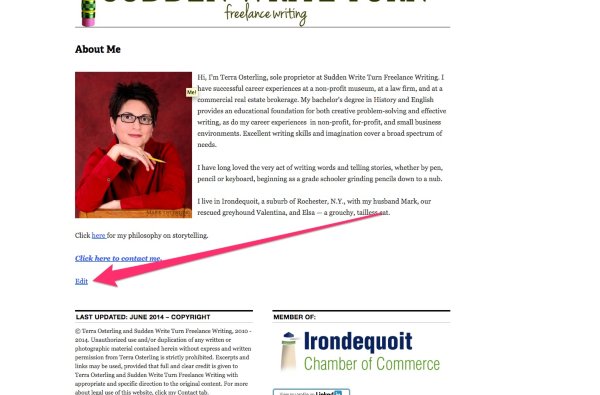
Can you let me know if that link isn’t showing up on your side?
The site also now counts my visits and clicks as if I am not logged in.
That definitely shouldn’t be happening! Can you confirm you’re definitely logged in (can see the black admin bar at the top of the screen) and aren’t using a private window in Firefox?
-
No, the Edit link is not showing up for me. And, no, the black admin bar is not showing. Lastly, no, I am not using a private window.
I am using Firefox. Your question gave me an idea to try visiting my site with IE. With IE, I can see the admin bar and the Edit link. So, perhaps a Firefox bug?
-
Hi there,
The admin bar/Edit link combo is working correctly for me in Firefox so I suspect this might be the result of a setting somewhere. Can you try to visit your Dashboard at suddenwriteturn.wordpress.com/wp-admin and let me know if it asks you to login?
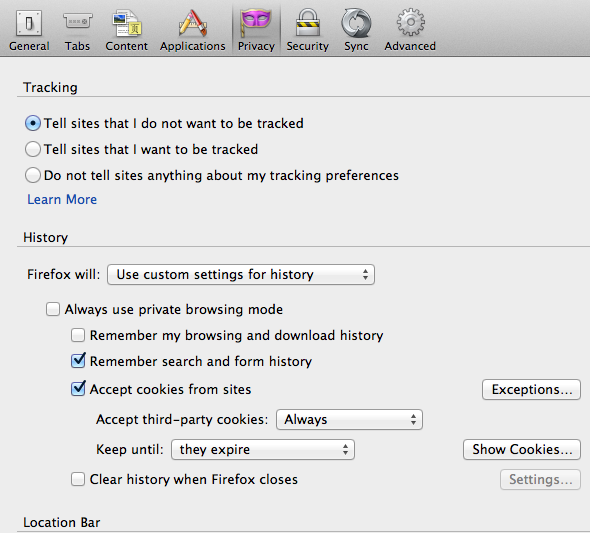
Also, can you navigate to Firefox -> Preferences and let me know if you have the browser set to accept cookies? It should look something like this:
-
It was the cookie settings! Apparently, I wasn’t allowing 3rd Party cookies. Edit link and Dashboard bar are both back.
THANK YOU.
-


- The topic ‘Edit button no longer on live pages’ is closed to new replies.


 WordPress.com Forums