

Editing
-
How do I change the font size on a page I’ve posted? I don’t see size options on the editing toolbar.
The blog I need help with is: (visible only to logged in users)
-
Hi bricoleur14, are you using the block editor? If so you can select the section you want to change, then adjust the fonts like I’m doing in this screenshot:
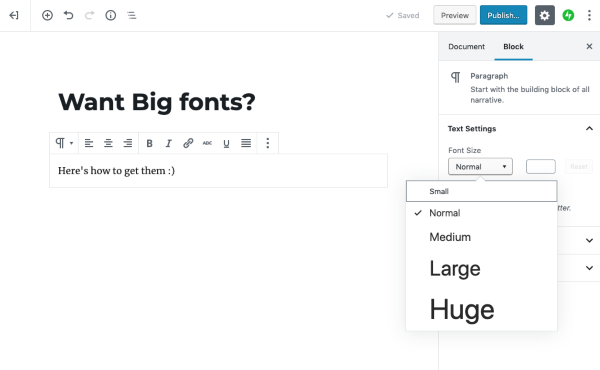
If you want to just make a single word bigger, you could also use the Classic Editor, or a Classic Block (which is like a mini Classic Editor for a single paragraph.) Here’s how to find that:
Let us know if you need more help!
-
Thanks for the tips.
It turned out I was able to correct the problem by copying the too small to read uploaded text and re-pasting it into the editing window. It then showed up at default size.
The Block editor is still a mystery to me, but I’ll explore it some other time. It looks like it is more rational than the procedure I just followed. – James C. -
The Block editor is still a mystery to me, but I’ll explore it some other time. It looks like it is more rational than the procedure I just followed
I would definitely encourage that.
The classic editor doesn’t actually have any option to change font size. To do that you’d have to switch to the HTML view of the editor and manually add inline CSS to the text you want changed.
The block editor has an option for this built in, so makes things much simpler in that regard.


- The topic ‘Editing’ is closed to new replies.
 WordPress.com Forums