

Editing Galactic MENU
-
Hey. I’m using theme Galactic, enquiring about the three-bar MENU on top RHS of page: my name APEETHA ARUNAGIRI appears with a vertically elongated white rectangle below it. Something needs to be done with this rectangle. A photo of myself would seem appropriate except for the size. Trouble is I can’t seem to edit this MENU now. This white triangle and the name spoils the whole blog at present. Suggestions for so,Union will be much appreciated. Salute. Apeetha
The blog I need help with is: (visible only to logged in users)
-
-
Do you mean this Intergalactic theme described here http://theme.wordpress.com/themes/intergalactic/ ?
You can post screenshots and share them with Staff. You can use http://snag.gy/ to share screenshots. Or you can use the WordPress.com guide I linked to and upload it to your Media Library, and return to this thread to provide the file name so Staff can examine it. Don’t forget to enter the modlook tag for their attention in the sidebar of this thread.
-
Oh gosh TimeThief, I will have to cogitate on what you say here, I will return when steady. Be appreciated greatly. Be patient. Be Thanked.
-
-
It looks like you’ve tried to add a Facebook Like box widget to that area. The Facebook Like box widget can only be used with Facebook pages, but you have a personal profile, not a page:
http://www.facebook.com/apeetha.arunagiri
Personal profiles on Facebook don’t have that option to be “liked,” which is why the widget can’t be displayed for your profile.
I hope this solves the mystery!
-
This is a response to TimeThief’s suggestions. Please excuse the delay, caused not just by flummox. . . . I don’t think I can screenshot with iPad. If that’s not true and would help solve problems please inform me. I’m in India at present with only the iPad.
I’m still hoping to either get rid of or fill that white rectangle in the MENU bar of Intergalactic theme on this blog:
Sorry but I don’t understand ‘modlook tag’. I can see there’s a box for adding tags but don’t have a clue what tag to add or what purpose this serves. Sorry.
-
The white box that you’re seeing here: https://cloudup.com/ca_MmOglCtg
… is because you’ve tried to add a Facebook widget for your personal profile. The Like Box can only be displayed for Facebook pages, not personal profiles. Once you delete the widget, the white box will go away:
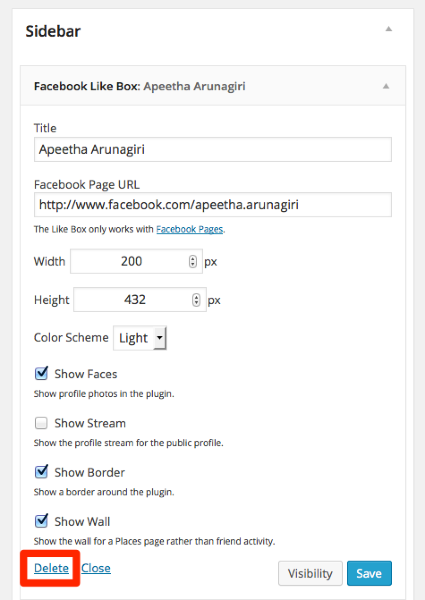
-
Oh this news is greatly appreciated Kathryn, thank you so much. So simple. Enjoy being a Happiness Engineer! Salute. Apeetha
-
The Delete button in the red box at the foot of the CloudUp page didn’t seem to function but that might be because the connectivity where I live is very slow, so I will go in nearer a tower today and see if this helps. Thanks again.
-
The CloudUp image is just a screenshot. You need to go into your own dashboard, under Appearance > Widgets, and delete the widget from there. :-)
https://welcometokaliyuga.wordpress.com/wp-admin/widgets.php
It looks like you already managed to do it, so hopefully you’re all set!
-
Hey Kathryn.
Two question topics for your advice please:
– Now I notice again that I don’t understand MENU in the WP sense: to me a menu is a list of contents. When I click on the three-bar MENU on the top RHS of the page, up comes what I call a menu, in this case there are three pages: HOME, ABOUT, BLOG. It would make sense to me to have a MENU within BLOG that lists the titles of all the posts and gives a link so that readers can navigate to whichever particular post they wish. I anticipate this should be possible since I’ve read WP claims to this effect but have not yet managed to find how to accomplish this. Under Dashboard/Appearance/Menus I find stuff that doesn’t count as menu material for me. Under Pages/most recent the structure of the blog pages with HOME as parent, BLOG and About as offspring, but under/view all up comes this menu: home: HOME (parent), with About and BLOG in that order, and another parent item on the list simply called HOME . . . However this parent has no offspring. How to clarify this confusion? I would like one parent called HOME with two offspring called About and BLOG in that order.
– second question is also about within MENU under Intergalactic theme: under the HOURS AND INFO heading it seems that I’m posting from the Catamaran Resort and Spa in San Diego. So can you please tell me how to replace this nonsense with NandiNagar, Tiruvannamalai, Tamil Nadu? If so I would be relieved; I’ve never set foot in a Resort or a Spa!
Thankful for your role as a Happiness Engineer. Look forward to hearing from you. -
Hi there,
It would make sense to me to have a MENU within BLOG that lists the titles of all the posts and gives a link so that readers can navigate to whichever particular post they wish.
If someone clicks on the BLOG link, they’ll be taken directly to a list of your blog posts (with the most recent posts first): http://welcometokaliyuga.com/home/blog-3/
The reader can then click on a particular post to navigate to that post and read the full article. Is that the sort of list you’re looking for, or do you want each of those posts to also appear in the menu that readers see when they click the three-bar menu at the top of the page?
The benefit of letting readers click on the BLOG link to see that list of recent posts is that list of recent posts on your blog page is created automatically. With that approach, you won’t need to manually add a link to each blog post to your menu.
How to clarify this confusion? I would like one parent called HOME with two offspring called About and BLOG in that order.
Sorry for the confusion! The items you see on the left side of the Appearance > Menus page are a list of menu items that you can add to your custom menu if you want. To actually add those items to your menu, you’ll need to check the box next to each item and click the “Add to Menu” button.
Then, you’ll see each of those items appear in the “Menu Structure” section to the right. That’s where you can move the items around and create sub-menu items to make your menu look the way you want it.
Please let me know if you have questions about how that works. :)
second question is also about within MENU under Intergalactic theme: under the HOURS AND INFO heading it seems that I’m posting from the Catamaran Resort and Spa in San Diego. So can you please tell me how to replace this nonsense with NandiNagar, Tiruvannamalai, Tamil Nadu?
You can change that under Appearance > Widgets in your dashboard:
https://welcometokaliyuga.wordpress.com/wp-admin/widgets.php
That information comes from the Contact Info Widget. By default, that widget puts in the San Diego contact information, but you can edit the details there to put in your own contact information.
Please let me know if I can do anything more to help with that. :)


- The topic ‘Editing Galactic MENU’ is closed to new replies.
 WordPress.com Forums