

Editing index size
-
How do I make the blogs published index smaller?
The blog I need help with is: (visible only to logged in users)
-
If you’re referring to the number of posts shown on blog pages at a time, you can adjust that here:
https://kaygogi.wordpress.com/wp-admin/options-reading.php
If I’ve misunderstood the issue, or if you have any other questions, please let me know.
-
Thank you for your response. Actually what i wanted to do was make the index boxes smaller so that all of the bog choices can be viewed without scrolling. I would even be satisfied with something less grandiose such as just dates and titles listed in chronological order that can be clicked on to link to that blog.
-
Thank you for your response. Actually what i wanted to do was make the index boxes smaller so that all of the bog choices can be viewed without scrolling. I would even be satisfied with something less grandiose such as just dates and titles listed in chronological order that can be clicked on to link to that blog.
-
Your theme is responsive, so, depending on the size of the viewing portal, all of the post boxes might be visible.
For example, when I view your site’s home page on my laptop browser, I can see all of the post boxes just fine:
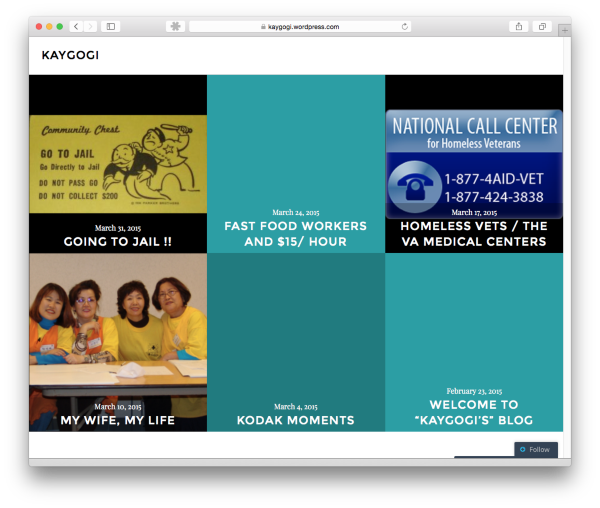
However, if I’m looking at your site on my mobile device, the screen is simply too small to view all the content, so your theme automatically resizes and repositions the boxes to create a better mobile experience, where I can use touch to scroll through your site.
If you have additional questions, please let us know.


- The topic ‘Editing index size’ is closed to new replies.


 WordPress.com Forums