

Editing my Home page
-
Hi, I don’t understand how to write and insert a picture on the Home page of my site. There’s a writing that says “Nothing found” “It seems we can’t find what you are looking for….” and underneath there’s a blank space.
How can I delete that writing and insert my picture and my text?
Also, there are already a few widgets on the right side, I didn’t put them there, they came with the Theme I chose. How do I edit those widgets?
Thank you very much,
PaolaThe blog I need help with is: (visible only to logged in users)
-
Hi Paola!
After looking into your account, I found that your Posts page is set as your Homepage. Since you have no posts, there is nothing on the posts page.
However, if you want your Homepage to be a static page with your picture and a snippet about yourself, you can set your About Paola Bolzan page as the Homepage. You can then go to Pages in your Dashboard, edit the page “About Paola Bolzan” and then insert an image/text. Make sure to hit Publish! Then go to Pages > Add New and create a page called Posts or Blog (or whatever you want to be the title of your Posts page.
Once these pages are published, go to Settings > Readings in your Dashboard. At the top, next to Front page displays, select Static page and set your About Paola Bolzan as the Homepage, and the new Posts or Blog page as the Posts Page.
I know in the beginning posts/pages can be a bit complicated, so I have provided you a support guide to help.
As for the Widgets, please go to Appearance > Widgets in your Dashboard. There you can add, remove, and move around the widgets you want to your desire.
I also recommend going through our new user’s guide:
In 10 quick steps, you’ll learn about all the best and most useful features of WordPress.com, with lots of screenshots and videos.
You can also browse our support documentation and check out the forums – you might find the answer you’re looking for.
However, you can always reach out to me if you need more clarification!
Happy Blogging!
-
Hi Grace,
Your reply was very useful and I did quite some work on my website, I haven’t started blogging though. My main interest at the moment is having a good looking website were later on I can add posts.
The problem I’m having now is with fonts and colors. I have found that the possibility of changing the size of the font is very limited -from -3 to 3 and the difference is not big- or maybe there’s a different way.
Also I cannot change the color of my font inside a text.
At the same time I have to say that I copied and pasted 3 pages from 2 different websites that I have and the result is very poor and I don’t manage to improve it. Moreover in those copied pages the font is different in sizes and in color and again I don’t manage to change that.
maybe you could take a look at my site and you’ll understand better what I mean.
Another question is about the page “order’. I’d like to have the Disclaimer page at the end, instead it appear right after my Home page. Maybe because I added it after, but in cases like this how do I change the position of a page?
Last question: I added a picture, is there a way I can write on the side of the picture, like it would be a text box in word?
Thank you very much for your help,
Paola -
Hi Paola,
The problem I’m having now is with fonts and colors. I have found that the possibility of changing the size of the font is very limited -from -3 to 3 and the difference is not big- or maybe there’s a different way. Also I cannot change the color of my font inside a text.
Since you have the Custom Design upgrade, you can change this the font size and color by editing the CSS. Most of our CSS support is done in our community forums by both staff and volunteers:
https://en.forums.wordpress.com/forum/css-customization
When you create a CSS-related help request, please make sure to select or link to the WordPress.com blog you’re working on and include a clear description of the change you’re trying to make. It helps a lot.
To learn more about how CSS editing works at WordPress.com, see this help page:
http://en.support.wordpress.com/custom-design/editing-css/
If you need to hire a consultant to help you with in-depth design work or large CSS revisions, please consider getting a quote from Tweaky:
http://en.support.wordpress.com/customize-my-site/request-theme-customization/
At the same time I have to say that I copied and pasted 3 pages from 2 different websites that I have and the result is very poor and I don’t manage to improve it. Moreover in those copied pages the font is different in sizes and in color and again I don’t manage to change that.
I’m assuming you are talking about the pages: Love & Biodanza, Love & Eft and your Disclaimer page. For these, go in to edit the pages, and then you can change the font, font size, color, etc. using the Visual and Text Editor. Check out these support guides to do this:
http://en.support.wordpress.com/visual-editor/
http://en.support.wordpress.com/editors/styling-individual-posts-and-pages/Another question is about the page “order’. I’d like to have the Disclaimer page at the end, instead it appear right after my Home page. Maybe because I added it after, but in cases like this how do I change the position of a page?
This can easily be changed by creating a Custom Menu. Go to Appearance > Menus where you can add your pages and drag them around to fit the order you want.
Last question: I added a picture, is there a way I can write on the side of the picture, like it would be a text box in word?
If you click on the image when you are in the visual editor, you will see the edit button (the mountain icon at the top left hand corner). Click that and you will be able to add text. After you click Update you should be set!
Happy Blogging!
-
-
-
Hi Grace,
Little by little I managed to do the changes I wanted on my site. There’s one thing I don’t manage to do now: There’s not name on my home page. If you take a look you can see that it says #1, where it should say Home. I tried to add the title, but the only place where it would come out in on the page, where actually I don’t want it.
Another problem linked to this aspect is that I’d like to avoid having the title of my page written at the top of the actual page, you can see it on all of my pages. I mean, the page Love & Biodanza opens with the title Love & Biodanza at the top of the page. I don’t want it (and moreover it not in the same font).
Last question: I don’t see the change in font on the page Disclaimer. I did as with the other pages, but with this one it doesn’t work.
Thank you in advance,
Paola -
Hi Paola,
If you take a look you can see that it says #1, where it should say Home. I tried to add the title, but the only place where it would come out in on the page, where actually I don’t want it.
Please go to Pages > All Pages in your Dashboard and you will see that the first page at the top has no title. Hover over (no title) with your mouse and underneath the Edit button will appear – click that. Then right under Edit Page Add New you can enter the title that you want. Make sure to click Update on the right.
Another problem linked to this aspect is that I’d like to avoid having the title of my page written at the top of the actual page, you can see it on all of my pages. I mean, the page Love & Biodanza opens with the title Love & Biodanza at the top of the page. I don’t want it (and moreover it not in the same font).
You can remove this by editing CSS. Go to Appearance > Customize in your Dashboard and click on the tab labeled CSS. Once you are there, add this:
.entry-title {
	display: none;
}
This should remove all the page titles.
I don’t see the change in font on the page Disclaimer. I did as with the other pages, but with this one it doesn’t work.
It looks like the font is changing as seen in the screenshot below:
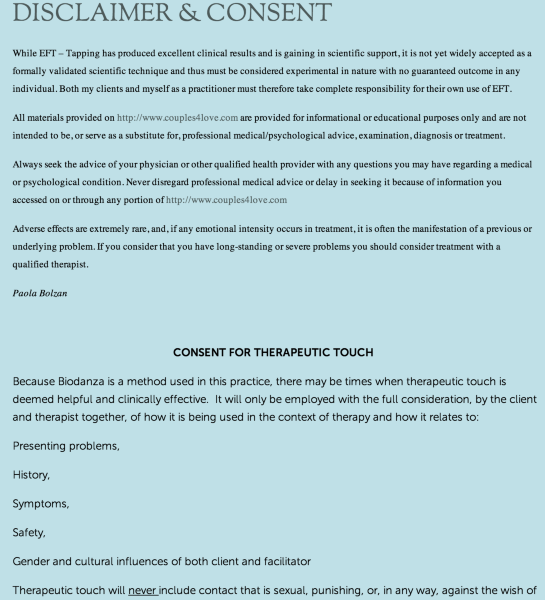
After the intro, the font changes when “CONSENT FOR THERAPEUTIC TOUCH” begins.
Hope this helps!
Cheers!
-
Thank you for your continuous support.
I managed to get rid of the titles.
I don’t see the change in the first part of the page “Disclaimer” even though I followed all of the instructions on the text part.
I already tried to put the name Home on the first page the way you told me, it doesn’t work, the page is still called #1
What else can I do?
Thank you,
Paola -
HI Paola,
I changed the Menu so that it says HOME instead of #1. As for the Disclaimer page. I’m not sure what you are asking for. Currently the font is different as seen here:
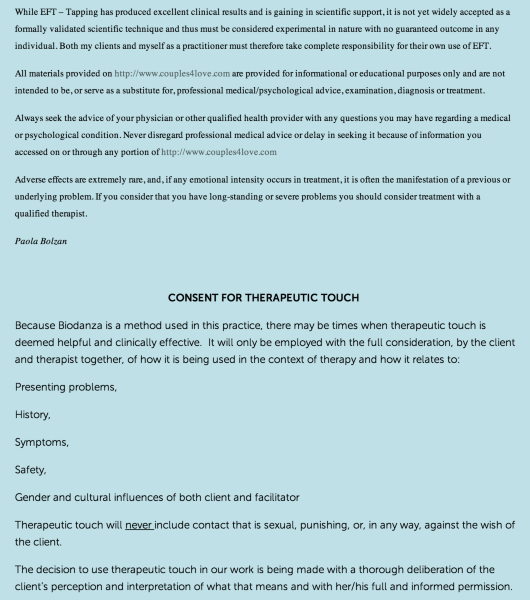
What is it exactly that you would like to do? Do you want the font to be the same? Please clarify and I’ll see what I can do.
Cheers!
-
Thank you Grace, you are an angel!
Yes, I’d like the Disclaimer page to be all in the font Museo Sans and I don’t manage to do that.
Have a great day,
Paola -
Hi Paola,
I have changed the font to be same on the entire page to Museo Sans!
Happy Blogging!
-
Thank you Grace, for some reason I was mistaken and actually I wanted it the other way round, but with your change now I understood what I needed to do.
You’ve been very precious for me. I really didn’t understand most of what I needed to do when I started and now, thanks to your help and instructions, I know so much more!
Paola -
Hi Paola,
Oh, I see! I’m glad I was able to help! :)
If you have questions with anything, feel free to ask!


- The topic ‘Editing my Home page’ is closed to new replies.


 WordPress.com Forums