

editing portfolio
-
i want to edit my portfolio page in UBud and i can’t find it in the sidebar or anywhere.
The blog I need help with is: (visible only to logged in users)
-
Hi Cecelia,
You should be able to find it under Pages of your Dashboard. Here’s the direct link to it:
https://cecechapman.wordpress.com/wp-admin/edit.php?post_type=jetpack-portfolio
Let me know if you have any questions with this!
-
Thank you for your help. I see portfolio in the side but how do you open the page itself to view what is going on? Or make it your homepage?
-
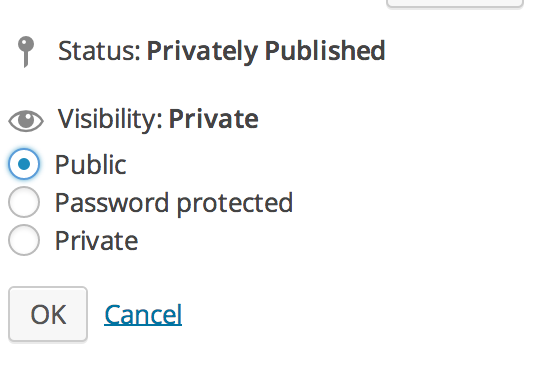
Do you want to view your Portfolio Projects on your site? I see that you set you projects to Private so they are not viewable on your site.
To make it public, please go back in and edit your post. In the publish module, you can set it to public as seen here:
Also, take a look at the support guide for Ubud here:
https://wordpress.com/themes/ubud/
If you have more specific questions, you also can receive direct support from the theme author himself here:
-
-
-
I still am not able to find the portfolio page, or get info about it from the support material. All i want to do is access the portfolio page, edit the layout or even view it. I see the projects but no main page? I want to make it my home page but how can i do this if i can’t find it. In the ubud material it shows the grid layout but there is no way I can find to access this page in the dashboard.
-
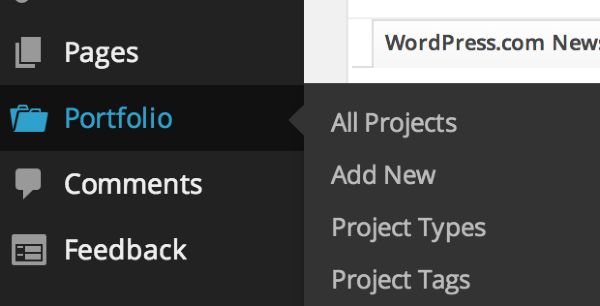
When you log into your Dashboard you will see Portfolio in between Pages and Comments as seen here:
Every page and portfolio is currently set to Private. If you make it public you should be able to see everything. You can do this by going to Pages > All pages and Portfolio > All Projects in your Dashboard. Then select all pages/projects by checking the box left of “Title”. Then, go to the drop down menu labeled “Bulk Actions” and select “Edit”. Click on “Apply”, and you will see another dropdown menu under Status. Select “Published”, and click “Update”.
Then you should be set.
-
I understand this. But there is no portfolio page to make visible. There are project pages but where is the main portfolio page? I haven’t made all the pages public yet because it is a portfolio and I need to finish the project pages completely. Of course I have made them public to see them and made them private again but where is the main portfolio page with the grid of projects? This is why I got UBUD because I want to make my website a portfolio with the portfolio page the home page.
-
-
Now I have all the pages visible but I still don’t know where the main portfolio page is to make it my homepage?? I need information to fine tune the projects before I publish it but it has taken me two weeks to get no reply to that. How can I access complete documentation on ubud so I can just complete the site without having to ask and wait for answers?
-
Hi Cecelia,
Ah, I see what you mean – you want them viewable on your site, not in the Dashboard! So, the Ubud theme does not support Portfolio projects as seen here on their support page:
https://wordpress.com/themes/ubud/
The artwork or portfolio project can be shown directly in a WordPress post.
So they would need to be in a post for it to be viewable – not in Portfolio.
Sorry for the miscommunication!
-
Ahhh…so the ubud theme photograph is not portfolio… Thank you. Ubud is listed as one of three themes, and sketch and illustrator that support portfolios. I liked it because it is so clean and simple. But I bought it once before and returned it because I could not get support on that fact or figure it out…then waited and got an upgrade plus ubud again determined to get my portfolio up. It is very hard because all the support material is in two or three places and you have to ask questions. thanks for your persistence. I will have to find another theme.
-
Hi there,
Yes, I’m sorry about this. I can completely see the confusion here. I can provide you a full refund if you no longer plan on using the Ubud theme.
I see that you added Illustratr! That’s a great choice. Some others that will use the Portfolio Project feature are the following:
http://theme.wordpress.com/themes/eighties/
http://theme.wordpress.com/themes/espied/Let me know if you still want the refund!
-
I guess I will get the refund and move on. I see others too that may work. Thank you again for your help.
-
No problem at all. I have provided you a full refund and removed it from your account. Please note that it may take up to a week for the refund to show up in your bank account.
-
-
-
Now I should ask you if I ca can use the portfolio page as my homepage in illustrator and if so how do i do that, once again I can not locate the portfolio page, nor does it appear as it does in the theme photograph?? Thank you!
-
Have you taken a look at the Illustratr support page?
https://wordpress.com/themes/illustratr/
It states:
When you first activate Illustratr, your posts will display in a traditional blog format. If you would like to show your portfolio projects on the front page of your site (like Illustratr‘s demo site), just follow these instructions:
1) Create or edit a page, and assign it to the “Portfolio Page Template” from the “Page Attributes” module.
2) Go to Settings → Reading and set “Front page displays” to “A static page.”
3) Select your portfolio page as the “Front page,” and then choose another page as the “Posts page,” (to display your blog posts).Let me know if you need help with that!


- The topic ‘editing portfolio’ is closed to new replies.
 WordPress.com Forums