

Editor Feedback
-
@norcalnews Filtering photos by what’s been uploaded to a post isn’t part of the new editor yet, though we are considering adding it in the future if there’s demand for it so I’ll consider this a vote for bringing it back :)
The tag issue has been noted and will be fixed.
-
@thewarfist Thank you for the feedback. For the “return to draft” issue specifically, if you open a published post below the site title it will say “Published 19 hours ago” for example. Clicking this will expand the box with a few more options, one of which is a Revert to Draft button that will return the post to draft status without needing to mess with the scheduler. Hope that helps!
-
@jaydeejapan Thanks for the compliments and feedback, all of these are on our list to bring to the new editor in the future.
-
@cindygurmann Did you make any changes to the post date in the scheduler or it just posted with a different date than the current date? Could you provide a link to the post so I can take a look? Thanks! http://we.me/p4717A-1ln is the short link my url is cindygurmann.wordpress.com – if you click into url it does not take you to latest blog which is further down the scroll. Previous editors have dated on publish date this looks like dated draft date- I never have put in specific dates in scheduler to publish – just pressed publish when post was ready – thanks for looking into this
-
@adaklara After inserting the image into your post, click the image then click the link icon in the toolbar. Save the full size image URL that is auto-filled and the expand behavior will return on the front-end of your blog. We’re planning to make further improvements to this, but this linking process will work in the meantime.
-
Follow-up to my earlier post. Ok, so C&P a URL in the body now is the way to do it, instead of “insert media.” So thanks for that direction.
However, I tried using the wp-admin append to my site, and it took me to a VERSION of the old editor, but the only option to compose a new post was a miniature place like a “quick update” that took up the upper R quadrant of my screen. This is MUCH too small for me to post a new post in. I tried clicking on the pencil image from that screen, but it took me back to the new editor. Is there some way that I’m missing to see the normal/old real full “new post” screen the way it used to be?
Also a new hate: I have two blogs. One I have only used once. I do not want to kill or delete it as I may use it again one day. But because I always post at the rockandrollmama post, when I previously clicked on the pencil icon, it always just opened a new post in that blog. Now I have to manually select which blog I want to post to every time. This is a small detail, but it’s again LESS convenient and “smart” than the previous editor. Is there a way to fix it without deleting my other blog?
-
@kauilapele
2. When I now open the new editor, there is NO “stick post to top” tick box”… even though the WP support says there should be.
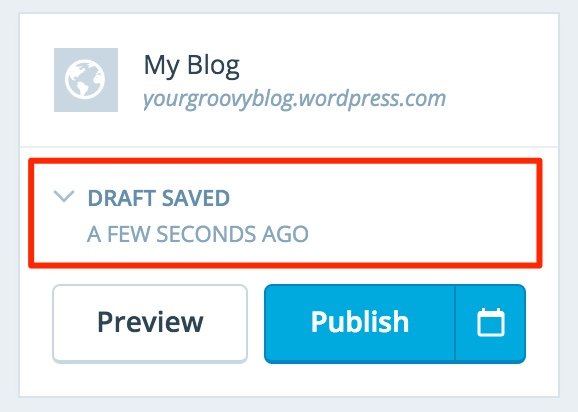
Below your site title on the left side it will say “Draft saved 1 minute ago” or “Post published 1 minute ago” though the time and language will vary depending on the post status. Clicking this will open a panel that includes the sticky option:
3. When you do open the new post editor for existing post, it opens up at the BOTTOM of the HTML text box. Very inconvenient.
Could you let us know what browser and operating system you’re using (supportdetails.com) so we can look into this as this is not expected.
6. In classic editor, you can drag and drop an image into the text box. With the new editor, I tried this, and was not able to. I like this drag and drop feature. Save me a lot of time and mouse clicks.
The new editor also supports drag-and-drop image uploads. When dragging an image over the editor you should see a drop zone appear over most of the editor to upload the image. If you’re not the browser information I asked for above will let us look into this as well.
7. I, too, want the formatting toolbar at top of the HTML text editor.
I’ve noted this feedback, thank you!
-
@aw05se Could you link to the post that didn’t post correctly? I’d like to take a look.
For the preview, next to the X close icon you will see a box with an arrow that allows you to open the preview in a new tab just like the old editor. You can also hold command (Mac) or ctrl (Windows) when clicking Preview to do the same thing.
-
@cindygurmann What is the title of the post with the scheduling issue? And did you write it entirely in the new editor or perhaps start it in the old editor and finish it in the new one? That should help me take a closer look.
-
@rockandrollmama the only editors we offer now are the new editor at wordpress.com/post and the classic WP Admin editor by adding /wp-admin/post-new.php to the end of your site address
You can hide the unused site without deleting it here:
https://dashboard.wordpress.com/wp-admin/index.php?page=my-blogs
Once it’s hidden the pencil should automatically open your main site.
-
I decided to give this new thing a go again, because you have to move with the times and basically we have to get used to things, but after using this new feature I would say the following.
I asked if the old template was still available and received the answer yes, in the WP admin section. I found an old version of the template, but a very old version. I want the template in use before this new template arrived.
Also, although it might just be me, I write my blogs on my computer, usually in pages or word, according to whether I am on my apple or Microsoft and do not have to permanently save them. I then do a copy paste. I can no longer paste in this new version, so I have to used strg V which is very annoying.
In the old template the HTML followed me through the template. Now I have to scroll to find it again. the same with the heading of my text. In the previous template this was not the case and so I am continuously up and down.
I do not like, detest, the narrow feature of the writing frame. Why alter this when the other version was so perfect.
I do not need to drag and drop my photos. I have 16,000 photos on a photo hosing site, complete with html links for various sizes, which would not be practical to use in WordPress, so I apply html. I like html, I worked on web sites myself, and completed a web assistant course, so why should I now be forced to forget what I learnt. the previous template was so perfect.
As said I will continue to use this new version, I am forced to get used to it, but I do not like it and find it a step in the wrong direction, particularly as I am permanently finding the comment “we decided not to include this feature” and the features were good. So now please tell me where I find the previous template, not the one hidden in the WP Admin section, or perhaps I am doing something wrong.
-
It’s killing me not to be able to accurately resize images. The +/- option is inadequate. And even when I manually edit an image’s size in HTML, the changes don’t work on the published page for some reason. I also have to manually add link tags to images, where before I was able to assign a custom URL.
Am I missing something here? Please restore the old functionality!
-
@cindygurmann What is the title of the post with the scheduling issue? And did you write it entirely in the new editor or perhaps start it in the old editor and finish it in the new one? That should help me take a closer look.
Autumn in Connecticut- it was started in old editor and then proofread in new editor – manually since new editor does not have that critical function- posted with new it should have published nov 18 it published as nov 9 -
Hi, I’m using the scrawl theme and can’t find the word count? I write on my iPod at the moment as I’m travelling and it doesn’t have word count like a word processor so I’d like to be able to see it on the wp editor. Am I not looking in the right place or is it not there to be found?
-
It’s nice to be able to use the Editor in the Admin Dashboard as it is CLEARLY SUPERIOR to the new editor, but here is my problem with it: The Admin Dashboard which is vital to even having a blog or website here is going away next week!!!! (That is based on the extrapolation of the pace of changes here over the last 4 to 5 weeks).
So, it’s very nice of you to suggest that we use the Admin Dashboard editor since the new one does not work and nobody is happy with it since you know full well that you are taking that away too. Question: How the hell is anyone supposed to have a blog or site on WordPress without controls?
You put up a new editor which is entirely different from all previous versions (and not nearly as functional) and you do not even provide documentation?! The support documents for the editor, not to mention the other functions needed and used daily is 10 years out of date!!!!!!!! Nobody has even bothered to update that! It’s not even on the list! Everything in those support documents is wrong!
I am sick and tired of the empty promises and wet noodle answers on here from support!!!!!!! Save that crap for the stupid political elections and political BS!!! -
I normally embed an audio file from soundcloud for many months now and it works fine. Now I am trying to embed the same type of url and a message pops up that it is not an url.
What do I need to do to get this audio to my blog post?
-
I am amazed. seriously.
You made something from the ground up and forgot half.
Here to make people happy, wasn’t that one of your slogans. If I read this you hardly makes us feel happy. More so you just ignore those who made you big. The classic users which had everything that was complete and now you stuff a half product in our face.I get it is lot of work and i for one would not do it after you. But these complaints here are real. and some are just not fixable, though you don’t see them.
I honestly believe like many others that your greatest asset, a one page fits all do all dashboard is being killed over your thirst to have a better appeal than functionality.
Ooh yeah and today that new reader. an abomination. Now if only we it was mirrored had the old version with the menu on the right side. Oooh wait we had that with better smaller menu before all the unnecessary updates.
I am deeply disappointed you give up your perfectly working easy to use functionality for looks.
Guess you can’t make us all happy.. incomplete and forced to be used how funny is that.
Yeah I vote for the classic a 100 times over. -
@equinoxsociety Manually entered custom sizes will be coming back. In the meantime, rather than editing HTML you should also be able to click the image and then drag the corner to make it whatever size you’d like.


- The topic ‘Editor Feedback’ is closed to new replies.
 WordPress.com Forums