

email notifications of new post and read more option question
-
Once again, after changing the settings and following your advise, I only get my posts sent to me for one or two times and then it stops again – this has happened repeatedly now for nearly a year – I am presently thinking about not renewing next year due to this problem that you can’t seem to fix. I enjoy receiving and email copy of my posts to send to the 500 plus email friends on my list to expand my readership, and you give me instructions, I follow them and it is fixed for a couple of weeks, then goes back to not working again – also – the read more option seems to have changed too – I used to be able to put it in the middle of a sentence , but now it moves it to the end of that particular paragraph which does not then entice the people to read on – when did this change and why? Please solve these problems for me –
The blog I need help with is: (visible only to logged in users)
-
Hi there!
I’m sorry you’re having trouble. To fix the subscription error, please navigate to the following page:
http://wordpress.com/following/edit/
Click on the “Edit” link next to your blog. Under “Send new posts by email”, select an option other than “Off”. You should begin receiving new post notifications through email in the frequency you select.
Regarding the “More” tag, when I insert the tag in the middle of a sentence within the Visual Editor, the tag does not move to the end of the paragraph. It just sits in the middle of the sentence. If you’re still having trouble, can you let me know the steps you take when adding the tag to your post?
-
Hi Jeremy,
Thanks for your help – the first step that you asked me to do I have done 10 to 15 times before over several months, selecting the response and frequency I want, and it works for one new blog then it stops sending me the emails – so I don’t see the value of repeating this step over and over and then writing you over and over. There must be another problem that is causing the edit button to be turned off – I am frustrated –
With regards to the More tag – I used to be able to place it in the middle of a sentence and it would immediately create a space there that was noticeable and then when I posted it say on facebook or other venues, the space would show up at the precise place. But now whatever sentence I place that more spot in, it jumps to the end of that paragraph rather than at the precise place I want it at. Does that make sense.
Thanks for your help – I will wait for your advice
Sincerely and Warmly,
Jay W. West
Blog at http://www.anointed2go.com
-
I am now on my page and I can’t even find the edit link – I’ve looked repeatedly over and over and cannot locate it at all – so now my problems are magnified beyond my first response to you directly above – thanks
Jay West -
okay u- I went to that page and the notice that says instant email delivery was already checked – but I am not receiving them – so I can’t check something that is already checked – again- there is another problem – thank you – I still did not find the word Edit though
-
okay – I finally found the Edit button and did what you asked – but again, I have remembered doing this several times since last March – and again it only lasts usually for one blog post then reverts back – I am sorry to have troubled you with all my notes above – but the reality is that this is only a temporary fix – I guarantee based on my past experience these past few months that this pattern will repeat itself and I won’t get the email noticed after my next blog post –
-
okay – I finally found the Edit button and did what you asked – but again, I have remembered doing this several times since last March – and again it only lasts usually for one blog post then reverts back – I am sorry to have troubled you with all my notes above – but the reality is that this is only a temporary fix – I guarantee based on my past experience these past few months that this pattern will repeat itself and I won’t get the email noticed after my next blog post –
I definitely understand your frustration! That would be annoying to have to check this setting repeatedly after each blog post. One main way this option would become unchecked is if you clicked the “Unsubscribe” link at the bottom of your email notifications when you receive a new post. Is it possible that you’ve clicked this link by accident?
With regards to the More tag – I used to be able to place it in the middle of a sentence and it would immediately create a space there that was noticeable and then when I posted it say on facebook or other venues, the space would show up at the precise place. But now whatever sentence I place that more spot in, it jumps to the end of that paragraph rather than at the precise place I want it at. Does that make sense.
I’ve created a few screenshots to demo what I’m experiencing on my side. When I insert the “More” tag within a sentence, it seems to stick in the middle as shown here:
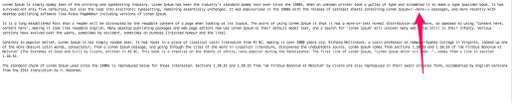
When I publish that page, the “Continue Reading” dialogue sits right where the “More” tag was published:
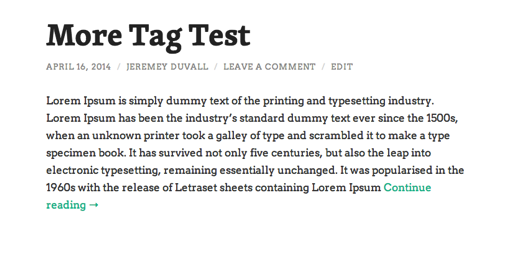
Is this not what you’re experiencing? Also, let me know if the issue appears on your site or just social media profiles.
-
I have never clicked the unsubscribe link – I want to received these every time to forward to my ongoing client list by email to get them to sign up too – this option worked like clockwork the first 15 months of my having a blog then suddenly last year about May it stopped happening – and like I said, I have set and reset it many times –
And the read more option did it on the last three posts – I had my 22 year old son check this for me too – as he is computer savy and he said it obviously was doing it but he did not know why – he has a blog with you too and his options on both of these seem to work fine – can you check internally on my page to check things out somehow to see if either of these two things can be fixed – thanks for your ongoing assistance with this – Jay West
-
Hey Jay,
I’m not exactly sure why you’re being unsubscribed. The only way to unsubscribe would be to either accidentally click the unsubscribe link in the email body or do it manually by unfollowing your blog either through the Reader or the admin bar. If you stop receiving them for any reason, please let me know, and I’ll see if I can track down what changed between now and then or how you may have become unsubscribed.
Regarding the More tag, can I ask how your’e writing your posts? Are you writing them in Word or another editor before copying and pasting them into your WordPress.com blog?
-
Thanks for your help – honestly – after I do the edit deal I never go back in and mess with anything and I am the only one who uses this computer so no one else has access to my account –
Regarding the read more deal – sometimes I do copy and paste from word but not always, but when I do that, it is in the body of the text of the blog document – I always write free hand right on your site when I start my blog – I then add pictures that fit some of the paragraphs and select a place to read more – then I proof it a couple of times to make sure. does that help???
-
That does help! I only ask as you have several HTML tags in your posts. For example, in your Text Editor, you’ll see the following at the opening of your latest post:
<p style="background:white;"><span style="color:#0000ff;"><strong><span style="font-family:Calibri, sans-serif;">Dear Pastor Jay,</span></strong></span></p>
<p style="background:white;"><span style="color:#0000ff;"><strong><span style="font-family:Calibri, sans-serif;">My greatest pleasure in life is not only to receive God's blessings for me and my loved ones, but to give the glory and honor back to Him because I know that all good things come from our Father.</span></strong></span></p>
Some of those tags are not necessary. For example:
<p style="background:white;">The default for your theme is to have a white background behind posts so you shouldn’t need to specify that within your text.
<span style="color:#0000ff;">With this line, you’re specifying the text color with what’s called in-line HTML. It definitely works, but it’s repetitive. As you can see above, it repeats on every line. If you would like, I can give you a CSS script that will change all body text within a post to that shade of blue. This excessive HTML is typically generated when you create a post in another processor like Word and paste into your WordPress blog.
The main reason I mention this is that I think it may be affecting how the “More” tag operates. I realize you may not have changed your posting process recently, but we recently changed the Post Editor a bit. This may influence how the tag reacts to the various HTML elements within your post.
I compiled a short screencast indicating how the More tag is reacting in my post:
As you can see, I placed it within the middle of a sentence in the Visual Editor, and it didn’t seem to jump to the end of the sentence.
So, moving forward:
- Can you give the example I provided a try, just typing straight into the editor and using the More tag? Let me know if it behaves similarly to my example in the video.
- Can you let me know if you have any additional questions regarding HTML tags, how they work, or why they appear?
- Let me know if you would like me to provide a CSS code that would change all of your post text to the blue color!
-
you have been so helpful – I do appreciate it – but honestly everything you wrote above I do not understand at all – yes my last post did have a cut and pasted beginning to it – but the previous ones did not – I plan to write a blog sometime this weekend or Monday and will let you know what happens -and when my son get homes from college tomorrow I will have him read your notes above to help me understand what you have written – I am grateful, just unclear on what you are actually trying to convey to me – thank you so much for your assistance thus far – Jay
-
Hey Jay,
I apologize for the confusion! Basically, copying and pasting content from other programs like Microsoft Word can inadvertently place a bunch of unnecessary gibberish in your posts. When you create your new post this weekend, can you try to do so directly in the WordPress.com editor?
-
I always do a preview to make sure the jibberish is taken out – if you look at my final posts, that jibberish as you refer to it is gone – but yes I will write the post without pasting and see if that makes a difference in the read more option
-
The HTML code won’t appear in the published version of your post as WordPress.com converts it into working elements. However, I suspect it might be changing how the “More” tag reacts. Let me know how the next test goes!
-
Hi – I just went back and re-edited a post from 2012 and tried to move the More option to a newer place, but no matter where I placed it, it would only appear at the end of the paragraph that I was trying to put it in – and this article was written free hand – so whatever you could do, I am unable to do from my end – I will try and write a short article tonight or tomorrow too and see if I can use that More Option and let you know
-
also – I got a post change email and I cut and pasted it here – as this is how they always show up – totally unable to read them-
<div><span style=”font-family:Arial;font-size:large;”>We had an amazing healing service today (02/11/2012) at Beautiful Savior Lutheran in Omaha – I was blessed to pray for so many folks – we saw restored hearing, ringing in the ears healed, clogged ears and partial deafness restored, breathing difficulties healed, clogged arteries opened based on a man’s report of knowing his blood pressure dropped – more on that later – lots of pain issues and metal healings, God kept downloading words of knowledge to me and I would offer them, pray for folks using others to help pray too that I know and trust and people got well – -<!–more–>One lady who was partially deaf was having severe problems hearing and often confused – after I prayed for her she would cover one ear than the other as I whispered words to her from 3 feet, 6 feet, and about 10 feet away just saying random colors and numbers and she was able to repeat all of them back to me 100% accurately. </span></div> <div><span style=”font-family:Arial;font-size:large;”>We had an amazing healing service today (02/11/2012) at Beautiful Savior Lutheran in Omaha – I was blessed to pray for so many folks – we saw restored hearing, ringing in the ears healed, clogged ears and partial deafness restored, breathing difficulties healed, clogged arteries opened based on a man’s report of knowing his blood pressure dropped – more on that later – lots of pain issues and metal healings, God kept downloading words of knowledge to me and I would offer them, pray for folks using others to help pray too that I know and trust and people got well – -<!–more–>One lady who was partially deaf was having severe problems hearing and often confused – after I prayed for her she would cover one ear than the other as I whispered words to her from 3 feet, 6 feet, and about 10 feet away just saying random colors and numbers and she was able to repeat all of them back to me 100% accurately. </span></div>
<div> </div> <div></div>
<div><span style=”font-family:Arial;font-size:large;”>Another man told me he was healed in three places including where there is metal in his body. Still another man who also had hearing problems told me that when I prayed for him prior for the service he was wondering what might happen. I actually encountered him in the hallway and just prayed there. He stated that usually the singing and music sounds like tin on a trashcan, but after I prayed and from the first note of the worship that my son Jason West led, he could hear all of the notes plainly and that his hearing was like it use to be before he lost it. </span></div> <div><span style=”font-family:Arial;font-size:large;”>Another man told me he was healed in three places including where there is metal in his body. Still another man who also had hearing problems told me that when I prayed for him prior for the service he was wondering what might happen. I actually encountered him in the hallway and just prayed there. He stated that usually the singing and music sounds like tin on a trashcan, but after I prayed and from the first note of the worship that my son Jason West led, he could hear all of the notes plainly and that his hearing was like it use to be before he lost it. </span></div>
<div> </div> <div></div>
<div><span style=”font-family:Arial;font-size:large;”>The majority of the healings came as God downloaded sympathy pains through knowledge impression pains or images of people who needed prayer through words of knowledge, but obviously some were just what people were sharing. The Spirit of the Lord was so strong and the anointing was powerful. I am just glad so many got well. And then I had tears of joy later in the afternoon, just like I did Wednesday evening after so many got well at the service I reported on earlier this week. </span></div> <div><span style=”font-family:Arial;font-size:large;”>The majority of the healings came as God downloaded sympathy pains through knowledge impression pains or images of people who needed prayer through words of knowledge, but obviously some were just what people were sharing. The Spirit of the Lord was so strong and the anointing was powerful. I am just glad so many got well. And then I had tears of joy later in the afternoon, just like I did Wednesday evening after so many got well at the service I reported on earlier this week. </span></div>
<div> </div> <div></div>
<div><span style=”font-family:Arial;font-size:large;”>The senior pastor stated that this was the most healing he had seen in the healing service I have been blessed to lead at this church over the past few years – just incredible stuff as God blasted so many people – wow – – Thank God !!! And on top of that 19 people surrendered their lives to Jesus. </span></div> <div><span style=”font-family:Arial;font-size:large;”>The senior pastor stated that this was the most healing he had seen in the healing service I have been blessed to lead at this church over the past few years – just incredible stuff as God blasted so many people – wow – – Thank God !!! And on top of that 19 people surrendered their lives to Jesus. </span></div>
<div><span style=”font-family:Arial;”> <div><span style=”font-family:Arial;”> -
on the one I updated – it is from FEb 2012 – and I added pictures and have definite paragraphs which you can see on the page I am working on it – but when I go to preview – the paragraphs disappear and the pictures are gone – I go back to the working page and everything is fine – so I reposted it and the pictures are gone and it looks like one huge paragraph – something is definitely wrong – and I am very frustrated – please help me – Jay West
-
Hi Jay!
I definitely understand your frustration. I’m happy to take a look. Just a note, is the post you’re referring to titled “Reposting Fire Drill, Holy Kiss- Hershey Kiss, Sid Roth”? If not, can you let me know the post title?
-
so I posted a brand new note last night – composed it on the blog site – I did not copy and paste anything – and I inserted the read more option in the middle of the first sentence, but once again it jumped and put it at the conclusion of the first paragraph – so I wanted you to know this as I did not cut and paste anything from anywhere else – but the problem still persists – if you can solve this one problem, I can handle the other stuff even though I don’t like it – thank you Jeremey!


- The topic ‘email notifications of new post and read more option question’ is closed to new replies.


 WordPress.com Forums