Emailed Blog Post Showing Up Weird
-
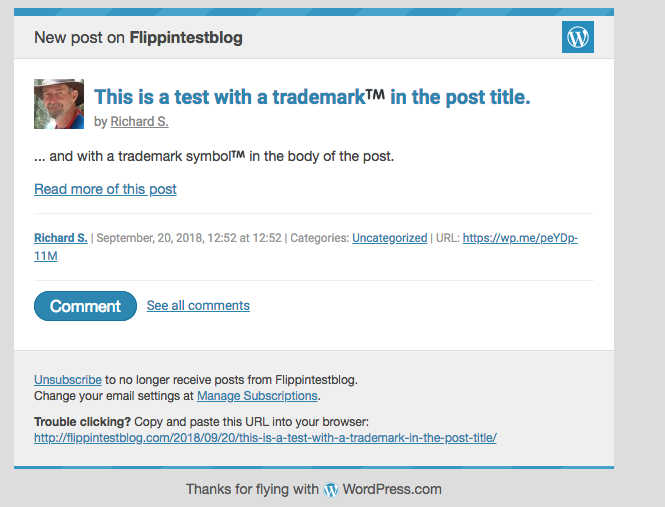
I am trying to figure out why, when an email is received for a blog post, the TM symbol appears huge. It does not appear huge in the actual blog.
I manage four blogs and all four do the same thing. Any ideas on why this is happening?
The blog I need help with is: (visible only to logged in users)
-
Hmmm, that could be an issue with the email program not rendering the font and symbol as you have it on your site. Email programs and browsers can differ in how they render things.
Are you using an email program, or are you accessing your emails via your browser? If so, which browser?
-
I am using Outlook on my computer and then the Mail app on my iPhone and neither are appearing correctly; Outlook shows the TM huge and my iPhone shows the TM still larger than it should be, but not huge.
-
Now that I’m looking at it a bit more, in the emails, it appears to come across as a picture for some reason. Any thoughts?
-
-
Hmmm, image… can you check the email to see if it has attachments and if one of those is a TM image?
Also, try right-clicking on the TM to see if it is listed as an image?
-
Yes, in the email it’s listed as an image. I have to download images in order for it to appear.
-
-
Hi hospitalpointofsale,
Would you be able to make a screenshot of the image and upload it to your Media Library (on hospitalpointofsale.wordpress.com) so I can take a closer look? And just to confirm — this email is from a site you are following through the WordPress.com Reader?
-
This issue is happening with the following sites:
hospitalpointofsale.wordpress.com
nonprofitpos.wordpress.com
tamretail.wordpress.com
theassistantmanager.comI will get a screenshot uploaded to hospitalpointofsale.wordpress.com.
-
The images have been uploaded. I showed what it looked like with and without the pictures downloaded.
-
Hi there,
It does appear that it’s intentional that the symbol is rendered as an image, but we also include inline styling intended to limit the size of that image:

In my Gmail account that is working fine to restrict the size of the ™ symbol, but it could be Outlook and your mail app are both rendering that styling differently, perhaps even due to a specific setting in the software or on your device itself. If that’s the case there’s not much we can do about it from our end, but on the other hand, most of your subscribers are likely not seeing the same thing, unless they’re using the same email client and the same configuration.
-
I’ve just uploaded a new image from my hotmail account. While the icon does resize, it still does not format correctly. See in the title (hyperlink) how it is black instead of blue? And in the body, it is bold when nothing around it is? I have checked now in three different ways and none of them show correctly. If you have one that shows correctly, can I see what it looks like? I do not want my customers receiving sloppy emails. Thanks.
-
Hi, I just tested with Gmail, through Chrome, Safari, and Firefox, and the same on iCloud, and on my Mac Mail program, and what I see if all of them is virtually identical to this screenshot: https://cldup.com/SF0yvzpL4h.png
The latest image you uploaded from the hotmail account, was it viewing the image through a web browser, or still through Outlook? Are you using the online version of Outlook or the local program that comes with Windows?
If you view the email in a web browser, does this occur both in Chrome and in Edge/Internet Explorer?
Looking at the code that @kokkieh posted above, this is the image url from the TM symbol in the email,
https://ci4.googleusercontent.com/proxy/llsyeJyCtj9S6hHc2yTjK7eSRiJ81f-xK2hktgU1C_yDUA3YfGz8zMu_vNpH-r_zaQ-cEO3_bNCF8RDs7HYJP8Qqf0KVx0rweAZkX3fnWyfLxat-mvcnkruv4u3Ju9_bPqCvvg=s0-d-e1-ft#https://s0.wp.com/wp-content/mu-plugins/wpcom-smileys/twemoji/2/72x72/2122.pngwhich means that we have no control over the color of the image. I tried viewing that image, but Google won’t let me.
-
The most recent image was through Chrome. I also looked at Edge and it appears the same as the most recent screenshot. How did it even become an image? I used the alt code to put it into the email. Do you guys know of a different way to handle that?
-
I am looking for a way to get the TM into my article/title and have it format correctly so it looks the same as everything else. Any tips will be tested. Thanks.
-
Okay, I spoke to one of our developers about this, and here’s what’s happening:
Symbols like the trademark symbol and emoji are not images, but characters, “letters”, if you will. However, not all devices and operating systems have the same support for displaying those characters.
With emoji specifically, mobile devices have supported them for quite some time, but not desktop computers. This means if such a character was included in the email, it would not display at all. That is why our system converts that character into an image instead, to make sure it can still be displayed on any device, even if the operating system does not have support for the specific character.
But email clients can render these images differently, as is happening here where your email client (both Outlook and Hotmail, which both happen to be Microsoft products) is ignoring the attributes we add to the image to control the size at which it must display. This is not something we can fix. I tested with Gmail and Yahoo email addresses, and there the TM image shows at the correct size.
So whether or not your subscribers will see the bigger image will depend on their email provider.
We will be investigating if there’s anything we can do on our end to change this – as both Windows and Mac OS now have emoji support we might not need to convert these characters to images any more – but I can’t promise a quick fix.
-
Even if I had to type out TM and then you guys have a feature for superscript, that would be fine… Thanks for your help.
-
You can use the following HMTL in your post content, but it won’t work for the title:
<sup>TM</sup> -
To clarify, you’ll need to switch to the HTML mode of the editor to add that, then it will display as superscript if you switch back to visual mode.
But I also want to encourage you to contact Microsoft support so they can investigate why their email clients are not respecting the attributes we’re including in the email code to control the size of the image. Using superscript instead of the symbol will only make it look better on Outlook and Hotmail emails, and might make it look worse on all other email clients, as well as your site’s RSS feed and the site itself, where the symbol is not being incorrectly sized.


- The topic ‘Emailed Blog Post Showing Up Weird’ is closed to new replies.
 WordPress.com Forums