

Embed Youtube video properly
-
My chosen youtube video is not embedding properly. I read through the Support tutorial + searched troubleshooting + all I saw were tips to unlink the url which I’ve already done. The video is on my “What is Body Sugaring” page on sugarmethod.com, ‘Shine On’ theme.
Thanks in advance for any help provided:)
The blog I need help with is: (visible only to logged in users)
-
Hi there!
It looks like you have some additional formatting in your Post. This can happen when you copy your posts’ content from a rich text editor like Microsoft Word.
Right now, if you open your Text editor you’ll see this:
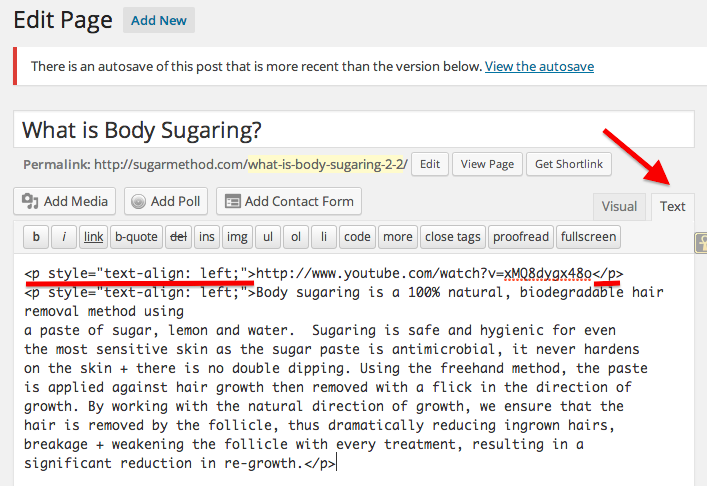
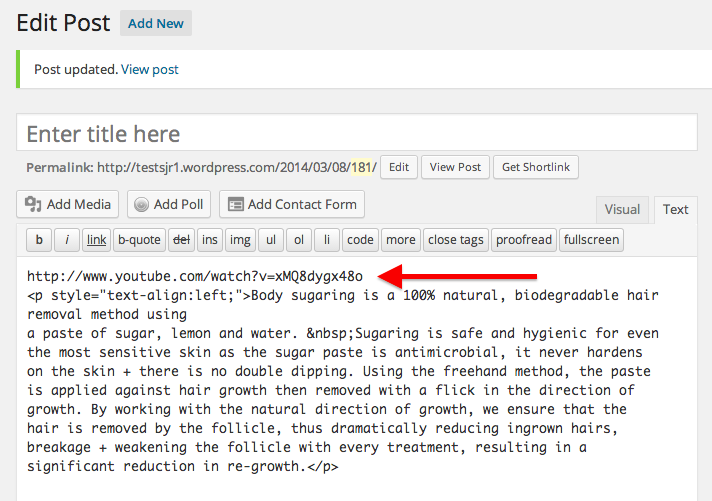
If you remove the parts I have underlined, and update your Page, your Youtube video will embed properly. It should looked like this:
Let me know if I can help further!
-
Hi Shawna,
Thanks so much for trying to help, but I didn’t see any underlining at all in the post in the text editor. I tried just cutting + pasting the https://i.cloudup.com/heCvxZeReA.png link and updating, still doesn’t show that actual video in the browser, just the link. Also, I do need to mention that the content was not copied from Word or any other text editing software, it was just typed directly into WordPress which just mystifies me as to what is happening?If you have any further insights given this new info, please let me know, and thanks again for your help so far:)
-
Hi there!
I’m sorry for the confusion. I added the red underlining to highlight what you need to remove from your Text editor.
I’ve gone ahead and made that change to your post:
http://sugarmethod.com/what-is-body-sugaring-2-2/
Let me know if you have this issue in the future!
-
Thanks Shawna, I really appreciate it! Btw, do you recall which parts you underlined? I checked but I never did see your underlining + that’s too bad as I really appreciate the fact that you did that, as it would have help so much for future video embedding.
-
-
Shawna, that’s awesome, thanks so much for taking the time! Now I understand, it was that paragraph tag. Have a great weekend:)
-


- The topic ‘Embed Youtube video properly’ is closed to new replies.
 WordPress.com Forums