

Embedding a graph
-
Hi,
I can’t embed a graph into my wordpress site it just comes up as a link and I want to see the whole graph. I have tried different option but have no plugin options on my website. vote-citizen.com Can you help me?
The blog I need help with is: (visible only to logged in users)
-
Hi there!
Can you tell me the format of your graph? PDFs will only display as downloadable links, but image files (like JPEGs, GIFs, PNGs) will embed…so will Google doc graphs.
Looking forward to hearing from you. Thanks very much.
-
Hi, I’m not sure what format it is in but here is a link to it. http://d26adhsj11a4c2.cloudfront.net/NXPlv/1/
At the bottom of the graph there is a code for embedding. I have tried that but only the link comes up, not the graph. Thanks for your help.
On another issue is there any way I can change the menu in my header? I move it around but it always comes up in alphabetical order.
-
Hey there!
That type of iframe code is not allowed on WordPress.com sites. Third party code like that cannot be added to sites hosted on our servers, as it can pose a security risk.
If you’d like, you can create a screenshot of the graph. This will make an image file. Then, you can upload the image to your Media Library, and add the image to your post or page. Here is information about how to make a screenshot:
On another issue is there any way I can change the menu in my header? I move it around but it always comes up in alphabetical order.
To adjust your menu, click the link below:
https://votecitizencandidate.wordpress.com/wp-admin/nav-menus.phpMake any changes you want to your menu. Below the menu structure, you’ll select “Primary Menu” as your menu location. Then, save your changes.
That should do the trick! If I can help in any other way, please drop me a line. Cheers :)
-
I couldn’t take a screen shot. Nothing happened, there was nothing to paste. Is there another way I can turn the graph into a media document. What if I print it out?
Also, on the menu, I have pulled everything to where I want it on the menu and saved it. On the admin page they are in the right places but when I return to view the site they are still in alphabetically order on the menu bar across the top. Nothing has changed????
-
Hi again!
There shouldn’t be any pasting. I’m not sure what your intention is with that action.
However, I took a screenshot of your graph:
https://cloudup.com/coLU-2N8arsYou can download that and upload it to your site’s Media Library. Then, add the image by clicking Add Media in your post or page. You’ll do this in the same way you would add any other image to a page on your site.
Also, on the menu, I have pulled everything to where I want it on the menu and saved it. On the admin page they are in the right places but when I return to view the site they are still in alphabetically order on the menu bar across the top. Nothing has changed????
I’m not seeing that you selected “Primary Menu” as your menu location, as I suggested in my last note to you. If you’re not sure where to do this, I’ve illustrated it below:
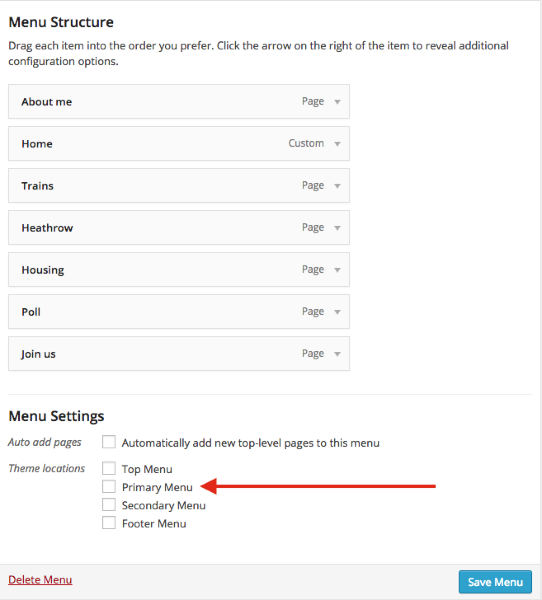
Click that box, then save the menu.
Thanks again!
-
Thank you Happiness Engineer. Both worked wonderfully well! Now I have one more problem. About three days ago I put an alias domain name for my site which was ‘votecandidate.com’ in case people left out the hyphen in ‘vote-candidate.com’ . This has not been activated yet – have I done something wrong?
Thanks. Della
-
Hey there!
Terrific! Glad that worked for you :)
I am not seeing that you’ve added votecandidate.com to your site. Could you tell me how your added it?
I do see that votecandidate.com is a registered URL at GoDaddy. Does this belong to you? If so, it does need to be mapped to your site, using these instructions:
http://en.support.wordpress.com/domains/map-existing-domain/#instructions-for-mapping-an-existing-domainLet me know! Thanks again.
-
Sorry, I made a mistake there. My blog is called vote-citizen.com and I put as an alias votecitizen.com under edit DNS CNAME votecitizen.com alias of vote-citizen.com.
I did it a few days ago but votecitizen.com doesn’t bring up my website. Have I done something wrong?
-
Hi there!
Oh, I see. That’s not how CNAME records work, unfortunately.
There isn’t a way for you to use votecitizen.com as an alias for your site. Domains are unique. Since votecitizen.com is already a registered domain, it cannot be used on your site.
A CNAME record is for a subdomain. So, something like blog.vote-citizen.com. What you did was create votecitizen.com.vote-citizen.com. I suggest deleting this as it will not function as you wish.
Hope this makes sense. Let me know!
-
Now I see why it won’t work, but I read on the forum that you could have up to three domain names in case someone made a typo and you wanted them to still find you. I think that many people will miss out the hyphen. Is there any way I can redirect from votecitizen.com to vote-citizen.com? For instance could I set up a sub-domain and copy over all my content?
thanks
Della
-
Hi Della,
I’m not sure where you saw that information, but it’s not accurate. You can actually have as many domains as you want…but you must own them. There’s no such thing as an alias domains on WordPress.com sites.
You cannot redirect from votecitizen.com to vote-citizen.com because votecitizen.com belongs to someone else.
Honestly, once you get your website rolling strong, and you’re putting up content, and updating your site, you really only need one domain. You will be found and seen online. Most users only have one custom domain (with or without a hyphen), and it works out great.
If you want a domain without a hyphen, you’ll have to choose an entirely new domain name…votecitizen.com cannot be used.
More questions? Let me know. Thanks.
-
Hi Happiness Engineer. Thanks for your last response. I’m sure you are right. I wonder if you could help me with something else. People have been signing up to subscribe to my website. They have received verification and confirmed but then they don’t get any updates. Is there something I should have done on this?
Thanks.
-
Hello there!
When folks sign up to follow your site, they are subscribing to receive notifications of new blog posts you’ve written. While you’ve created quite a few pages, I am not seeing any posts created on your site yet.
To create a new post, you can go here:
https://wordpress.com/post/86980490/new/?optinIf you’re not sure about the differences between pages and posts, this may help:
If you have any other questions — let me know! I can help out :) Have a lovely weekend.
-
Thank you. that’s really helpful. Thanks for sorting me out so quickly! Have a good weekend too.
Della
-
-
Happiness Engineer, I hope you are not on holiday right now as I need your help again. I have set up my first blog ‘post’ but when I go to publish it I can’t change the page set up to show it full screen. It has the side bar with it and also my gavitar message below, though I have never put this here. Can you tell me how to clear this so I can publish just the post?
Thanks Della
-
Hi Della!
Only Pages can be made full width/no sidebar in your theme, Responsive.
You can choose which widgets will appear on your blog pages, but there does have to be a sidebar.
You can see how that works on the theme’s demo site:
https://responsivedemo.wordpress.com/blog/
Not all themes work in this manner, but it is an element in Responsive.
If you want to pick and choose which widgets appear on your blog posts, you might look into Widget Visibility:
If you have other questions about this, let me know.
-
Thank you, once again you solved the problem, but you really should be on holiday today. I didn’t expect an answer until tomorrow. Hope you are getting paid double time.
Many thanks. So grateful.
Della
-


- The topic ‘Embedding a graph’ is closed to new replies.


 WordPress.com Forums