

empty site
-
accidentally deleted some files. I would like to start fresh again. Much appreciate if you
Thanks
The blog I need help with is: (visible only to logged in users)
-
Hello there,
See Restoring from Trash https://en.support.wordpress.com/trash/If you are willing to wait rather than DIY http://en.support.wordpress.com/empty-site/ Staff can empty the whole blog for you. That will remove all data including posts, pages, tags, categories, comments, and uploaded files and once deleted, the data cannot be recovered.
If you are sure you want Staff to proceed, and you are prepared to wait then type modlook into the tags in the sidebar of this thread for Staff attention and post again to this thread to:
(1) confirm the URL of the blog you want them to empty;
(2) confirm that you know content deletion is irreversible.IMPORTANT NOTE: Deleting blog content does not remove it from the SERPs (search engine page results). Google and Bing only clear their caches of deleted indexed content that produces a 404 (page not found) every 3 – 6 months. To completely remove an entire page from Google search results: https://support.google.com/webmasters/answer/1663419?hl=en
-
If you want a fresh start on your WordPress.com site, you can delete all of your content from your site and still keep your current WordPress.com address (such as yourgroovysite.wordpress.com).
Here’s how to do it:
If you’re having an issue and would like me to empty the site for you, please confirm the address of the site in question, as @timethief stated.
Let us know if you have any more questions.
-
The issue is I have deleted some default page, post and categories. What I mean having issues is my blog post do not automatically show on blog page as I may have deleted.
What I really want is in under settings >reading to have the home page asvdtatic and post page as blog which will display posts. But since I may have deleted those it’s not showing up in home page
-
Set your Posts page to Blog:
https://diykodi.wordpress.com/wp-admin/options-reading.php
Then, once you start creating posts, they will appear on your Blog page:
Also, you may want to add the Blog page to your site’s custom menu:
https://diykodi.wordpress.com/wp-admin/nav-menus.php
If you have additional questions, please let us know.
-
I have done all that but for some reason it’s not displaying. That’s why it’s best if I start all over so please empty.
Thanks
-
Seems my blog will not be emptied but only offers other option and solutions which does not solve any. May be I will have to use a different blogging platform to keep the domain name and start all there
-
You’ve set the Front page to Blog, not your Posts Page:
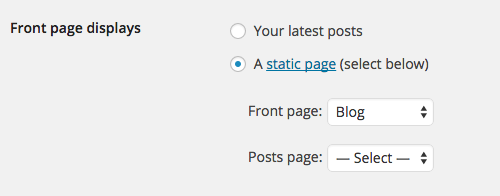
Please set your Front page back to Home and your Posts page to Blog.
Also, you’ve not added your Blog page to your site’s Custom Menu:

https://diykodi.wordpress.com/wp-admin/nav-menus.php
If I’ve misunderstood the issue, or if you have any other questions, please let me know.
-
I have deleted all pages and post to get it cleaned from your end. Once it’s done then I can do that. In the mean time what I want is to get it all cleared or emptied so I can start fresh.
-
Thanks but shouldn’t it take me automatically to initial set up ?
Think to get through this is to allow post to appear in a page. How to do that then
Thanks,
-
To find out what emptying a site entails, please check out our related support document:
You can always administer your site here:
http://diykodi.wordpress.com/wp-admin/
If you’re just starting out with WordPress.com, I can go through our new user’s guide:
https://en.support.wordpress.com/start/
You’ll learn about all the best and most useful features of WordPress.com, with lots of screenshots and videos.
You can also browse our support documentation and check out the forums; you might find the answer you’re looking for:
You can create the effect of a single page showing a group of related posts by following these steps to link to an archive of all posts in a certain category.
1. Assign the same category to all of the posts you want to appear on a given page.
2. Create a custom menu in Appearance > Menus.
3. Using the Categories module to the left of the Appearance > Menus screen, add the categories you want to appear as pages to your menu, and drag to arrange them.
You can review the full details here:
http://en.support.wordpress.com/category-pages/
If I’ve misunderstood the issue, or if you have any other questions, please let me know.
-
Thanks for the info. But this is not really what I am looking for
When started it had a default page that automatically display posts. That page I may have deleted. So rather than creating category blog I wish to have that default option. Think it only possible if I start fresh installation. Do you think you could let me start fresh? -
A new site is not necessary.
Simply change Front page displays back to Your latest posts:
https://diykodi.wordpress.com/wp-admin/options-reading.php
If you have additional questions, please let us know :-)


- The topic ‘empty site’ is closed to new replies.
 WordPress.com Forums