

Enhanced stats
-
My enhanced stats page does not load. All I get is a spinning wheel, not stats. The stats on the dashboard for each blog show up.
The blog I need help with is: (visible only to logged in users)
-
There’s no known issue I am aware of.
In order to help you we need to know your specific computing environment details. Please work through what follows and report back.
1. If you are not running one of the browsers and versions listed at http://browsehappy.com/ please try upgrading or switching first.
2. If you are using an IE browser in compatibility mode please disable that mode. http://www.sevenforums.com/tutorials/1196-internet-explorer-compatibility-view-turn-off.html
3. If you are running one of the browsers and versions listed at http://browsehappy.com/
(a) Try clearing your browser’s cache http://www.google.com/support/accounts/bin/answer.py?hl=en&answer=32050
If applicable see here for instructions on how to clear the cache for Chrome and Safari on the iPad:
http://browsers.about.com/od/howtousemobilebrowser1/ss/safari-ipad-clear-cache.htm
http://browsers.about.com/od/howtousemobilebrowser1/ss/How-To-Clear-Browsing-Data-In-Chrome-For-Ipad_6.htm(b) Make sure that you have both third-party cookies enabled and JavaScript enabled
http://en.support.wordpress.com/third-party-cookies/
http://www.google.com/adsense/support/bin/answer.py?answer=12654(c) Disable all browser extensions or add-ons temporarily.
(d) Try enabling HTTPS: http://en.support.wordpress.com/https/
Add both *.wordpress.com and *.wp.com to your list of trusted sites under the Security tab. Make sure to uncheck the box for “Require server verification (https:) for all sites in this zone.” http://en.support.wordpress.com/https/#frequently-asked-questions
4. You can use this link to see if your flash is up to date. http://www.adobe.com/software/flash/about/ If it’s not then go to http://www.adobe.com/products/flashplayer/ and download and install the latest version of flash.
5. Try using another browser.
6. If you are not successful let us know:
(a) Exactly what kind of device you are using to connect to the internet and to WordPress.com.
(b) Exactly which browser (and version of it) you’re using by checking here if necessary http://www.whatbrowser.org/
(c) Exactly what you experience including what any error reports you receive state. -
Running Mac OSX version 10.9.2. Safari 7.0.3. Come to think, that was first installed April 2, and I think the problem has been going on that long. It certainly used to work. Flash is up to date, and cache & cookies have been cleared. It is working on Chrome, but I prefer to use Safari, since it works on all devices & I use Keychain. I have tried the link on the dashboard page and the sparkline. No joy.
On the iPad, it loads everything but the bar graph. That will load from the Site Stats link on the dashboard, but not from the sparkline link.
-
Thanks for your report. I’ll tag this thread for a Staff follow-up. Please subscribe to the thread so you are notified when they respond and please be patient while waiting.
-
Hi there! Are you able to view this page correctly?
http://wordpress.com/my-stats/?unit=1&blog=13805151
I tried loading the page in my Safari browser and experienced no problems. Here’s a screenshot:
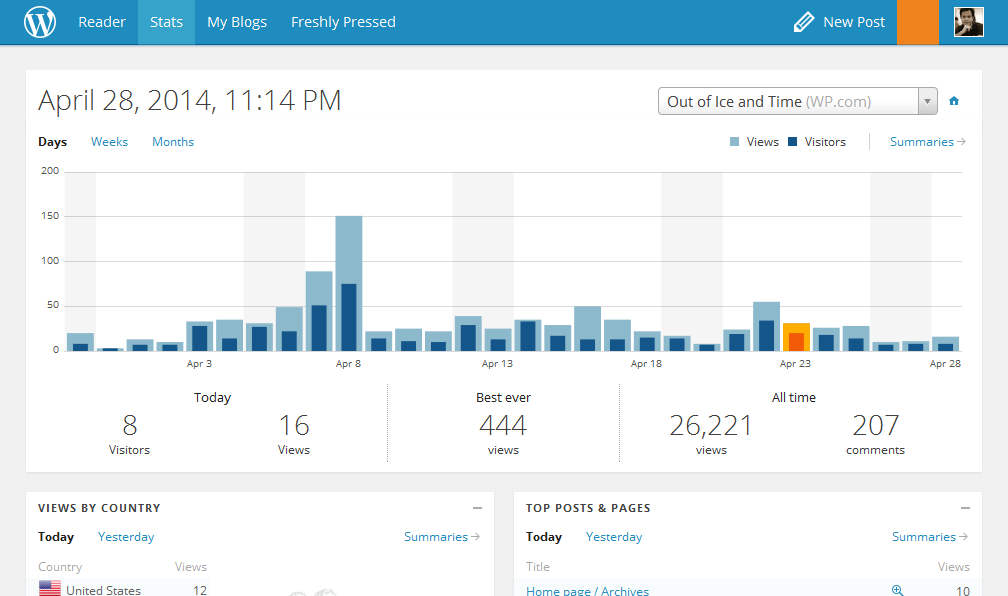
I’m guessing that this could be a problem specific to your browser. If you can kindly try uninstalling then reinstalling Safari, that would probably help. You might also want to read through our advanced troubleshooting tips here:
http://en.support.wordpress.com/browser-issues/advanced-browser-troubleshooting/
Please get back to me if you don’t see any improvements. Thank you!


- The topic ‘Enhanced stats’ is closed to new replies.
 WordPress.com Forums