

Error getting video embed to play
-
Hello,
I’ve tried uploading my video to my site several times and the upload appears okay in the media library. However the shortcode is producing an error message on my post, as is the ogg link. (I posted both in an attempt to get the video to play for visitors.) It’s not playing on mobile, though, nor on some desktops.I rendered the video into a wmv file, which has always worked in the past. Not sure why it’s not this time. Can you let me know how to fix it?
Thank you so much!
Here’s a link to my post: http://karmamamma.com/2014/10/07/my-sons-toy-sword-is-making-me-yell-at-everyone/Lauren
The blog I need help with is: (visible only to logged in users)
-
Hi there Lauren!
I visited your site, and your embedded video worked great for me in Chrome and Firefox.
It appears as if you’re using Firefox…do you have Silverlight updated on your PC? You can click this link to make sure you’re up-to-date:
http://www.microsoft.com/getsilverlight/Get-Started/Install/Default.aspx
Give that a try and let me know the results. Thanks much!
-
Hi there Robyn!!
That did the trick on my PC. Thank you!!
On my phone, an iphone, I’m seeing a black screen w/ white text that reads ‘download file’ where the video should be, and nothing happens when you touch it.
Thank you,
Lauren -
Hey Lauren,
The issue is that both the formats you’ve included in your post (.ogv and .wmv) are Windows-based. I recommend using a .mov or .m4a file instead.
I hope this helps! Let me know how it goes! Cheers.
-
Hi Robyn,
I’m so confused because I’ve always uploaded the video as a wmv and it’s always worked on my phone. I’m wondering what makes this particular time different?
Thanks so much again,
Lauren -
Lauren,
The wmv usually works for me as well. So, I looked closer at your posts.
I actually see a difference with the way you embedded video in your most recent post, and the way you embedded it in the past.
Of course, we know your latest post doesn’t play your video on the iPhone.
However, when I visit another post (linked below), I’m not having any trouble with the file:
http://karmamamma.com/2014/09/23/when-my-kids-talk-to-siri/If you open both those posts in the editor, you’ll see the difference between your codes. Is there a reason you made the change? If not, can you edit your non-functioning code to match the shortcode of the other video? Let me know how that works for you.
Perhaps I can assist, if you were hoping to attain a goal with the new type of code. Drop me a line and I can help!
-
Hi Robyn,
Thanks so much for taking a look at the codes. I noticed the difference too but the difference wasn’t something I instituted; it was generated automatically by wp when I uploaded the file. When I would insert the code into the post I got an error message. After several tries re-uploading the file, the code seemed to work but I was concerned it wouldn’t work consistently, so I also included the link (think it’s the ogg link) to give people another option to view it.
I couldn’t figure out what prompted the difference in codes and the error message since the video rendering stayed the same.
Thanks again for helping me!
Lauren -
Lauren! That is so strange!
Here’s the code that’s currently on your post:
[video width=”1280″ height=”720″ wmv=”http://karmamamma.files.wordpress.com/2014/10/sword2.wmv“][/video]And here’s the one you want to replace it with:
[wpvideo MOiPqN1A]In the future, if you’re looking for a video’s short code, you can find it by going to your Media Library, opening the video, and looking in the right-hand column for the short code. For instance:
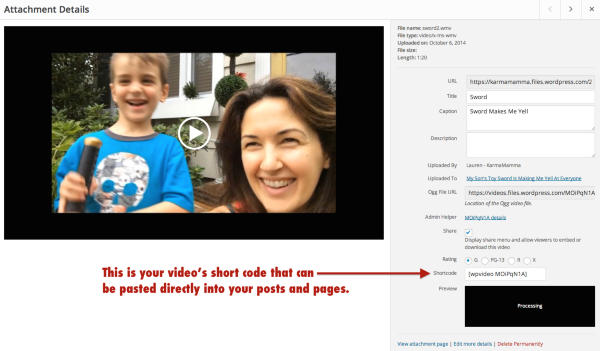
I hope this helps! Take care.
-
Hi Robyn,
Thanks so much. Did you change the shortcode? The original code generated when I uploaded the video wasn’t working. I’ll give the one above a shot and let you know how it goes.
Thanks again,
Lauren -
Lauren,
I didn’t replace it, just because I want you to see the correct format and how to implement it, in case the issue arises again and you need to fix it.
Give it a try, and if it works, great. If not, I can definitely help with it!
Thanks much!
-
Ohhh, okay. The shortcode wasn’t working originally, that’s why I went with the link instead. But then problems arose with getting the link to play on mac platforms. I apologize for not mentioning I had problems with the shortcode too.
Just as a test, I attempted to re-insert the shortcode into the post. When I do, this error message pops up, which confused me since the video is rendered into a wmv format:
Error
Your uploaded video is encoded incorrectly: we are unable to process it. Please try using a standard format (.avi, .mp4, .m4v, .mov, .wmv, .mpg), or different encoding software.Thank you, Robyn!
Lauren -
Lauren,
Ok, thanks for that information!
I did see one different setting you’d chosen on this media file, versus the other working files.
This one had an “Embed Link” Attachment Page selected, while the working videos had the “Link to Media File” option chosen.
I created a copy of your page — as a TEST draft. It’s saved as a draft in your library of posts. I added the video file with the Link to Media File option chosen.
Would you like to take a look and test it out? I didn’t include the .ogv file, just so you’re aware.
Let me know how it goes. If it works, and you’d like to publish it, you can delete the old post, take the “TEST” off of the one I created, and give it the same publish date as your old one.
Thanks for your patience. We’ll get this video up and running! All the best :)
-
Hi Robyn,
Thanks so much for pointing out that the different embed option was selected. I don’t remember altering that and I’m wondering if it happened automatically, some how. Either way I’m so glad you told me so that I can double check it in the future.I checked out a preview of the test post you created on my PC and also on my iphone. For some reason the video isn’t playing on either one.
As an aside, I recompressed the video again yesterday to see if a different version would work on both PC and mac. I tried the .mov and the mp4. Neither worked for me on the upload. I got an error that read “http error”. I tried again recompressing and uploading an mpeg version but didn’t test it on the post yet. It may be something with this particular video, it’s strange though.
I really appreciate all you’re doing to help. Thank you so much!
Lauren -
Lauren,
It may be something with this particular video, it’s strange though.
I’m starting to wonder the same thing. The rest of your video appears to play beautifully, but it’s this one file that’s causing so much trouble.
Did you take the video on your iPhone? If you have time, you may want to try something with the file itself. Try to trim just a tiny bit from it. This isn’t too make the video a smaller file, it’s just to change it slightly and resave it as a brand new video file.
You’re probably a pro, but in case you need some instruction on trimming video on your iPhone:
http://www.imore.com/record-trim-videos-ipad#trim-video
Once you save the new file, try to upload it to your Media Library, and let’s give this another go!
Thanks Lauren!
-
Hi Robyn,
Thanks so much for sending this along. I did indeed take the video on an iPad and then I edited it on Vegas, as I frequently do w the others. The one thing that’s different about this video is that I used a separate program to “flip” the first half of the video because it was shot upside down. I think I used movie maker, I can’t remember. Is it possible that this caused the error? Everything played perfectly in the editing program and exported perfectly (at least on the PC). But all is certainly not the same w the upload.
If this is the issue, I’m not sure how to reconcile. I’ll put the files back in Vegas, trim them, re-render and export as you said and see if that helps. I’m concerned though.:(
Thank you, Lauren -
Hi Lauren,
I do think we need to think about what is different with this file, versus on the working videos. And then, moving forward, you’ll know what NOT to do, so this won’t interrupt your blogging again.
The flipping / use of movie maker certainly could be the unique issue that’s making to problem occur.
Can you let me know how the work on the video goes? We can move forward from there…It’s probably best to leave Movie Maker out of the loop this time. Maybe just use iMovie on your iPad for the flipping:
http://support.apple.com/kb/PH3162?viewlocale=en_USAlso, you can test the original file by uploading the raw video and uploading it into your Media Library, and onto that test page. Go to the source, and work your way forward through the process, to figure out where the problem occurs during the process.
Thanks much!
-
Hi Robyn,
I’ll upload the raw file to the test page,
That’s a great idea.As for flipping this video and others should I need to in the future, here are the challenges;
My iPad won’t let me put the videos I pulled off of it and uploaded onto my PC, back onto the iPad so I can re-flip them. Maybe I need to adjust something in the settings? When I drag the files or copy them they won’t transfer.
Going forward, I’m not sure how to tell the videos were shot upside down by looking at them on the iPad. Do you know if there’s a way to determine that?
Thank you so much on all!!
Lauren -
Hello again Robyn!
I uploaded the raw files to the test page and they seem to be working flawlessly. A side note, the first raw file is actually not raw. It’s been flipped in movie maker – something I can’t undo because in error I didn’t save the original. However this file and the second video are, in essence, the raw files that I imported into Vegas to then cut up and render into the finished product – the one that we’re having problems with. I’m still stumped because I assumed it was the raw file that was troublesome, and not the rendered version (since I’ve always rendered to a wmv.) But we’re definitely narrowing the issue!
Thanks again for all,
Lauren -
Hi Lauren,
If things are working well with this new video, it sounds as if there might have been some sort of interruption during the rendering process in Vegas. I am able to view the draft posts as well without any trouble.
Can you replace the old video with the new on your existing post?
The way I look at it is, if it happens once, it is just be an anomaly. If it continues to happen, then we may need to re-look at Vegas and how it’s rendering or compressing your video. It may conflict with our video player. However, as things are working fine now, I suspect the former, rather than the latter.
Are your subsequent videos all playing correctly?
Take care, Lauren! Cheers.
-
Hi Robyn,
Thanks so much for getting back to me. The problem with replacing them is that I edited the raw files down to create the shorter piece. I’m concerned about putting the time in to re-edit and re-render without knowing it will work. Is there something I can look at in the rendering of the existing piece, or specific settings I should try? I had tried rendering as a .mov and an mpg but got errors when I uploaded them to the media library. And, yes, the other videos I’ve rendered and uploaded are playing well.I also have a side question. I noticed that when my scheduled posts post to Facebook they show up without my website name, and the title of the post is just words, not an active link. I took a screen grab to show you and can email it to you if helpful.
Thank you,
Lauren


- The topic ‘Error getting video embed to play’ is closed to new replies.
 WordPress.com Forums