

Expanded menus
-
Trying different themes and most of them have the menus collapsed by default, contrary to the picture shown in the Theme section (where you pick a theme).
When you have few categories this is very annoying to force the users to first click “menu” and then have the list show up, instead of seeing all the items at the first glance.
1. Can we force expanding the menu in Baskerville 2?
2. Any theme you would recommend that would allow that?
Had the same problem with several themes so it’s getting old (the theme picture shows the menus expanded, you try the theme, and find out the menu is always collapsed, then spend more time trying to find a setting)
Thanks
-
Hi there,
If that’s what you’re seeing you’re likely using a smaller screen – most themes are designed to adjust this dynamically based on the screen size of the device you’re using to view the site, but most themes show the full menu on desktop screens.
Here’s how the Baskerville 2 demo page loads for me:
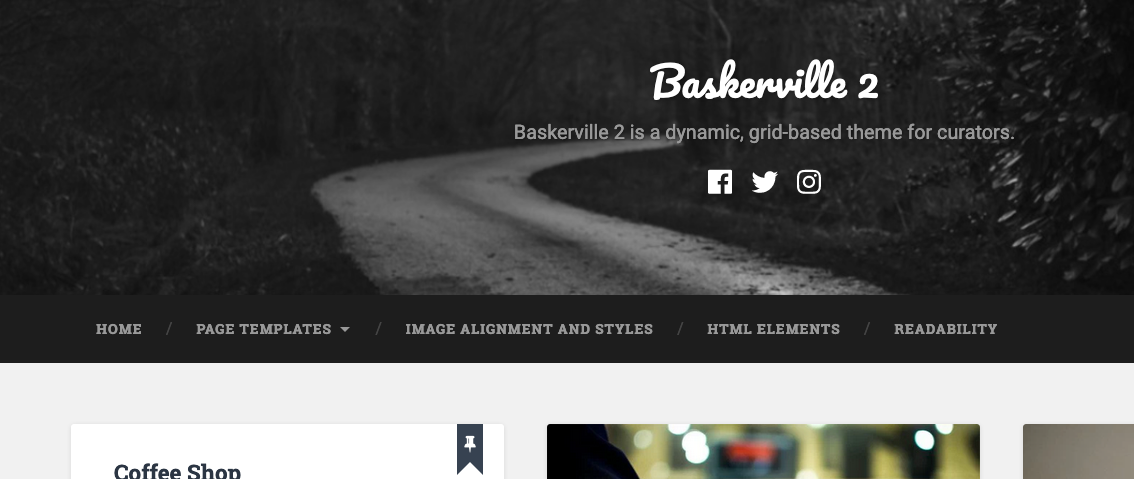
The only way to prevent that from happening is to add custom CSS to the theme to override the mobile menu. Because that breaks the mobile responsiveness of the theme, we don’t provide help with that type of CSS.
Adding custom CSS to your site will also require our Premium Plan or higher.


- The topic ‘Expanded menus’ is closed to new replies.
 WordPress.com Forums