

Export/import issue
-
I have content on one of my blogs that I would like to have appear on another one of my blogs. I did already export the content from oldladygear and then imported it to old lady matters. I received an email from you saying that the import had been sucessful, but, in fact, the content did not appear under old lady matters. So I am trying it again today, but all steps seem the same as before, so I expect that this attempt will also fail. Although, for some reason, you thought it worked.
What is wrong? What can I do?The blog I need help with is: (visible only to logged in users)
-
Hello there!
If you’ve run the upload a couple times, and you’re not seeing your content, I wonder if it may be your export that is the problem.
Could you confirm that you are running the export according to the following steps:
http://en.support.wordpress.com/export/And the import, as well:
http://en.support.wordpress.com/import/Please let me know, and I can help further. If you’re still having trouble, make sure to inform me which content you’re trying to export from oldladygear.wordpress.com. All content? Or something more specific.
Looking forward to hearing from you. Thanks very much.
-
I think so. I just did it again, only this time, I said export posts as in the example, instead of all content.
-
Hi thatrobyn;
Well again I got the email. Here it is:
“Your WordPress import was successful.
http://oldladymatters.wordpress.com
Happy Blogging!
— the WordPress.com team”
In the email, http://oldladymatters.wordpress.com is an active link. when I click on it, this is what comes up:
Nothing Found
It seems we can’t find what you’re looking for. Perhaps searching can help.
SearchIs there anything you can do on your end to make this work? Again I am trying to transfer everything that shows on OldLadyGear.wordpress.com to OldLadyMatters.wordpress.com.
I have tried at least 4 times, gotten the congratulatory message each time, but nothing has been transferred.
-
I have used the export feature under tools on OldLadyGear.wordpress.com and the import feature under tools on OldLadyMatters.wordpress.com. IN Firefox. the export creates an xml file which I drag to the desktop from the downloads section of Firefox. Then I import that file into OldLadyMatters.wordpress.com.
-
Hi again!
If you give me permission, I will run the export and import for you. I do need you to make sure that OldLadyGear.wordpress.com is ready for the export, and that OldLadyMatters.wordpress.com is clear of any unwanted content, so I can run the import.
Once I hear from you, I’ll run the job.
Please confirm if you want me to export ALL the content from OldLadyGear.wordpress.com.
Also, make certain that all the media that you want transferred is attached to a post or page. Only attached images, video, sound files, etc will export/import. You will have to move unattached media manually. If you’re not certain how to manage unattached images, take a look at this link:
http://en.support.wordpress.com/media/unattached-files/
Once you give me the thumbs up, I’ll get the ball rolling for you! Thanks very much :)
-
-
I think I may see the problem, Freda.
You are attempting to export from OldLadyGear.wordpress.com. However, if you look at OldLadyGear.wordpress.com/wp-admin, you’ll see that the site is nearly empty. I think what you actually want to export is the content from this site: http://www.oldladystuff.com/ . Is that the case? If so, this is a self-hosted site, rather than a WordPress.com blog, and I don’t have access to those files to run an export. Because that site is self-hosted and not on a WordPress.com server, you’ll have to download that content independently.
If you can complete an export from http://www.oldladystuff.com/, I can assist with the import into OldLadyMatters.wordpress.com/.
Please be in touch and let me know if my theory above is correct, and if I can help further. Thanks!
-
Thank you Robyn; What is strange is that when I look at my sites, it shows oldladygear.wordpress.com as having that content. That is, when I first login to wordpress.com, I see Blogs I Follow as the main page with , at upper left, Reader, My Sites and Stats. When I click My Sites, I see OldLadyMatters, Jamnwhistler and OldLadyGear from top to bottom….OldLadyGear shows oldladygear.wordpress.com under it with all my content. When I click visit blog, I go to Oldladystuff.com, which I constructed using Weebly.
I bought the domain name from WordPress, then transferred it to Weebly. Now I would like to transfer it back to WordPress, but my understanding is that I will lose the content because Weebly, so it is said, will not allow you to export or copy work that is done on their site. Can you tell me anything about this?
Alternatively, can I just copy and paste on WordPress from that blog to my Oldladymatters blog? -
Hey there!
Could you send me a screenshot, so I can see where you’re viewing your content from oldladygear.wordpress.com? That would be a huge help. I’d like to clear up why you’re seeing content, but I’m not.
You can simply upload the screenshot to your Media Library, like any other image, and I’ll be able to access it from there. Just let me know when there’s something I should look at.
The page at the following link has some helpful tips for taking screenshots:
Once I see this, I can help further.
You can absolutely cut/paste from Weebly into WordPress.com, but I was hoping to help you avoid the manual labor!
Looking forward to hearing from you. Thanks very much.
-
-
-
Hey there!
I see the screenshot. Thank you!
I am seeing that you have a site named oldladygear.wordpress.com, but I don’t see evidence of any content within that site.
Here is a link directly to where your Posts would be kept for that site:
https://oldladygear.wordpress.com/wp-admin/edit.phpIt’s completely empty. In order to move your Posts, you’ll have to export from the self-hosted site that you’ve been updating. You haven’t actually been posting to the WordPress.com site, so an export/import is fruitless.
From my research, it seems Weebly doesn’t make it easy to export, but it may be possible. Have you contacted their support team yet? Here is their support page:
http://help.weebly.com/Let me know what they say. If they don’t export into an XML file, they may export in a way that would create a file compatible with another blogging platform. We can still upload some of those. If you go to Tools → Import, you’ll see the list of blogging sites from which we can import.
I’m here to help if you have other questions! Thank you. Wish this could be easier for you :)
-
Hi Robyn;
It’s been quite a while since I posted here.
But today I went to my old weebly blog and simply selected all (ctrl a) then copied (ctrl c). Then went to my old lady matters wordpress blog and pasted (ctrl v) . I got something all right, but no side bar stuff.
Can you look at it and tell me how to get that stuff into a sidebar? Am I using the wrong template?Thank you,
Freda Brown -
Hi Freda,
Are you referring to your post titled “Be Truly Appreciated and Loved”? Currently, I see the sidebar area on your site as shown here:
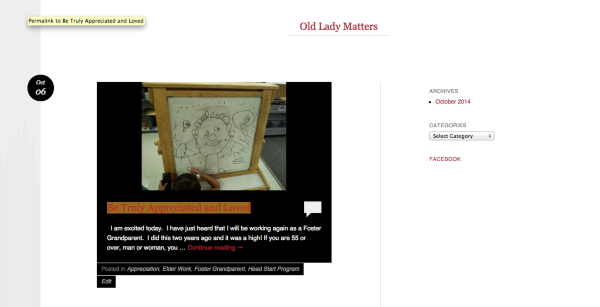
Is that sidebar not appearing on your side?


- The topic ‘Export/import issue’ is closed to new replies.


 WordPress.com Forums