

Expound Theme:
-
Hello,
Two questions involving the appearance of the blog pages when using the Expound Theme:
1) On the main blog page, why does the blue banner over the photos in each blog entry underneath the first blog entry on the page contain the blog’s categories and how can one either eliminate the blue banner or perhaps change the words to the title of the blog?
2) How can one change the size of the text for the heading of each blog. The text seems way too large. Here is a link to illustrate this issue: http://acupuncturecenterofnj.com/2014/03/31/acupuncture-and-the-transformation-of-winter-into-spring/
Thank you for your help in resolving this issue.
The Acupuncture Center of New Jersey
The blog I need help with is: (visible only to logged in users)
-
1) On the main blog page, why does the blue banner over the photos in each blog entry underneath the first blog entry on the page contain the blog’s categories and how can one either eliminate the blue banner or perhaps change the words to the title of the blog?
I’m not seeing a blue banner anywhere, did you still need help with this?
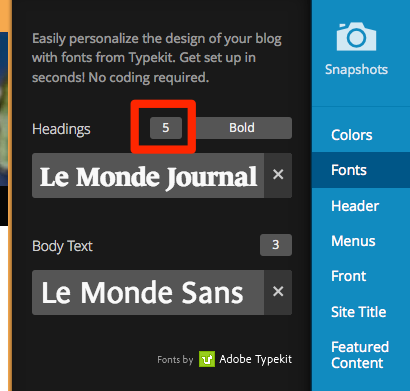
2) How can one change the size of the text for the heading of each blog. The text seems way too large. Here is a link to illustrate this issue:
Try decreasing the heading size from “5” to something smaller, under Appearance > Customize > Fonts:


- The topic ‘Expound Theme:’ is closed to new replies.
 WordPress.com Forums