

Expound theme – change language on predefined buttons
-
As this site is in Norwegian, is looks stupid to have the buttons in Englis, check “Home” in top menu and “Continue reading” on top post. How can I change this?
Tried to tweet the maker of the theme, as he claims to prefer twitter for a-mails, but never got any answer…Anyone? :)
The blog I need help with is: (visible only to logged in users)
-
Translation on WordPress.com is a community project and anyone can contribute.
The Norwegian translation is not complete, but you can feel free to contribute translations:
http://translate.wordpress.com/projects/wpcom/nn/default
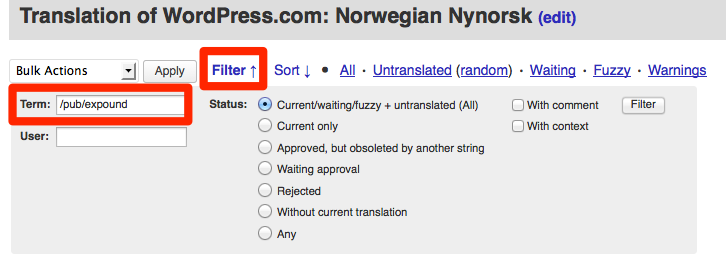
If you want to focus on strings specific to Expound, click “Filter” and enter /pub/expound in the “Term” field, like this:
Here’s an FAQ about how translations work on WordPress.com and how you can get involved:
-
Also, be sure you’ve switched your site’s language to Norwegian under Settings > General – Language.
I just checked and it looks like it’s currently set to English:
https://stavangerradgivningsbyra.wordpress.com/wp-admin/options-general.php
-
Thanks Kathryn I will check once more for the set up thing; earlier today I only found these two items in English, both front end and back.
Didn’t know about translations, I’ll make sure to do my bit:)Thanks Happyness engineer and have a beautiful day:)
Vevdronning:)
-
Just let me know if you nee further help. Your site settings still look like they’re set to English: https://cloudup.com/cUcTo2rX34A
-
-


- The topic ‘Expound theme – change language on predefined buttons’ is closed to new replies.
 WordPress.com Forums