

Facebook likes not shown correctly
-
The likes my posts are getting on Facebook are not being counted correctly on the various social media tools that gather this kind of data (also in the share section at the end of my blog posts) . This has happened to my last two posts.
For instance my last post http://patrickcolgan.wordpress.com/2014/06/14/una-notte-al-monte-koya/ is showing only one like while it had like thirty
you can see it at the end of the post in the share section, but also in another site that gathers this kind of informationhow can I solve this problem?
The blog I need help with is: (visible only to logged in users)
-
I’ll tag this thread for a Staff follow-up. Please subscribe to the thread so you are notified when they respond and please be patient while waiting.
-
Hey Patrick!
As I checked on your post, I’m seeing only 5 Facebook likes on the share button, and 5 likes on sharedcount.com. Can you tell me a bit more about the 30 likes you mentioned? Thanks!
-
Druesome: I’ll try to explain. Asking other bloggers about this, they suggested that those counters only track likes received by the post if I share it using the button on the blog. And that it wont count likes received if I just copy the link and post it on Facebook, but I am not convinced as in the past I never noticed any inconsistencies between the totale of likes received and likes shown on counters.
If you check my blog’s facebook page you can see that the mentioned post received 15 likes only from the page (https://www.facebook.com/OrizzontiBlog) and more in other groups.
I was wondering if it has anything to do with wordpress.com.
-
I just discovered I’m having a similar problem. (My blog is http://anneinpt.wordpress.com). I just posted a new topic wondering where 100 of my followers disappeared to, but
a) the topic has already been closed to replies (!!), immediately after posting! and
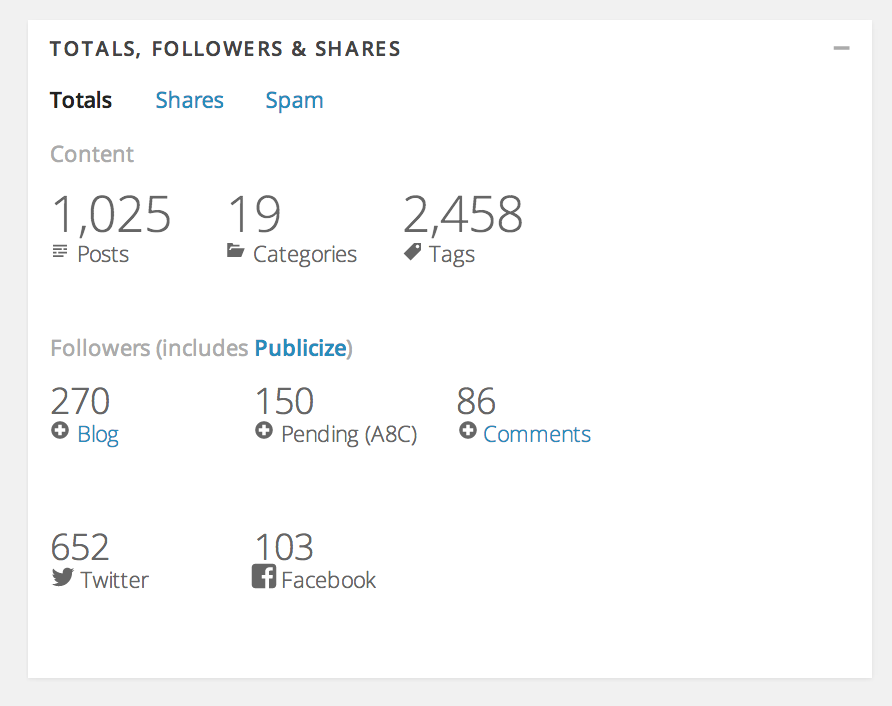
b) It suddenly dawned on me: My facebook followers are not being counted in my total followers, only my Twitter and WordPress followers.On my stats page at the bottom where it lists my followers, my Facebook followers are not mentioned at all.
-
Hey Patrick!
That’s correct — the likes your post receives when you share it on Facebook is separate from the likes it gets on the blog post itself. Right now, your post has received 6 in total according to the Facebook API:
I hope that clears things up. Let me know if there’s anything else I can help you with. Thanks!
-
Sorry to come back to this but I’m still waiting for a reply to my question above.
My facebook followers have disappeared from my followers count. I used to have over 1000 followers of my blog but now it lists only 923 followers. When I look at my stats page with the numbers of followers, it lists wordpress, email, comments, and Twitter followers, but the facebook count is absent. Yet my blog is connected with my facebook page and shows avatars of my followers. What’s going on?
-
Hi Druesome, glad to inform you that my stats seem to have reset themselves and they’re now back to normal again. I can’t figure out what happened, why my facebook followers count disappeared, but as long as they’re back now, all is OK. :-)
I wonder if it was a glitch from the facebook end.
Thanks for the help.
-
-
Dear Druesome, I am still a bit confused, I dont’understand completely
what you wrote> the likes your post receives when you share it on Facebook is separate >from the likes it gets on the blog post itself.
how a blog post can get likes on the blog post itself if not shared on facebook? Also, I am posting here because I suspect something has changed in the last month/month and a half as the facebook Api and all websites that count likes don’t seem to pick up correctly all the likes and shares received by a post. And the likes accounted for my posts went down dramatically, to like 1/10 of the likes effectively received.
just to show what I mean
http://www.sharedcount.com/#url=http%3A%2F%2Fpatrickcolgan.wordpress.com%2F2014%2F05%2F19%2Fil-sentiero-fra-levanto-e-monterosso%2Fand these posts received in reality the same amount of likes and comments, more or less.
That could have something to do with wordpress or my template or the url normalization done by facebook? I am just wondering
-
Hi Druesome,
I am having the same issue regarding FB post sharing count. I have two examples to show you:
1) number of shares counted on the blog (FB) = real number of shares
http://www.sharedcount.com/#url=http%3A%2F%2Fwww.thecuriouscafe.com%2Fit%2F2014%2F04%2Fquestione-di-punti-di-vista%2F
I had this situation in the past.2) Number of shares counted on the blog (FB) is different from the real number of shares (i.e. this post http://www.thecuriouscafe.com/it/2014/05/un-sogno-chiamato-santorini-preview/)
as you can see at the end of the post FB counter is zero.
This is really impossible because I’ve personally shared this article at least two times.
What’s happening?
Thank you in advance :) -
how a blog post can get likes on the blog post itself if not shared on facebook?
I believe Druesome was referring to the fact that there is a like system withing WordPress.com that is not connected to FB shares or likes.
-
staff-ozmodiar ok, but that was already clear to me as it is clear to everybody I think.
There is a problem with FB counting total likes correctly and that seems to affect, from what I have seen, mostly WordPress.com blogs (not just mine) and that since 4-6 weeks. Anyone experiencing the same issue?
Not sure what is the reason. I just guess it could be some issue concerning the url normalization since wordpress.com has a standard, very long, permalink structure which includes the date (I don’t think there is any way to change that)
-
staff-ozmodiar ok, but that was already clear to me as it is clear to everybody I think.
There is a problem with FB counting total likes correctly and that seems to affect, from what I have seen, mostly WordPress.com blogs (not just mine) and that since 4-6 weeks. Anyone experiencing the same issue?
Not sure what is the reason. I just guess it could be some issue concerning the url normalization since wordpress.com has a standard, very long, permalink structure which includes the date (I don’t think there is any way to change that)
-
One important thing to note is what is written at the top of this page:
https://wordpress.com/my-stats/?blog_shares
Just a note: we don’t count shares from ‘official’ buttons, just the standard share links. These numbers may not match the Sharing buttons or stats provided by the Sharing Services themselves, because we can only count shares that happen on WordPress.com
So using a site like sharedcount.com is unlikely to match up with the data that we have available on WordPress.com.
-
staff-ozmodiar @druesome just to show what I mean. These numbers used to match and they still match. The problem is that they don’t count all the likes anymore…
For instance, last post
Blog http://patrickcolgan.wordpress.com/2014/06/30/una-notte-nelle-antiche-case-di-shirakawa-go/ (showing 8 likes at the end)
Sharedcount ttp://www.sharedcount.com/#url=http%3A%2F%2Fpatrickcolgan.wordpress.com%2F2014%2F06%2F30%2Funa-notte-nelle-antiche-case-di-shirakawa-go%2F (showing 8 likes)Ebuzzing (blog stats site) http://labs.ebuzzing.it/top-blogs/source/patrickcolgan.wordpress.com-1OgJ (showing 8 likes)
but the problem is that the post got at least 20 between likes and shares… and the number shown on the mentioned sites used to be correct.
-
If those like or share actions are not taken on WordPress.com (or on a self hosted WordPress site using jetpack), we cannot count them. So it is entirely possible for stats to not match between what WordPress displays and sharecount etc shows if some like/share actions were taken outside of WordPress. It is also possible for those stats to match very closely if most/all of the like/share activity was taken from the WordPress post page.




- The topic ‘Facebook likes not shown correctly’ is closed to new replies.
 WordPress.com Forums