

Facebook Widget & New Editor
-
Dear Sir/Madam:
Since WordPress has switched to the new editor interface I have had difficulty editing my blog. I intensely DISLIKE this editor, yet there isn’t an option to permanently select the previous editor versus the new one.
If there is means to permanently select the old editor would you provide me with the directions to do so? When I was posting last night, one time the option was displayed for me to select the previous editor interface. I chose that option and proceeded to edit and publish without issue.
The next time I signed in to my website, I was not offered this choice, and once again the new editor was displayed.
Also, since this format has changed my FB Widget is not displaying faces on my iPhone or iPad. It was previously working and I have not changed any settings. Just to make sure, I checked to ensure that my FB permissions were set for ‘any age’ to view/like the page.
Again, nothing changed other than the editor interface. Faces are displayed on the Widget when viewed in a browser on a desktop/laptop, but now they are not displaying properly on iPhone or iPad.
I would appreciate your assistance.
Thank you,
Ayanna
The blog I need help with is: (visible only to logged in users)
-
Hi Ayanna,
If there is means to permanently select the old editor would you provide me with the directions to do so?
So the choice is based on your cookies. Once you choose to opt-out by switching to the classic editor, note that it will remember your choice for 6 weeks unless you clear out your cookies. Make sure your browser does not do that and your choice will be remembered. After 6 weeks, just switch again. You will see the choice at the bottom right hand side of the page as seen here:

There is no permanent option. If you want to reach the classic editor everytime, you can do so via the Dashboard:
http://ayannanahmias.wordpress.com/wp-admin/
Also, since this format has changed my FB Widget is not displaying faces on my iPhone or iPad. It was previously working and I have not changed any settings. Just to make sure, I checked to ensure that my FB permissions were set for ‘any age’ to view/like the page.
I don’t think the Facebook widget would be affected by the new editor because I am able to a profile in your Facebook Like Widget as seen here:
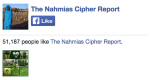
I am seeing this on an iPhone. Can you show me what you are seeing on your iPhone/iPad? If you could take a screenshot that would be very helpful. You can upload that to your Media > Library page.


- The topic ‘Facebook Widget & New Editor’ is closed to new replies.
 WordPress.com Forums