

Feature Header Image not working on Twenty Eleven Theme
-
Help. I must be doing something wrong. According to the theme information, the theme “Twenty Eleven” supports Feature Header Images for pages, but I can’t seem to find the setting anywhere. Is it possible that I just misread the theme advertisement? Am I using the wrong theme?
I want to be able to change the header image on some of my pages (not just my posts).
The blog I need help with is: (visible only to logged in users)
-
You will find the Featured Image panel at the lower right corner of the Edit Page screen, beneath the Page Attributes panel.
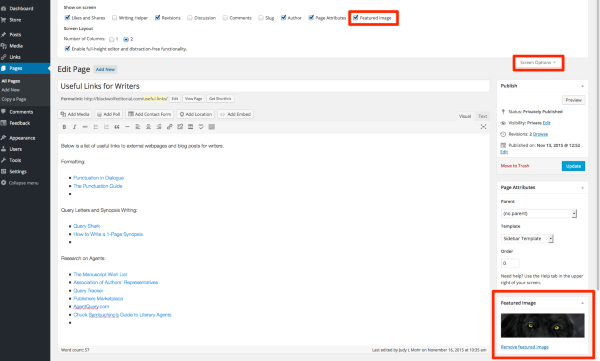
If you don’t find it there, scroll to the top of the screen, expand the Screen Option slider at the top right corner. Select the Featured Image checkbox. This should show the Featured Image panel.
Give it a try and let me know how it goes.
-
Judy, your theme on judylmohr.com is Twenty Ten, not Twenty Eleven. They have some things in common, but Twenty Eleven is responsive – adapts automatically to different-sized screens – so I’d recommend it over Twenty Ten.
This is where you can add a featured image to a page in WP Admin:
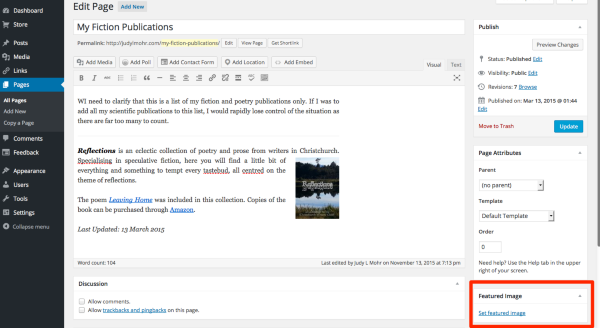
And in the other editor:

Let me know if you have any other questions.
-
When I posted this question my theme was “Twenty Eleven”, but out of frustration and inability to get the different header images to show on different “pages”, not just “posts”, I opted for the much easier option and actually started a second site for the pages that are meant to have a different header.
I changed the main site back to “Twenty Ten” when I discovered a significant flaw in the design of “Twenty Eleven”: when viewing a single “post”, the sidebar menu structure disappeared. When the post was on the main blog feed, all was fine, but as an individual post… This is not good and far from the desire look that attracted me to “Twenty Ten” in the first place.
-
I will reexamine “Twenty Eleven”, but if the fault I saw mention above continues to be present, I will likely reinstate “Twenty Ten” in full.
-
Hi Judy, could you please provide a link to a couple of pages where you’ve added a featured image so I can take a look at why it may not be showing on the site? Thanks.
-
One thing to check is whether your featured images meet the theme’s minimum size requirement:
Twenty Ten – at least 940px wide by 198px high.
Twenty Eleven – at least 1000px wide by 288px high.
Featured images smaller than that will not be displayed in the header.
-
The pages in question have been moved to a different domain (my method of desperation to get everything to work). In the end it was decided that having the pages on a different site wasn’t just a bad idea because that pages were for my editorial business.
Later this afternoon, when I get access to my computer from my husband, I will revisit “Twenty Eleven” for both sites.
-
Hi kathrynwp,
I have temporarily activated “Twenty Eleven” on my other site which is located at http://blackwolfeditorial.comAs these pages are currently under construction, I have no problem with these one still being played with. They are not linked to my main site yet.
There is one page in particular that would be nice to active different “header image” for, but I am unable to work out where to put this in. The page in question has a permalink of http://blackwolfeditorial.com/useful-links/
Using the so-called “new and improved editor”, the one with the blue background, there is a “Featured Image” option. I’ve selected a random image, but this is not changing the header image. And on the WP Admin system (black background editor) I do not see the “Feature Image” setting as you indicated in your images you posted.
I must be missing something entirely.
-
And on the WP Admin system (black background editor) I do not see the “Feature Image” setting as you indicated in your images you posted.
Open the Screen Options panel and check the “Featured Image” box:
My colleague and I did some testing and found that featured images in Twenty Eleven must be either square or landscape orientation to display. Since the image you uploaded to this page is in portrait mode (i.e. it’s taller than it is wide) that’s why it’s not being displayed. You can crop the image before uploading it so that it fits one of the accepted aspect ratios.
Just let me know if you have any other questions.
-
-
Never mind… I think I figured out the whole issue. It would appear that some features of “free” themes you still can’t access unless you use a Premium site.
That sucks. Now to get in some money so I have this option.
-
Screen Options doesn’t require an upgrade, but it’s only visible in the WP Admin dashboard, which is where you were having trouble finding the Featured Image area.
Do you see it at the top right here?
https://blackwolfeditorialdotcom.wordpress.com/wp-admin/post.php?post=40&action=edit
-
WhooHoo… Success… I finally see it. I was obviously in the wrong section of my system. I was in the WP Admin, but not actually in an “edit page” mode.
Thank you so much for your help with this. I have been doing my head in with this.
-


- The topic ‘Feature Header Image not working on Twenty Eleven Theme’ is closed to new replies.
 WordPress.com Forums