

Featured image and title cut off in tablet view
-
No matter how I edit my image, when previewing my site in tablet mode it cuts off both the title and the image on the actual blog post. What can I do?
Thank you!The blog I need help with is: (visible only to logged in users)
-
I haven’t been able to replicate this in an iPad mini with Safari – here’s what I see:
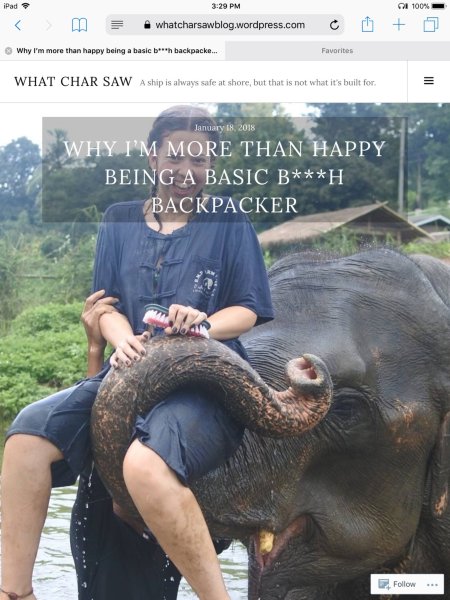
Landscape mode also looks fine.
Could you please upload a screenshot to help in troubleshooting?
Here’s a guide on how to make a screenshot:
http://en.support.wordpress.com/make-a-screenshot/You can upload the screenshot – in a graphic format like JPG, PNG, or GIF – in your Media Library, and provide a link so I can see it, or upload it with a service like Imgur or Snaggy.
Also let me know:
- what specific device you’re using (i.e. Nexus 7)
- what version of Android or iOS you’re using (i.e. Android 4.4.4 Kitkat) – visit http://whatismyandroidversion.com/ or https://supportdetails.com/ if you’re not sure
- what browser you’re using (i.e. Chrome, Safari, or other)


- The topic ‘Featured image and title cut off in tablet view’ is closed to new replies.


 WordPress.com Forums