

Featured image blog problem
-
Hi,
I want my blog posts change the header according the featured image but I can’t. What Can I do?
I’m using Lodestar theme and my website is http://www.ihself.com
The blog I need help with is: (visible only to logged in users)
-
Hey @ihself,
Could you tell me if you have a Featured image attached to the blog post
Because if there isn’t one, it will default to the one set under Customizer-> Header Image
Keep me posted.
Robert
-
Yes, I have already attached a featured image to the blog. So I don’t know why the header don’t change
-
-
I can’t seem to understand why it doesn’t work for you as I’ve tried several things to replicate this behavior.
I’ll tag this topic with modlook in order to get some help from the staff members.
-
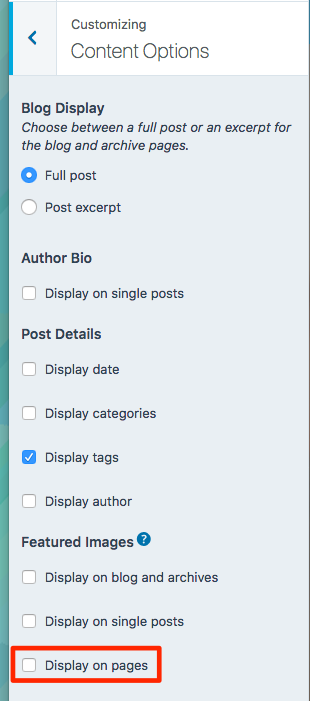
Hi there – go into your Customizer‘s Content Options panel, and in Featured Area section there, make sure the box next to “Display on pages” is checked. You currently have it unchecked, and that’s what’s preventing featured images from displaying on pages.
robertghetau – thanks for helping out and flagging.
-
-
-
Hi again,
I have another issue. the header image for portfolio projects doesn’t display.
I have attached the featured image, this is the link https://ihself.com/portfolio/tanatologia-puebla/
-
Featured images on individual portfolio projects display above the project title, not in the header area, as you can see on the demo site:
-
p.s. if you need further help, could you please start a new thread rather than returning to this one? Thanks!
-


- The topic ‘Featured image blog problem’ is closed to new replies.
 WordPress.com Forums