

featured image on sticky page isn't displaying …
-
I set up a featured image and posted it to my blog because I wanted to start using the slider (I am using the Oxygen Theme). I made the homepage static and it worked beautifully. Well, I noticed a part of the featured image was covered with the wording for the title that the template places over the image, so I edited the image. Well, I deleted the old feature image and then reposted the updated feature image. When I refreshed the homepage the large static image was no longer there. There was a small space for it and the layout is the same for that template. Thoughts?
I noticed that when I deleted the original large featured image and uploaded its replacement, it added a “1” after the name. Now, when I permanently deleted the old feature image I thought it would give it the same name. However, the renaming makes me think that the template is still looking for the old image (without the “1”); that it is still there somehow.
Help!
The blog I need help with is: (visible only to logged in users)
-
Hi there,
Is the updated featured image the one on your post Art Classes Starting at The Poetry of Seeing? If so, the issue is actually with the size of the new featured image.
The Oxygen theme you’re using will only feature the post and its featured image if that image is at least 750 pixels wide. If the image is smaller than that, the post will just appear in your regular list of blog posts.
Can you try uploading a wider version of the image to see if that fixes it for you?
-
Thanks for getting back to me, Rachel. Actually, no the image on the post (or the /classes landing page) presently use the normal banner-style image. I created a 750×380 featured image specifically because the guidelines online for this template say to do that. I took it down and quickly switched over to the normal (i.e., non-sticky page template) so it would show up properly should someone click on it from my Facebook page. (If you go to http://www.facebook.com/ThePoetryOfSeeing, you will see the large feature image that was posted there when I initially launched the post early this AM.)
The problem arose when I tried to upload a replacement 750×380 feature image. 1) I deleted it from my Images list on WordPress as I don’t like unused images to take up space or clutter that display. 2) I then uploaded my fixed graphic. 3) I then refreshed the page and the new graphic did not appear. 4) I noticed that the slider template for the homepage was still in effect; the 750×380 image was simply not there. The only indication that something was originally there (or, perhaps, SUPPOSED to be there is a better way of putting it), is that a small space was bumping down the listing of blog posts. 5) I deleted the image again thinking I accidentally put a “1” in the graphic title because that was the name that was presently showing up. “1” was NOT in my original graphic title though. Uploading it again only added a “2” the graphic title. :(
I hope that more-detailed explanation of steps helped you understand more clearly what happened. I will repost things again so you can see it. I should have screen shotted it so I would have record of what was happening.
-
Ok, I switched things around. What is there is what was happening this morning after I replaced the 750×380 graphic with an updated one of the same size.
If you go to: http://thepoetryofseeing.com you will see it: no large graphic but a small space where it should belong with the rest of the modified homepage template showing up.
-
Okay, I think I may have made a blunder by putting the image in for the PAGE and not the POST.
The issue has been fixed. I apologize for any inconvenience, Rachel.
-
Okay, I think I may have made a blunder by putting the image in for the PAGE and not the POST.
The issue has been fixed. I apologize for any inconvenience, Rachel.
-
Well, I did figure it out. Apparently, you need to have BOTH a Page AND a Post. Who knew, right?
Now, the issue is that the 750×380 post is showing up on the homepage and it links to the appropriate “/classes” page. Here’s the catch. Because I am using the 750×380 feature image, when I set up a “blog” link in the main navigation (so there’s a landing page for the rest of my blog posts) the feature image is distorted when you go to that “blog” link.
What’s up with that?!
-
Hi there!
I took a look at your website and I think this is the image that you’re referring to:
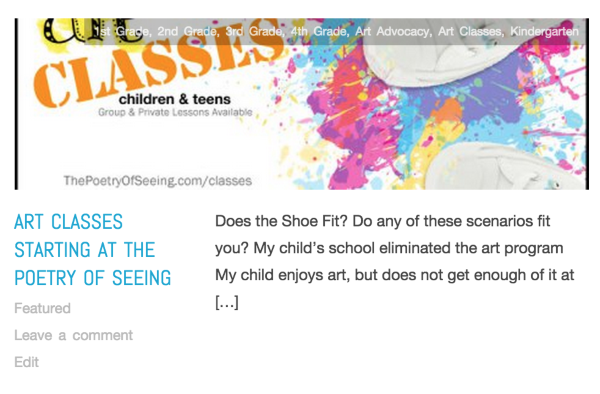
The image that appears above each blog post in this page is a thumbnail. If your featured image doesn’t have the same dimensions of the thumbnail, it will be auto-cropped. That thumbnail’s dimensions are 470 × 140.
Take a look at the site’s demo:
https://oxygendemo.wordpress.com/You’ll notice that several of the (same) images display in different ways on the site. This works best if you have images that you don’t mind being cropped in many different manners. Banners with specific dimensions may appear as you wish in one location, but not the other.
You may wish to look into another theme, if this type of layout doesn’t work for you. If you decide to go in this direction, and you want help looking into another theme, I’m happy to help.
Looking forward to hearing from you. Thanks very much.
-
Yes, there in is the problem, Robyn. I really love this theme. They took care of so many other details, I’m surprised they made such a glaring error. Ah, well. I’ll work with it for now. I’ll probably modify how I do the sticky pages. Are there other magazine-type blogs you could recommend that resemble this one and might fit my art educator blog?
I found another ‘issue’ as well. The sticky pages apparently keep your sticky post at the top of the blog list. Go figure. Again, odd for such a polished and well-thought out blog. We all make mistakes, eh?
Thanks for your help!
-
Hello! :)
Are there other magazine-type blogs you could recommend that resemble this one and might fit my art educator blog?
Here are few other blogs using Oxygen:
I found another ‘issue’ as well. The sticky pages apparently keep your sticky post at the top of the blog list.
That’s actually the main purpose of making a post Sticky:
https://en.support.wordpress.com/posts/post-visibility/#sticky-posts
The Oxygen theme just uses the sticky functionality for the slider in addition to that. Some themes create the slider by using a featured tag (like Zuki) if you’d prefer to that method.
-Alex G.
-
Thanks, Alex. I have visited these blogs before. Two of them are having the same issues so the reality is that the designers made this function this way. I disagree with it, but I was not creative director for this company. So, I’ll have to work with it. The template has so many other positives to it that I’m not going to ditch it. It does so many other things so well.
I thought the ‘sticky’ component kept the large 750×380 banner on the homepage, not the post it was tied to per se. But, again, oh well. Like I said, I’ll work with it. I would have set up a timeframe for which the ‘sticky’ post stays at the top. Once the time runs out, I would want to have the large banner on my homepage, but NOT have the blog post remain at the top of a blog listing. I want to be able to continue on with my content and not be locked in like this. To me, this is more of a branding feature area that could remain long-term on the homepage, but the way they implemented it, I will not be able to use it the way I had envisioned. In the final analysis, oh well. Not the end of the world.
Thanks for pointing me to Zuki. I think I’ll stick with Oxygen. And, thank you also for your comments.


- The topic ‘featured image on sticky page isn't displaying …’ is closed to new replies.
 WordPress.com Forums