

Featured Image Size
-
What are the reproduced dimensions of a Feature Image?
A cropped image is displayed if not to size.
Someone has this answered before but I cannot seem to find where. Can anybody help me with this?
The blog I need help with is: (visible only to logged in users)
-
Motif recommends a featured image size of at least 1140px wide.
https://theme.wordpress.com/themes/motif/
You can see the dimensions of any image by right-clicking and choosing Inspect Element from browsers like Firefox and Chrome that have built-in inspectors and looking at the HTML. Here’s a screenshot with an example:
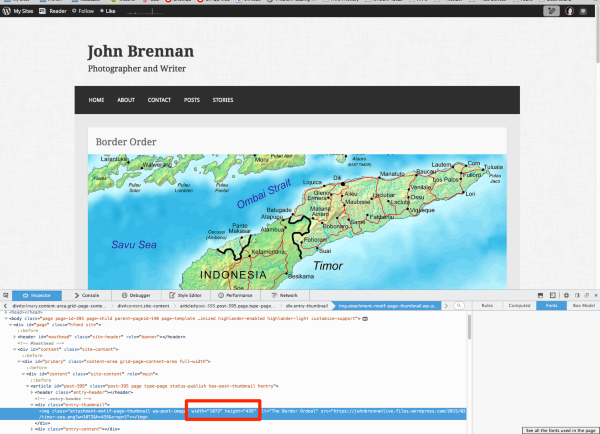
Just let me know if you need further help.
-
Hi Kathryn
Thank you kindly for your clarification and pointing out the inspector.
One thing I did notice, however, is that in Border Order when the image is displayed as a Featured Image, the full image is displayed.
When I click on it to read the story, the image is cropped.
Why is that?
-
That’s because the featured images have different proportions in those two spots – in other words, the height to width ratio is different. That means the image gets cropped in one of the two.
-
That’s because the featured images have different proportions
Would it be possible for WordPress to make these proportions identical to avoid one being cropped?
-
Not wishing to sound rude, insulting or offensive please consider the following.
From a photographer’s perspective, having two proportions for the same image is ludicrous. We devote time to picture composition and framing then crop our image to fit the requirements of the Featured Image credentials.
We click on the image inside text page, only to find that all our good work is wasted, because the image has been randomly cropped.
May I suggest 2 solutions:
1. Make the proportions uniform OR
2. Discard the second image that has been randomly cropped.Cheers
John Brennan -
I understand your point completely.
We won’t be changing the proportions of the featured images in Motif, as it’s a theme that’s already been released and it would change all users’ sites.
Motif is a business theme, not geared to photographers or artists, so retaining the proportions of its images isn’t something that was considered when building the theme.
You might prefer a theme aimed at photographers or artists, like Illustratr or Sketch. Those themes also come with some beautiful portfolio templates, to show off your work to its fullest.
Here are some more photography-geared themes to consider: https://wordpress.com/themes/filter/photography/
And portfolio themes:
https://wordpress.com/themes/filter/portfolio/ -
Thank you kindly for your response.
I took a quick look at the themes you recommended, and will have an in depth look later.
Originally, I was attracted to the themes with a GRID TEMPLATE and chose the FREE Motif Theme, because of its simplicity.
I use a STATIC PAGE as my front not the Motif front page.I write stories and wanted a GRID TEMPLATE front page, where the viewer could just click on an image and the story would open.
Kathryn, I thank you for explaining the situation with the Motif Theme.
It’s a shame that it cannot be altered.It is rather complexing though having two different format sizes for the one featured image.
Once again Kathryn, thank you for your assistance.
-
From a photographer’s perspective, having two proportions for the same image is ludicrous. We devote time to picture composition and framing then crop our image to fit the requirements of the Featured Image credentials.
We click on the image inside text page, only to find that all our good work is wasted, because the image has been randomly cropped.
Do all the GRID TEMPLATE themes have different format sizes for the one image, or just Motif?
-
-
-
Do the other GRID TEMPLATE themes have 2 format sizes for the one image?
One size for the featured image and a cropped size for the text image?
Goran Edin etc.
-
Do the other GRID TEMPLATE themes have 2 format sizes for the one image?
Generally yes, because on single pages the featured image takes up a space in the header, which does not have the same width:height ratio as the smaller images.
Having a look directly at the demo sites will give you the best sense of what to expect:
Sela – https://selademo.wordpress.com/
Edin – https://edindemo.wordpress.com/
Goran – https://gorandemo.wordpress.com/You may want to look for a theme with a Masonry (jigsaw-puzzle-style) grid instead, which is designed to keep the original proportions of the image. Illustratr is an example of a Masonry-style theme, and a couple more free ones are:
Visual – https://gorandemo.wordpress.com/
Triton Lite – https://tritonlitedemo.wordpress.com/ -
Hi Kathryn,
I took a look at those optional sites, but I prefer the layout of Motif Theme, but thank you all the same.
In the Motif Theme I tried to delete that randomly cropped image in the text, but there was no HTML listed, so I could not do it.
The other option that I am considering is adding a top and bottom border to the front page Featured Image, and hope that it displays correctly in the randomly cropped image in the text.
The front page Featured image won’t look so good with the added bits top and bottom, but at least my framing will be as how I want it.
I am not sure what the creators of Motif had in mind, when they created this different formatting for the same image. It’s quite bizarre.
-
In the Motif Theme I tried to delete that randomly cropped image in the text, but there was no HTML listed, so I could not do it.
It’s possible to hide the featured image on grid child pages with some custom CSS:
.page-template-grid-page .entry-thumbnail {
  display: none;
}
You would need Custom Design, which comes with the WordPress.com Premium and Business plans.
-
Hi Kathryn,
Thank you kindly for your reply. I shall take a look at that and get back to you.
-
From a photographer’s perspective, having two proportions for the same image is ludicrous. We devote time to picture composition and framing then crop our image to fit the requirements of the Featured Image credentials.
We click on the image inside text page, only to find that all our good work is wasted, because the image has been randomly cropped.
Would it be possible for the creators of Motif Theme to change the size of the inserted thumbnail, so that it is the same as the Featured Image?
.page-template-grid-page .entry-thumbnail {
display: none;Where it says display: just place in the image size.
Would this be possible?
-
Would it be possible for the creators of Motif Theme to change the size of the inserted thumbnail, so that it is the same as the Featured Image?
As I mentioned earlier, there won’t be any changes made to the way Motif displays featured images.
Where it says display: just place in the image size.
Would this be possible?
I’m afraid not. The theme generates the various required image sizes within its function setup, and it’s not possible to change that with custom CSS alone.
-
Thanks Kathryn,
Motif Theme
Grid Page template static front page
I have a Grid Page template static front page and I am not sure what the dimensions are
1200 X 487 pixels OR
1200 X 643 pixels.Thumbnail in text
Do you know what the dimensions are, when it is cropped?You see, If I want the images to look the same.
I can achieve this by adding a top and bottom to the the Grid Page template static front page Featured Image.I am trying to figure out , how many pixels do I add.
Are you able to help with this?


- The topic ‘Featured Image Size’ is closed to new replies.
 WordPress.com Forums