Featured Images on Home vs Pages
-
Hi there,
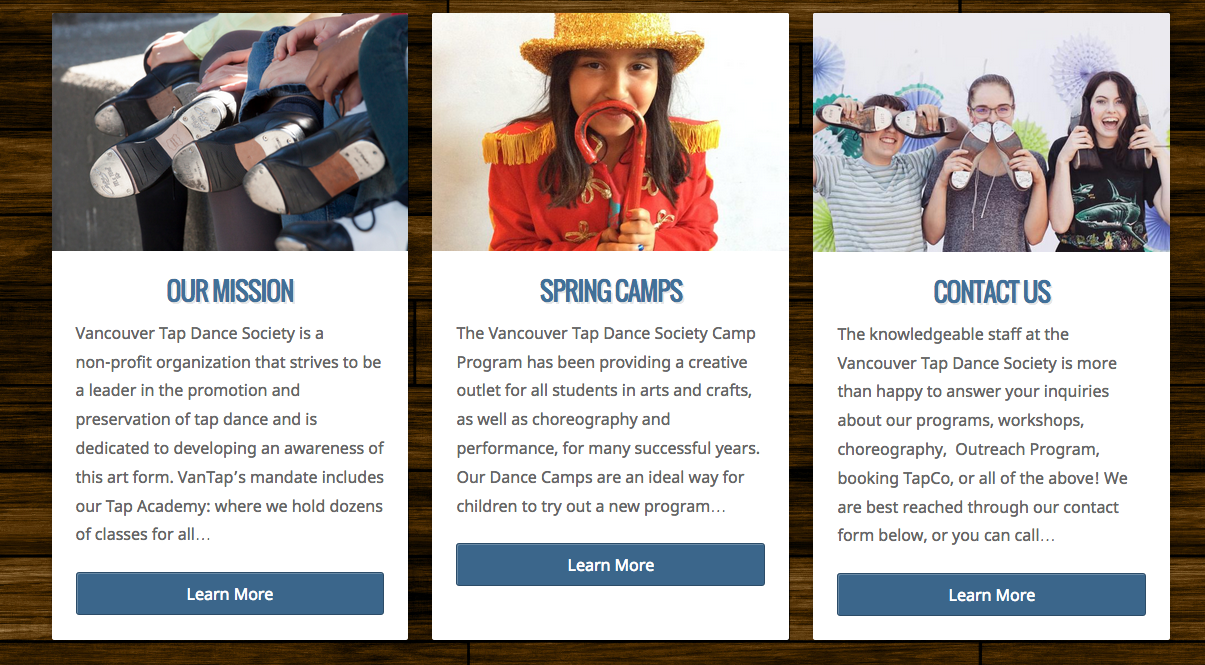
I have three featured pages on my homepage, and I put in featured images for each one. However, when I go on their respective pages now, the featured image is huge and takes away from the page (ex. Classes and Registration page). How do I make these images only show up on the homepage?
Also, is there any way to make the “Learn More” buttons even? I tried filling the box up with just enough text but that doesn’t seem to be working.
https://vantapdance.wordpress.com/
Thank you so much,
Courtney
The blog I need help with is: (visible only to logged in users)
-
Hi Courtney, the following will hide the featured image on all child pages.
.page-child .feature-img { display: none; } -
On the excerpts on the main page, I can force this, but what I would like to do is to wait until you have actual content in those child pages since this isn’t an issue on the theme demo site, so I think when you get your actual content in, it won’t be any issue on your site either. If it is, let me know and I’ll see what I can do for you.
-
-
-
It seemed to have worked for the first two featured pages, but not for the “contact us” page.
I have now put in my content, but the “learn more” buttons are still not aligned. Is there any way to fix this?
-
Ah I see that “contact us” is not a child page. Could I add another version of your code being “page-parent”?
-
-
-
-
Which page parent are you looking at? I’m not seeing any parent pages with a featured image.
-
Hi, thanks for the link. Contact Us is not a parent page, so we will use the unique page id CSS class from the opening body tag and add that to the page child CSS selector section so it looks like this.
.page-child .feature-img, .page-id-171 .feature-img {
	display:none;
}
You can delete the page parent CSS rule from your custom CSS.
-
That’s great, thank you! It seems though that this change has made the map on the page stick out from the border, is there any way to correct this as well?
I was also wondering about the other question I asked. On the Homepage, the “learn more” buttons are uneven. I’m such there is an easy change to this, I just don’t know what that is.
-
Hi there, I commented out the above CSS and the google maps element still does the same thing. Add the following to your custom CSS to fix the google maps issue.
.postarea .googlemaps iframe {
	max-width: 100%;
}
On the alignment of the buttons, I’ve tried several things and none of them work cleanly. The excerpt for child pages is based on a word count, and I think what is causing the issue is line breaks when words might be too long for spacing. If you look at this screenshot, on the left column, there are two lines with a bunch of white space because the words would not fix. On the center column, one line where a word would not fit. I looked at the demo to see if it had the same behavior, but all three child pages have the same sample content, so they all align perfectly all the time. When I narrow and widen my browser window, sometimes they are all aligned and sometimes one is out of place and sometimes two of them.
Given how the HTML of those child page sections are structured, I’m not seeing a way to get the buttons to always align.
-
Is there any way to re-structure the paragraphs of the child pages to make them able to fit in the blocks on the home page. You mentioned that the word count had something to do with it, so if I shortened or made the “Spring Camps” paragraph bigger, would it make a difference?
Another alternative would be to get rid of the paragraph excerpts in the homepage altogether, and just have the picture with the “Learn More” button. I think this would be the best option to prevent me having to constantly play with this. Can we do that?
-
To get rid of the excerpt on the home page child pages, we can use the following.
.home .text-holder p { display: none; } .home .featured-pages .information { height: auto !important; } -
-


- The topic ‘Featured Images on Home vs Pages’ is closed to new replies.
 WordPress.com Forums