

Featured post
-
Hello,
My theme is Alto Focus. It provides the possibility to create a “featured post” which is bigger than the others. It must be very simple but I can’t make it… I follow the steps but it makes only some “normal tags”, that I can add to posts, but no “featured post”. Do you see how I can do it ?
Thank you
The blog I need help with is: (visible only to logged in users)
-
Every theme has a detailed theme description page. This one is at https://wordpress.com/theme/altofocus and that’s where set up instructions for it and the live demo site link is found.
I do not see a custom header listed as a feature of that theme.
I do see a Featured Images section and a Featured Content sections with instructions and I see this under Quick Specs (all measurements in pixels):
The maximum width of single post featured images is 1200. -
If you do not succeed please type modlook into the sidebar tags on this thread for Staff help. How do I get a Moderator/Staff reply for my question? https://en.support.wordpress.com/getting-help-in-the-forums/#how-do-i-get-a-moderatorstaff-reply-for-my-question Subscribe to this thread so you are notified when they respond and be patient while waiting. To subscribe look in the sidebar of this thread, find the subscribe to topics link and click it.
-
Try following the instructions in the Featured Content section of the Altofocus setup guide:
Featured Content posts appear in the post grid, but with a few extra touches to help them grab more attention: they’ll display at at larger size, and hovering over them will highlight them with color.
To set up the Featured Content area:
- Navigate to Customize → Featured Content.
- Enter the name of a tag.
- Click the blue “Save” button.
- Create at least a few posts (or pages) and assign the tag you declared under Customize → Featured Content.
If you have any trouble, just let me know.
-
Thank you for the answers. I’v seen those different steps, but it only creates several tags, and I can do it. What I’d like is the “featured post” provided by the theme. I can’t obtain it by doing those steps, you see ?
-
What I’d like is the “featured post” provided by the theme.
Understood! The steps I gave you earlier will set your featured posts like you see in the Altofocus demo.
Let me try to explain it in a different way.
In your Customizer’s Featured Content panel, you currently have the word Tag. Remove that and replace it with featured, as you see in this screenshot:
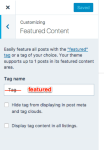
Then, open each post you’d like to feature in the editor and add the word featured to its Tags area. Here’s another screenshot:
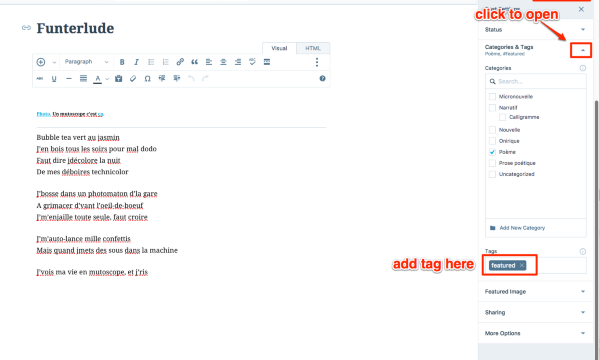
Let me know how it goes!
-
Ok, thank, I’ve done it. I tried on the blog post called “Ainsi ne soit-il pas” and it… disappeared on the main page. It must be a bug, nope ?
-
Very strange. I haven’t been able to pinpoint why the post is missing. I tested removing the “featured” tag from the Customizer, but the post still isn’t displayed. I also removed the “sticky” status but that didn’t make a difference.
One thing we could to test would be – could you try creating a new post with the content of the old post? Then set the old post to draft. Let’s see if the post shows up.
-
And… It works ! The new post with the content of the old post is now a “featured post”. Wouhou ! Good to know : I can create a new post with the tag “featured”, but I can’t afterwards add this tag to an old post. Many thanks, kathrynwp :)
-
Glad that worked!
You should be able to tag a featured post after creating it, so this was a weird issue.
The original post was just not displaying at all, even if I removed the featured tag in the Customizer temporarily, so I think there might have been something wrong with that specific post itself.
-
I tried to tag other old posts and it didn’t work – they all disappear, so it seems that it’s not only that specific post that goes wrong (Ainsi ne soit-il pas). Maybe there is a bug in the code of the theme ?
-
In fact, I try again to put it on an old post (Titre d’une nouvelle), and the post stays on the main page, but it has not become a featured post. Maybe that’s because I can only have one featured post ?
-
Maybe that’s because I can only have one featured post ?
Yes, that’s correct, Altofocus only supports one featured post. There’s a note about that in the Customizer’s Featured Content panel, but I’ll make it clearer on the theme’s showcase page.
-
Hi again! I just wanted to let you know that in fact Altofocus supports more than one featured post, and we’ve made a tweak to the theme so that works as expected now.
Here’s what you’ll need to do to get your featured posts showing correctly:
In your Customizer‘s Featured Content panel, check the box next to “Display tag content in all listings.” As you can see in the screenshot, that’ll get your two posts tagged “featured” to show up:
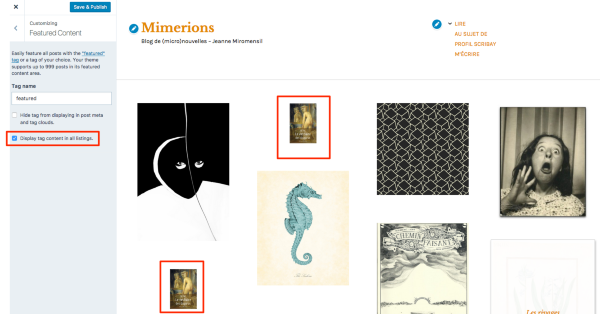
Now you can delete one of the two duplicate posts, and you should be all set.
Let me know how it goes!
-
Thank you ! The main problem that I have at the moment is the fact that the previous featured post has disappeared after the change that you just made. So, I edited this blog post (Ainsi ne soit-il pas) to put off the tag “featured” but the post hadn’t reappear yet. Sometimes it takes a few days after it comes back… And then, I’ll try to tag it with “featured”, but I’m affrayed the post disappear again :/
-
Hi there – looks like you missed a step. You still need to do this:
In your Customizer‘s Featured Content panel, check the box next to “Display tag content in all listings.”
Once you do that and save your changes, your featured post will appear, with the orange hover effect:
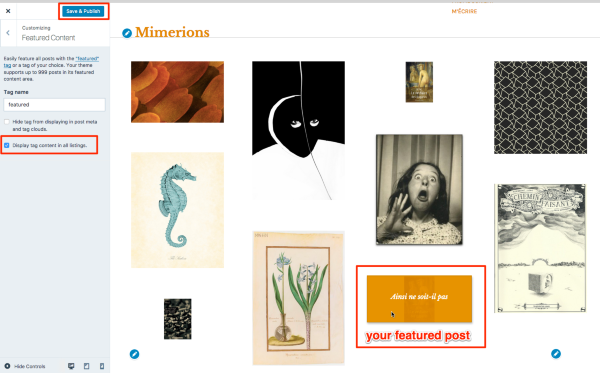
Let me know how it goes.
-
Sorry to make you repeat it… I thought that I must have done something else before this step. I did it and it works perfectly. I added another featured post in order to try, and now have 2 featured posts ! Wonderful (even if the second one is really big, I’ll see :D).
-


- The topic ‘Featured post’ is closed to new replies.
 WordPress.com Forums