

Featured Slider: when working, removes posts from front page
-
According to the theme guide:
“Sight displays up to 30 of your latest sticky posts that have featured images in a prominent slider on the blog page. To add a post to the slider, mark it as sticky and give it a featured image.”
I followed these instructions and have checked and double-checked but posts now exist EITHER on the slider or fixed on the page as ‘latest entries’. I want them to exist in both locations, isn’t that possible?
I tried ‘de-stickying’ a post to see if it would ‘return’ from slider to page, but it stays on the slider only. Double-checked by reloading the page but no change.
The blog I need help with is: (visible only to logged in users)
-
Hi!
It appears that posts may only be fixed on the page as a latest entry OR attached to the slider as a sticky, they cannot exist in both locations at the same time.
Is there a reason why you want the posts to be in the same locations? I ask, as there might be a work-around possible.
-
But according to quantum physics they can and do ;)
Seriously though, I see the slider as more of an advertising feature that not everyone will look at, possibly less then 50%, so I wouldn’t want readers to miss a post by electing to look only at the slider or the fixed posts. Hence, ideally they’d exist, quantum-like, in both locations.
Meanwhile the ‘Germania’ post persists in not leaving the slider and returning to the fixed page despite being unstuck. Perhaps if I log out and in again…
-
Update: even removing the featured image from the Germania post and unsticking it doesn’t remove it from the slider. I also tried returning it to draft and preview status, which removed, it but as soon as I published it again it returned to the slider.
This must be a bug.And I tried logging out but no change.
-
I did some testing and if you have browser extensions such as Privacy Badger or Adblocker or any other kind it may be interfering with it. For example, I had to turn off my Privacy Badger Browser Add-on and when I did that I was able to unstick the posts and they appeared in the fixed area.
Though the posts will appear in the Fixed Area in the order they were created.
Try turning off the add-ons and clearing your cache. WordPress has a guide here.
Let us know how it goes.
-
Hi,
I have Adblocker etc. running on Chrome, but I did all the building on Safari with no extensions running. I cleared the cache, everything but no change. What browser were you using?
I’ll try using Chrome without the extensions… -
wordilife – I’d like to try to help troubleshoot this.
Could you provide a link to the “Germania” post so I can take a look? I’m not seeing any post with that word in the title, either published or in the trash. Thanks!
-
Hi,
the Germania page has been replaced with real posts now. But the same applies. “Stepping back into 1930s England” is now appearing only in the slider whether I remove ‘stick to front page’ or not but “Scarred for life” is the reverse, it won’t shift from fixed to slider.
Please have a try yourself. I’ve just made these tests in Chrome with all extensions off and cleared the cache, but it behaves the same as Safari.
-
I’d like to be sure I understand:
Currently, one post is marked as sticky: “Scarred For Life.”
As expected, that is the one post I see in your slider:
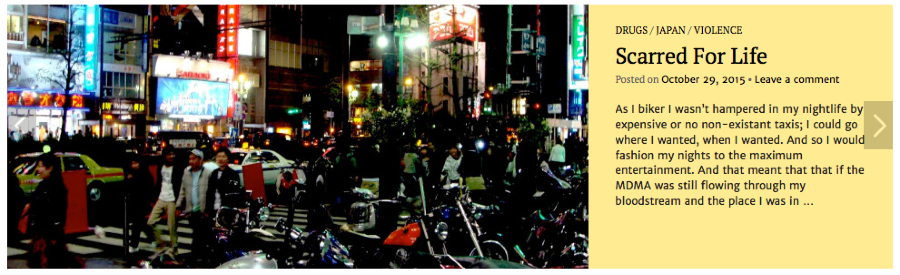
Are you seeing something else on your end?
I want them to exist in both locations, isn’t that possible?
No, it’s not possible. When a post appears in the slider, it will not appear in the blog stream, and vice versa. This is the case in almost every theme with a slider, with some rare exceptions.
-
Yes, it is as you understand. But did you do something? Because when I left it, ‘scarred’ was fixed and ’30s’ was in the slider.
Anyway, to check again I’ve just stickied ‘The First Foreign Step in a Lifetime of Adventure’, so it should now be in the slider, and I’ve unstuck ‘scarred’ so it should return to fixed.
Yet, at this time that change hasn’t affected any change on the page. They are both in the ‘wrong’ places according to the criterion for placing them.
OK I understand they can’t be in both places. In that case, if I can get them to go where I want them to, I’ll just limit the number in the slider.
-
But did you do something?
No, I didn’t do anything! :)
When I refreshed your site in my browser I now see “The First Foreign Step in a Lifetime of Adventure” in the slider:
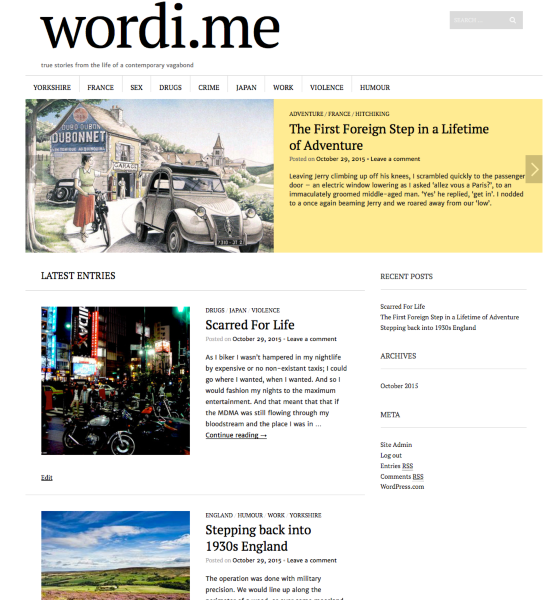
Are you refreshing the site in your browser after making these changes to make sure it pulls in the newest version of your site?
-
Strange, I wonder if it takes a visitor to trigger the change, or there’s just a delay of maybe 30 minutes or so because, yes I always refresh the site, but I too now see it as intended so it is working.
Thanks for your help anyway – perhaps you Happiness Engineers have some hidden powers you are as yet unaware of…(Twilight Zone music plays)…
-
I will test these possible Happiness Engineer superpowers tomorrow on Halloween. :)
Do let me know if this behaviour continues in the future and I’d be glad to dig deeper and do some further testing. It shouldn’t take a page visit to trigger the change.


- The topic ‘Featured Slider: when working, removes posts from front page’ is closed to new replies.
 WordPress.com Forums