

Finding a new theme
-
Hi there! I want to explore some new theme for my website. Is there a place to see examples of wordpress.com blogs that blogs that really shine? When I started with WordPress there was the blog name at the bottom of the page, so a blogger could search out a theme. Also on the description page they used to show a few great examples of that particular theme. It seems as if those tools are no longer available. Being in a creative field, I want my blog to look sharp but can’t afford a professional web designer. Am I missing any resources to get ideas? Thanks!
The blog I need help with is: (visible only to logged in users)
-
Hello susangittlen,
There are a lot of great and very well known companies that are using WordPress.com. You can find some great examples here (https://vip.wordpress.com/) and in the Case Studies section (https://vip.wordpress.com/case-studies/).
That section in the bottom of the page is still running on a couple of websites, but most of the people usually decide to at least not show the theme name they use in their footer section, while others don’t want to even show the WordPress.com name.
Also here is another good way for you to find new themes based on tags:
https://developer.wordpress.com/themes/theme-showcase-tags/
Hope this is helpful!
-
There are so many themes it can be overwhelming! When you say when you started with WordPress there was the “blog name at the bottom of the page”, do you mean it used to say the theme name that blog was using? That would be very helpful. I also don’t see, as you say, any “live blogs using this theme” type of information under theme info. It is probably very difficult to keep that information accurate as many blogs come and go.
Have you tried the “What kind of theme are you looking for” filters? Try style = artistic.
-
-
Hi there @samanthaainnes! Yes, a few years back every WordPress.com blog had the name of the theme at the bottom. If you ran across a cool blog, you immediately knew the theme.
-
Thanks @mihaiapetrei! The case studies are helpful. They are a little over my head, but it’s in the right direction. In the past, WordPress.com would have a blog post on a theme, done a three ways that gave it a totally different feel. I found inspiration and learned a lot from those articles.
-
I might take a look at your favorite sites and see if you find any common elements. Then try filtering the WordPress themes accordingly. “full width” “portfolio” “slider” etc. I hope this helps!
-
Hi Susan – looks like you got some great suggestions from Samantha for finding a theme you like.
If you let me know what kind of look and feel and features you’re looking for, I’d also be glad to suggest a few themes.
Also on the description page they used to show a few great examples of that particular theme. It seems as if those tools are no longer available.
An older incarnation of the theme showcase did indeed display example sites using a theme. I’ve put in a GitHub issue to suggest that feature be considered in a future iteration of the current showcase.
When I started with WordPress there was the blog name at the bottom of the page, so a blogger could search out a theme.
If you’re browsing while logged into your WordPress.com site, you should still see the theme name by clicking the three dots on the “action bar” at the bottom right:
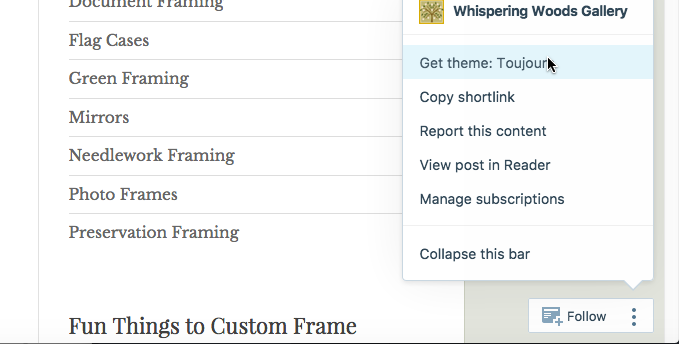
If you click “Get: Toujours” (or whatever the theme name is) you’ll get to the theme’s showcase page directly.


- The topic ‘Finding a new theme’ is closed to new replies.
 WordPress.com Forums