

Follow blog widget question (continued)
-
Hello,
A bit more than two months ago, I put up a post ( https://en.forums.wordpress.com/topic/follow-blog-widget-question?replies=11#post-1562827 ) asking the following:
“I am using the Follow Blog widget and would like to hide the number of followers from users who click the “Follow” button.
I notice the widget has a “Show total number of followers?” checkbox but the number still shows when this is unchecked.
Am I missing something? Or is this a bug in the widget?
Thanks in advance.”Still no new responses and no change.
Any chance this bug can get fixed?
(I’ve removed the Follow Blog widget but would prefer to use it IF the count would actually disappear when I uncheck the “Show count” box.)Thanks for any light on this.
Best regards,
BarryThe blog I need help with is: (visible only to logged in users)
-
I have no difficulty in hiding the number on either of my blogs.
1. If you are not running one of the browsers and versions listed at http://browsehappy.com/ please try upgrading or switching first.2. If you are using an IE browser in compatibility mode please disable that mode. http://www.sevenforums.com/tutorials/1196-internet-explorer-compatibility-view-turn-off.html
3. If you are running one of the browsers and versions listed at http://browsehappy.com/
(a) Try clearing your browser’s cache http://www.google.com/support/accounts/bin/answer.py?hl=en&answer=32050
If applicable see here for instructions on how to clear the cache for Chrome and Safari on the iPad:
http://browsers.about.com/od/howtousemobilebrowser1/ss/safari-ipad-clear-cache.htm
http://browsers.about.com/od/howtousemobilebrowser1/ss/How-To-Clear-Browsing-Data-In-Chrome-For-Ipad_6.htm(b) Make sure that you have both third-party cookies enabled and JavaScript enabled
http://en.support.wordpress.com/third-party-cookies/
http://www.google.com/adsense/support/bin/answer.py?answer=12654(c) Disable all browser extensions or add-ons temporarily.
(d) Try enabling HTTPS: http://en.support.wordpress.com/https/
Add both *.wordpress.com and *.wp.com to your list of trusted sites under the Security tab. Make sure to uncheck the box for “Require server verification (https:) for all sites in this zone.” http://en.support.wordpress.com/https/#frequently-asked-questions
4. You can use this link to see if your flash is up to date. http://www.adobe.com/software/flash/about/ If it’s not then go to http://www.adobe.com/products/flashplayer/ and download and install the latest version of flash.
5. Try using another browser.
6. If you are not successful let us know:
(a) Exactly what kind of device you are using to connect to the internet and to WordPress.com.
(b) Exactly which browser (and version of it) you’re using by checking here if necessary http://www.whatbrowser.org/
(c) Exactly what you experience including what any error reports you receive state. -
Hi timethief,
Thank you for your response.
I’ve been using Safari (and sometimes Firefox – with the same results).I’d uncheck the box, log out, visit my blog and still see the numbers.
After reading your post, I just tried it again. The first time, I still saw the numbers (in both browsers – even after clearing the caches and history and going in again).Then I tried using the Show/Hide drop down, arbitrarily picking “Page” in both lists (i.e., Hide if Page is Page). I don’t know how or why but the number was now gone — exactly what I’ve wanted.
Out of curiosity, I went back and defeated the drop down, returning it to where it was (with no selection) and the number is still gone.
So in the end, I have no idea of what changed at my end but your post made me go in and just play with the settings. I hope it lasts but right now I’m glad to say it is exactly how I want it to be.
Thank you very much for your response and your help.
Best regards,
Barry -
I’ve been using Safari (and sometimes Firefox – with the same results).
Exactly which versions of those are your referring to? Check here if necessary http://www.whatbrowser.org/
I’ll tag this thread for Staff assistance. Please subscribe to the thread so you are notified when they respond and please be patient while waiting.
-
Hi timethief,
Safari 7.0.1 (9537.73.11)
Firefox 27.0.1I have subscribed to the thread and will be patient.
Thank you again for your very much appreciated help.Best regards,
Barry -
-
One thing to add here:
The “floating” follow+ is no longer visible at the lower right corner of the browser window.Not sure why but at least I now have the follow option without the follower count visible.
Best regards,
Barry -
Hi Barry,
After looking at the blog, I found that the total number of followers was hidden as seen here:

In addition, I can see the + Follow button at the top as seen here:

Happy Blogging!
-
Hi gracejiyoung,
Thank you for your reply.
Yes, I’m not sure what I did last week but something changed and I was able to hide the number of followers.
I only see the +follow when logged into WordPress and it is in the upper left corner of the screen. What I don’t see anymore is the floating +follow at the lower right of the screen when *not* logged in.
But that might be okay. As long as the follow option is still there and the number of followers is kept private.
Best regards,
Barry -
Hi Barry,
Please note that button is only for WordPress.com users, so it would only appear if you are logged in. :)
Cheers!
-
Hi gracejiyoung,
I’m pretty sure I used to see the same floating +follow without logging in.
In any event, all if good now.Thank you.
Best regards,
Barry -
Hi Barry,
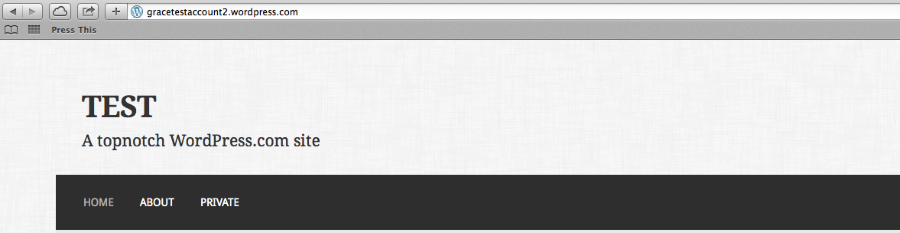
The admin bar at the top is removed once you are logged out of WordPress.com so that same +Follow button is no longer there as seen here:
Cheers!
-
Hi gracejiyoung,
I used to always see the +Follow at the lower right corner of my screen, whether logged in or not.
This was true on my Mac whether using Safari or Firefox.I haven’t seen it there since whatever changed to hide the follower count. No worries, just something I was curious about.
Best regards,
Barry


- The topic ‘Follow blog widget question (continued)’ is closed to new replies.
 WordPress.com Forums