

"Follow My Blog via Email" widget problem
-
Howdy
I’m having problems with my “Follow My Blog via Email” widget. So far I have only had one user (other than myself) successfully be able to sign up for email posts to follow my blog. A number of others have reporting trying but all encounter errors when signing up. I have actually seen this in action via my partner’s computer when he tried to sign up – instead of receiving an email confirmation to activate the subscription, he was taken to the “Manage my subscriptions” page.
All subscribers/attempted subscribers so far are not WordPress users.
I’m wondering if somebody could take a look at my blog and see what I’m doing wrong, or give me some advice as to how to fix this?
Many thanks for your time, Sam.The blog I need help with is: (visible only to logged in users)
-
Hi, further to the above problem I have just received some information from a “follower” that might help clarify the problem.
Apparently the field where a reader can enter their email address to subscribe is not showing up for all users. In fact, my current “followers” only discovered the line by clicking around on the widget until their cursor found something (clever people!). Other users however have simply clicked “Follow” assuming that would show them a field to enter their email address, and of course this led to problems. I am wondering if this has something to do with the colour palette I selected for my blog? I don’t want to alter anything in this respect until I have had confirmation from you that this might be the problem. Thanking you in advance, Sam. -
Hi there!
There does seem to be an issue with the Follow Blog widget coloring when it is in the sidebar. I’ve submitted a request with our team to have it fixed.
In the meantime, you could move your Follow Blog widget to one of the Footer widget locations, and the text box will be visible again. There is also a Follow box at the bottom of every WordPress.com site that displays to non-WordPress.com viewers:
https://cloudup.com/cVBiwM8eAnJ
When a WordPress.com user is logged into their account when viewing your site, they’ll see this:
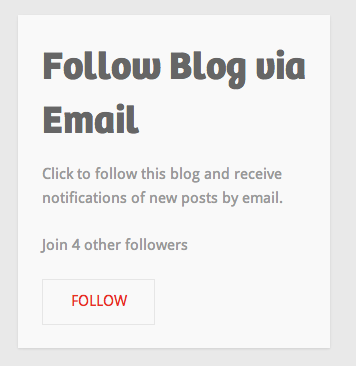
This is normal. When they click on the Follow button, they will be added as a WordPress.com Follower on your blog. Their subscription settings for your site will be set to email every blog post. They do not need to fill in their email address, because there is already an email address associated with their WordPress.com account.
Let me know if I can help with anything else!
-
Thanks so much Shawna!
Very helpful advice regarding moving the widget to the footer location – I’ll do that.
Cheers, Sam. -
-
Howdy! Thanks much for bringing this to our attention. We’ve fixed Motif such that the email form stands out from the widget background a bit. I hope this helps!
Cheers,
Caroline -


- The topic ‘"Follow My Blog via Email" widget problem’ is closed to new replies.
 WordPress.com Forums