Follow via email widget problems
-
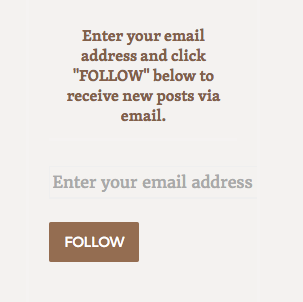
I’m using the follow via email widget in my sidebar. The auto text “Enter your email address” is truncated, missing the last “s.” Also, the box for email entry is not easy to see/no border. Can someone please help?
The blog I need help with is: (visible only to logged in users)
-
Hi there, add the following to your custom CSS to get the email input field to fully show.
.widget_blog_subscription input[type="text"] { width: auto !important; } -
I tried but rather than giving a border or something to cause the input field for show it eliminated the field. Wld it take a while to appear?
I’d like to do the same with the “search” field in that widget, too.
Thank you very much!
-
Hi there, I went into your customizer and added the code I have above, and it works. It will not show up in the Preview, and will not show on your actual site when you are logged in. That email input field will only show for those that are logged out of WordPress.com. I’ve left that code in your custom CSS. This is what I see when I now visit your site while logged out: https://cldup.com/-PDhW0cPEH.png
If you wish to add a border, I would suggest using the following code instead as the text is a bit too large to fit in the available horizontal space.
.widget_blog_subscription input[type="text"] {
width:100% !important;
border: 1px solid #000;
font-size: 90%;
}
You can edit the width and color code on the border as desired.
For the search widget, let’s start with the following.
input[type="search"] { border: 2px solid #000; } form.search-form { border-bottom: none; } .widget_search { padding-right: 0 !important; } -
I think it would be good for these two fields to look alike. Will you please help me create a non-bolded 4-sided border (e.g., the boldness of the current email field border) for the search field? I promise to leave you alone after that. Thank you so much!
-
Let’s try this as a start for the search widget then.
.widget_search form.search-form { border: 1px solid #000 !important; } .widget_search input[type="search"] { font-size: 90%; width: 100%; font-style: normal; } -
That works! The bottom border is bolder for some reason, but I can live with that if it is complicated to resolve. Thank you so much!
-
Oops! Replace the last CSS rule I gave with the following to get the bottom border to be the same width as the rest.
.widget_search input[type="search"] {
	font-size:90%;
	width:100%;
	font-style:normal;
	box-shadow: none;
	-webkit-box-shadow: none;
	-moz-box-shadow: none;
}


- The topic ‘Follow via email widget problems’ is closed to new replies.
 WordPress.com Forums