

Followers
-
I do not think email notices are being sent to my followers any more. I don’t think I changed any settings and cannot figure out what setting might control outgoing email announcements of new posts. Thank you.
The blog I need help with is: (visible only to logged in users)
-
-
-
Hey there,
I see that you currently have 16 e-mail followers and I do not see why any of them wouldn’t have received your post e-mails. Has any of them notified you that they haven’t received e-mails? I would have them check their spam folder if they do not see it in their inbox.
You can have them check http://wordpress.com/#!/read/edit/ to see if they’re subscribed via email.
Also, have them check http://wordpress.com/#!/read/subsettings/ to make sure that they aren’t blocking emails from us.
Let me know if you have any questions. Thanks!
-
Thanks for your reply and help, Darnell. Some readers tell me they are still getting email posts. But some are not. My wife is a follower, for instance, and has not received a notification in a while. I checked her spam folder and saw no emails. She is listed as an email follower, so I’m not sure why she shouldn’t be getting the emails. One friend, who is a WordPress follower, also has not gotten a notification in a while. I asked him to pursue the two suggestions you offer and I hope to hear back from him soon.
Thanks again for your help. Best wishes,
Jonathan
-
Hey there,
I would also have them check that they are not blocking incoming WordPress.com e-mails and if their notifications are indeed activated. Below is our support page on common reasons e-mails are not getting through:
https://en.support.wordpress.com/email-notifications/#what-if-the-emails-are-not-getting-through
-
Two followers have informed me that they do not receive post emails. I have checked one of their spam folders and found nothing.
Yes, they are subscribed. I can see them listed as subscribers.
The link — http://wordpress.com/#!/read/subsettings/
-
If you can provide me with either their usernames or e-mail addresses, I can take a look under their account and see if there is anything causing them not to receive your e-mails. No one else but me will be able to see their e-mails if you post them here in this thread.
I’d be interested in seeing if they have the block WordPress.com e-mails option activated under their account.
-
Thanks so much Darnell. Here you go:
(email visible only to moderators and staff)
(email visible only to moderators and staff)
It could be that they have a block option activated, but I know (since I know them both well) that neither of them opted to block WordPress.com emails and that both were receiving the emails until a few months ago.Best wishes,
Jonathan
-
Hey there,
If they go to https://wordpress.com/following/edit , their e-mails for new posts are turned off:
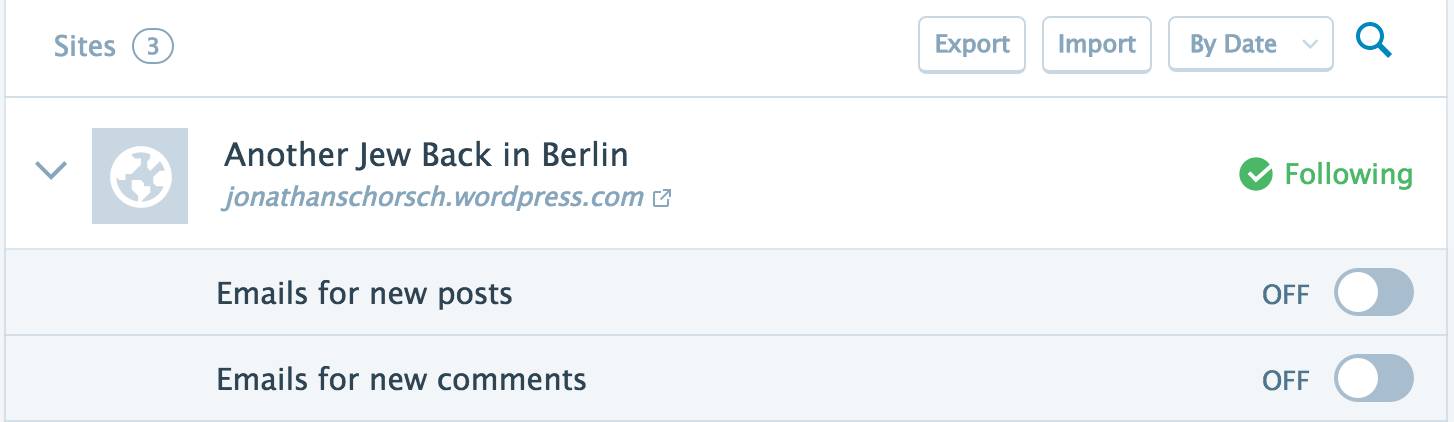
Tell them to turn that on and they should be good to go.
Thanks!
-
You mean THEY should go to https://wordpress.com/following/edit? Will do. Thanks!
Jonathan
-
-
Now, for some reason I cannot understand, two links in my latest post have disappeared. No matter what I try, I cannot get them to show or work. What gives?!
Thanks again.
Jonathan
-
Hey there,
I see a few links on your most recent post. Were you able to rectify the issue?
If not, let me know and I’d be happy to look further into the problem.
Thanks!
-
No. There were two additional links, one in the same graf, the other in the next one. I’ve tried numerous times and I don’t think I’m doing anything different. The links show up in the draft editing window, but do not remain marked or functional in either the preview or published updates.
-
If you provide me with the URL along with the word that you are wanting to hyperlink, I can try on my end to see if it works.
Let me know, thanks!
-
The first URL is http://www.hasidicstories.com/Stories/Nachman_of_Bratslav/bitter.html and the text link should be “tale in the 3rd paragraph.
The second URL is https://www.youtube.com/watch?v=UdwTuToxW9s and the text link should be “video” in the 4th paragraph.
Many thanks for your help, Darnell.
Jonathan
-
-
Great, Darnell. Many thanks. My question is: why wasn’t I able to do it myself? The other two links in that post were set up and function without problem. What was the issue with the two posts you had to set up?
Jonathan
-
I didn’t do anything out of the ordinary to link those two URLs to the post. I’m using Mozilla on windows as well. I’m not necessarily sure what the issue was – but I’d like to believe it was isolated since you were able to link to other URLs to the post.
I would try and link something else and let me know if you are still having issues. Try different browsers or even a different computer if the one browser you’re using doesn’t work. I’ll look further into it if the issue persists.
Thanks!


- The topic ‘Followers’ is closed to new replies.
 WordPress.com Forums