

Font type all over the place
-
Hi,the font type on my blog is all over the place. I asked help with this before and thought I could look up the answer to try and fix it but that is unfortunately gone. I’d like to have my whole blog neatly in one font size. Can I still fix this for the whole blog? Thanks a lot.
https://opeenkangoeroeeiland.wordpress.com/
Lieke
The blog I need help with is: (visible only to logged in users)
-
Hi –
Thanks for getting in touch. Nothing seems out of the ordinary when I looked over your blog. Are you referring to the post titles versus the post text fronts?
-
No it’s the actual font size in the texts of the blog. If you scroll all the way down you see some blogs are size 12 font, others 11 others 10 etc. See for example the difference between the most recent 2 blogposts. Can’t get it changed.
I understood it might have to do with me copying from Word. But I always use the same font size and Arial moving it from Word doc to my blog so I don’t get why it changes in a different font each time I copy it.
Thanks!
-
Right. First why this is happening:
The editor on your site uses the HTML and CSS coding languages to control how the content will look.
A word processor like MS Word uses a completely different language, called Rich Text Format (RTF), which works completely differently from HTML.
When you copy text from Word, you’re not just copying the text, but you’re copying the RTF code controlling how that text displays as well. Our editor tries to convert that into HTML, but it’s not always possible for it to do that, and that is causing the issues you’re seeing.
If you edit one of the affected posts and view it in the HTML view of the editor you’ll see a ton of junk code that was copied in and that we were not able to strip out, for example, https://opeenkangoeroeeiland.wordpress.com/wp-admin/post.php?post=212&action=edit
To prevent this:
Don’t copy directly from Word to your site’s editor. If you want to prepare your drafts in Word, always use the Paste as Text button in the editor when you want to paste it in here:
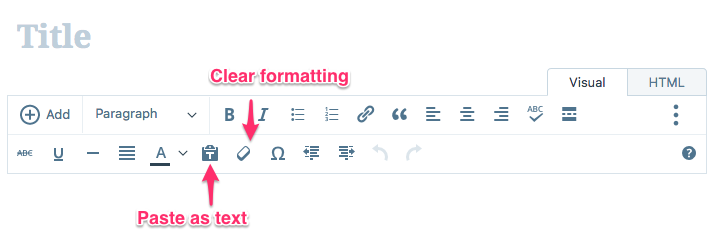
That will make sure no RTF code is included. It will also mean any formatting you added, like Bold or Italics, will be stripped out, so don’t even try adding those in Word, but leave that type of editing for the WordPress.com editor instead.
To fix this:
You’ll need to edit each affected post individually. Edit the post, in the visual tab of the editor highlight all the content (you can use right-click ->Select All, or press Ctrl-A/Cmd-A), and then click the Clear Formatting button in the editor (see the screen shot above).
That should remove all the junk code, and then you can just add the formatting like bold, italics, headings, etc that you want back using the editor.


- The topic ‘Font type all over the place’ is closed to new replies.
 WordPress.com Forums