

Fontfolio CSS tile spacing help needed!
-
I’m looking at changing to the fontfolio theme and really like the look of it. I would just like it if the tiles had some spacing between them, instead of all the tile images touching. Is there anyway I can do this using CSS, if so how? I don’t have much knowledge but would like a small-ish gap between. Don’t want to activate and purchase custom design if I can’t do this. Any help would be greatly appreciated!
The blog I need help with is: (visible only to logged in users)
-
You could try something like this:
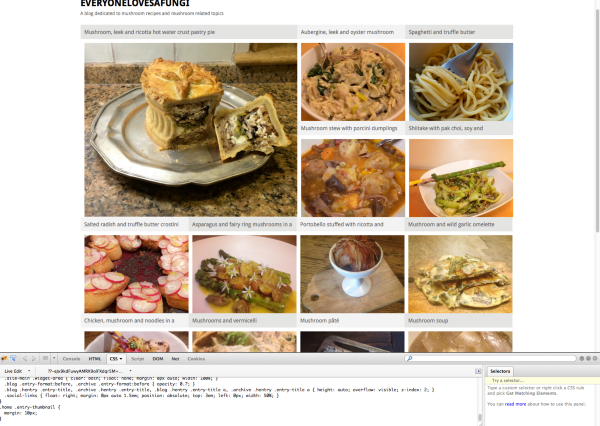
.home .entry-thumbnail {
  margin: 10px;
}
If you use a browser inspector like Firebug for Firefox, or the built-in Chrome inspector, you can preview the effect before buying the Custom Design upgrade.
Here’s a screenshot of what it looks like using Firebug to temporarily add the style:
Here are some good CSS resources if you’d like to learn more about using a browser inspector to help make CSS changes:
https://dailypost.wordpress.com/2013/07/25/css-selectors/
http://dailypost.wordpress.com/2013/06/21/css-intro/
http://dailypost.wordpress.com/2013/08/29/css-matched-rule-pane/
http://en.support.wordpress.com/custom-design/how-to-find-your-themes-css/


- The topic ‘Fontfolio CSS tile spacing help needed!’ is closed to new replies.
 WordPress.com Forums