

Fonts in Sidebar and Navigation does not change (or only in the editor)
-
I am customizing the Twentyfourteen Theme of my blog. I used CSS to change the font in the navigation and the sidebar to ‘Ubuntu’.
While using the wordpress editor I see the changes, but if I leave the editor and watch the website like a normal user, the font is not there.
I already tried clearing the webbrowser cash. I waited too (now 3 days). But I still see the font only in the preview of the editor but not in the live webpage.
The font Ubuntu is part of the customized fonts provided by the wordpress upgrade. My site is hosted by wordpress. The font of the post headline and the post itself have changed. Therefore: The font is available for the browser. Why is it not shown in the navigation bar?
By the way … The font is also not accepted for the meta data lines above and below the title of the post. And again the changed font is shown in the editor.
For now the editor looks like a what-you-is-what-you-not-get.
Blog is: http://seidenpriester.wordpress.com
The blog I need help with is: (visible only to logged in users)
-
WordPress.com sells custom design upgrades. They allow us to “preview” change that do not actually display on the blog unless we purchase the upgrade.
If you have not purchased the custom design upgrade note that no changes you try out aside from those such as Custom Background, Custom Header, etc. which are stated on the theme description pages in the features column (right hand side) will be visible to visitors.
http://en.support.wordpress.com/custom-design/
http://en.support.wordpress.com/custom-design/editing-css/
http://en.support.wordpress.com/custom-design/custom-fonts/You do not need to load the design tools unless you have the Custom Design upgrade. All of these functions can be accessed from your dashboard – without loading the custom design tools – no upgrade required.
Appearance > Header
Appearance > Background
Appearance > Theme Options (applicable only to some themes)
Settings > Reading (set a static front page)
Site Title and Tagline > Settings > GeneralIf you are using the preview mode for the Custom Design upgrade some of the settings in that mode will save but they won’t show up on the front end unless you purchase the upgrade.
To go back to the free options, go to Appearance → Themes → Customize → Colors and click the “exit the preview” link in yellow at the top of the panel on the right.
See also: http://dailypost.wordpress.com/2014/01/18/video-tutorial-customizing-your-theme/
-
If you have purchased the custom design upgrade, use this link https://en.forums.wordpress.com/forum/css-customization#postform so you can copy and paste your text into a thread that will appear in the CSS Forum where you will get the help you need.
-
I have purchased the Upgrade. The selected customized fonts are shown in the post (title = Ubuntu, Text = Droid Serif). But I cannot manage to use the fonts in the navigaton area and the sidebar.
Sorry if I mislead you by using the term “editor preview”. I tried to change the font via CSS. If I add the font-family command into the script, the font changes in the editor view but not on the website outside the editor.
@timethief: Which text shall I send you? My css script? It has 800 lines. I used the original Twentyfourteen script as a template.
—
I am not an CSS pro. But I understood 90% of the Twentyfourteen script. There are only three things I cannot change: The fonts outside my postings, the overlap area of the title picture and the width of the left sidebar. Most annoying is the font issue, because the editor is accepting my script changes.On the other hand … The editor seems a to be a little bit buggy.
-
If you have purchased the custom design upgrade, use this link https://en.forums.wordpress.com/forum/css-customization#postform so to create a new thread that will appear in the CSS Forum where you will get the help you need. Do not copy and paste the CSS into it.
-
Sorry if I am a little bit confused, but I thought that this is the css-cusgtomization forum. I will create a new thread. Give me a second.
-
-
-
-
No problem. In Germany is is 11:20pm. After looking at the css script for hours, my brain is numb (and the problem still there). It is astonishing that I still can write complete englisch sentences.
To all the others out there: The problem is still there.
-
Hello @seidenpriester, apologies for the delay. I’m just finding this help request now.
I did check http://seidenpriester.wordpress.com/ and I looked at the title of the latest post, “Anime vs. Reallife,” and it appears to load with the Ubuntu font for me, as expected.
Here is a screenshot of what I see:
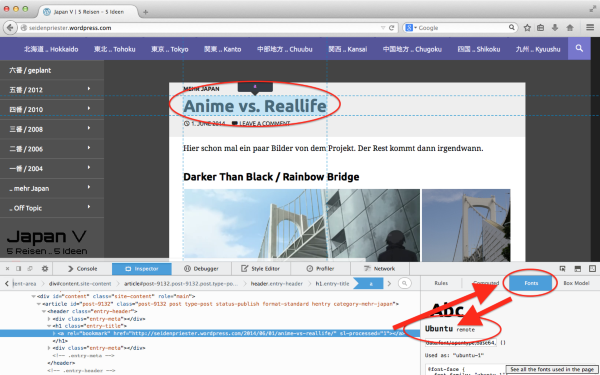
My css script? It has 800 lines. I used the original Twentyfourteen script as a template.
It’s probably not worth changing this now if everything else is working okay, but just so I’ve noted it, it’s not advised to copy the entire original stylesheet into the CSS Editor unless you are writing the CSS from scratch and are advanced enough with CSS to update all the related url() values so they are full links including the http:// and edit any other issues that need to be taken care of when CSS moves locations (such as moving it from the original CSS to a different pathway loaded by the edited custom CSS). Instead, a typical route is to only copy the CSS rules for the things you’d like to change in the CSS and add those to the editor. That way, you aren’t duplicating the rest of the CSS unnecessarily or copying local pathways in the url() function (and possibly other places) which will break the CSS and cause problems.
The copy/paste of the original CSS could cause other problems for you, but it doesn’t seem to me it would cause the issue with the font not loading that you have described.
Regarding the font not loading, there are a small number of people who have reported not being able to see web fonts, and in the cases I’ve seen so far, it’s limited to the local network or to a local area (such as a particular ISP). It can be troublesome to track a a problem like that down, but I’ll do my best to guide you if you want to dig into it. What I can tell you right now though, is that the Ubuntu font loads correctly for me at http://seidenpriester.wordpress.com/ without any problems. Are you still having trouble loading it?
-
Are you still having any trouble loading fonts on http://seidenpriester.wordpress.com/ ?
-
Hi!
Hi, the problem is still there. The title is not the problem. But in the menu above and on the left side I also definded Ubuntu. Instead, the script is using a simple sans serif font. Helvetiva or somthing like that.
But in the moment I do not have much time for details. I am planning my next trip to Tokyo while working 80 hours a week on a project.
Maybe after the trip to Japan I try again or hire someone who can fix that problem and also move the buttons to the previous and the next blog entry above the text. I hate to scroll down every time.
-
The title is not the problem. But in the menu above and on the left side
The result is the same for me, but I’m sorry because I have just realized I do have the font “Ubuntu” installed locally and that could be why I can see it and others might not in some cases (like the sidebar instead of titles). I also now see that you have referred to the font incorrectly in your CSS. In the script that loads the font, it refers to the font name as “ubuntu-1” and that is the name you must use in any custom CSS. I didn’t see it at first because of my local install of Ubuntu, my apologies.
If you have time later and you are interested in learning a little more about how web fonts work versus a font stack referring to the user’s system fonts (which is what you were using in your CSS before), this article has a good description:
http://web.archive.org/web/20131010010610/http://unitinteractive.com/blog/2008/06/26/better-css-font-stacks/There are two requirements to using the custom fonts set in your Appearance > Customize > Fonts panel in custom CSS. First, the font must be selected in Fonts and, second, you must use the name of the font as it is loaded by the remote script.
Here is another annotation using the same screenshot I sent you before showing where the remote font name shows up. Look for the yellow rectangle at the bottom right:
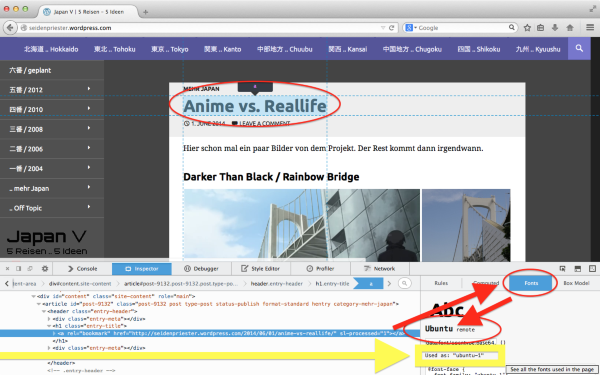
To fix your custom CSS to use the correct remote font name, you should change “Ubuntu” to “ubuntu-1” and that should fix the problem and correctly load the remote font.
Sorry again that I didn’t spot this before. It was a little tricky to figure out based on your description!
-
Hi,
I tried to rename all fonts to ubuntu-1. It only changed the font in the line below the title (where the date and “leave a comment” are).
Maybe I should think about removing my blog from the wordpress server to another server to gain full control over the script. But I am not a programmer. Otherwise I would have created my own design. After the fonts I would move the buttons for the previous and the next blog entry from below the text to above or the sides of the text, close to the title picture. But with my current work load on the job and the next trip to Japan starting in 7 weeks, there is no time to think about setting up a own server.
Dennis
-
Dennis, currently I’m seeing this in your custom CSS which is defining the font for the body text on http://seidenpriester.wordpress.com/ .
body, button, input, select, textarea {
font-family: Lato,sans-serif;
}
When I look at Appearance > Customize > Fonts I’m seeing Droid Serif set as the body text font.
If you can detail out what you are looking for, I’ll do my best to help you make that happen as quickly as we can.
-
Wow. Something I didn’t saw. Unfortunately I didn’t solved the problem. For some reason the customization option doesn’t affect the complete design. Therefore I tried to do it manually. For me it looks like that there is a different script that controls the design of the blog and the script I use is only controlling some details.
What I am looking for: The passage or the command that controls the fonts in the primary or secondary menu.
-
Hi there,
I am also seeing Ubuntu in your sidebar and in your menu and dropdown sub-menus, and unlike Sheri, I don’t have Ubuntu installed locally.
Could you please try updating your browser to Firefox 31 and see if that changes how the fonts appear on your end? Please also try an alternate browser, such as Chrome, just to rule out any browser-specific display issues.
For reference, the CSS for fonts for the areas you’ve indicated is:
For menu items:
.primary-navigation a {
font-family: Ubuntu, Arial;
}
For sidebar menu items:
.secondary-navigation a {
font-family: Ubuntu, Arial;
}
But as you can see, Ubuntu is specified, so changing the CSS there would likely not make a difference, although you could define additional fallback fonts.


- The topic ‘Fonts in Sidebar and Navigation does not change (or only in the editor)’ is closed to new replies.
 WordPress.com Forums