Footer HIVE theme
-
Hi,
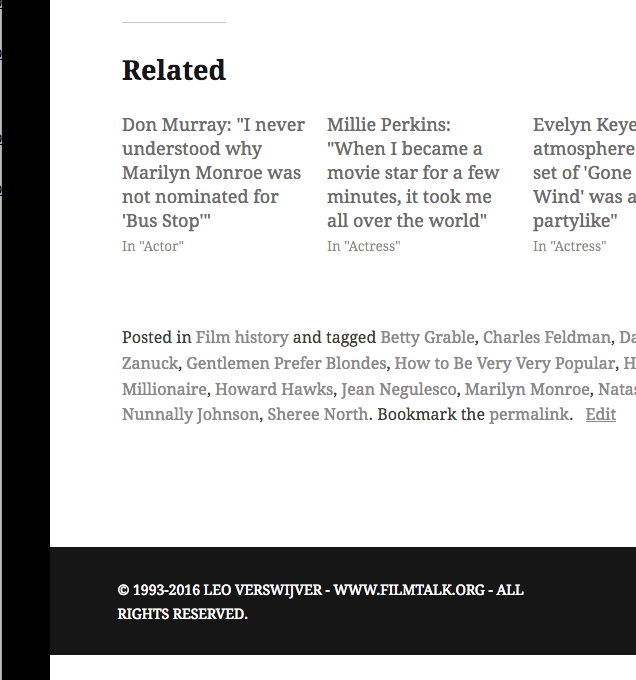
I use the HIVE theme and would like to ask you something about the footer. When you open the site and scroll down, the footer is always visible.
When you click on a post, it disappears.
My question is: is it possible – maybe via CSS ? – to make sure the footer (with your own information) is visible at all times? Meaning also when you go from one post or page to another?
Also, if I may, the bar of the footer, as well as the bar on the left and the small one on top of the screen, are black. Do you know if it is possible to change colors and use another color instead of black?
Thank you for getting through those requests and I look forward to reading your reply when it suits you.
By the way, HIVE rocks!!
The blog I need help with is: (visible only to logged in users)
-
Hi there, you have infinite scroll active on your main page that shows your posts. On single post pages and static pages, such as your about page, the CSS selectors are different. Add the following to your custom CSS to put your copyright statement on the other pages and single posts.
.site-footer .site-info:before { content: "© 1993-2016 LEO VERSWIJVER - WWW.FILMTALK.ORG - ALL RIGHTS RESERVED."; color: #fff; } -
On the black bar to the left, you have this in your custom CSS which is making it black, so you just need to adjust the color there as desired.
body::before, body::after {
    background: #000;
}
The footer background color would be set with this.
.site-footer { background: #171617; } -
Hi,
Thank you so much for helping me out! I certainly appreciate it!
One thing doesn’t seem to work, it seems. It’s about your first reply, where I tried to add your first info to my custom CSS (to put the copyright statement not only on the home page, but also on the other pages and single posts).
Is there something that I may have overlooked here?
-
Hi, I just went into your customizer and added the code I have above to add the copyright on other pages and it worked for me. Can you try adding it again, and add it at the very bottom of your custom CSS?
-
Hi, thank you so much for trying again! As you suggested, I just added it again at the very bottom of my custom CSS, but I’m very sorry to say it doesn’t seem to work.
The copyright statement only appears on the home page, as it did before, and not when clicking on single posts or other pages.
I’m keeping it at my custom CSS right now, although unfortunately it doesn’t work here. Could you tell me if I am doing anything wrong here?
-
Hi, I see the copyright on the bottom of the single post pages and static pages in Firefox, Chrome and Safari. Screenshot.
Can you try clearing your browser cache and then view your site again?
Also, in which browser are you not seeing the copyright? Can you try a different browser?
-
Hi, thank you so much for your support on my behalf. I followed your advise from A to Z and it all works perfectly.
Thumbs up and much obliged!
-


- The topic ‘Footer HIVE theme’ is closed to new replies.
 WordPress.com Forums