

Footer text colour
-
I would like to change the green text to blue. Is there a way for me to alter this colour?
thanks in advance
The blog I need help with is: (visible only to logged in users)
-
If you’re referring to the green link colour in Baskerville, there are two main options:
1) Choose from one of the other free colour palettes, by heading to the Customizer’s Colors & Backgrounds panel and selecting one of these options:
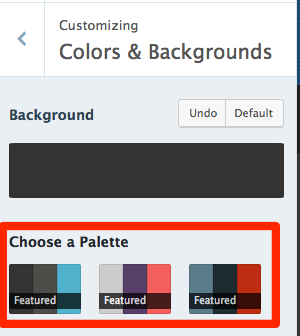
The first palette comes with a blue link colour.
2) If you want to specify your own specific shade of blue, you would need to use Custom CSS, which is a feature available with the Premium or Business plans. We could help you with the specific code in the CSS Customization forum. if you decide to go that route, depending on which specific pieces of text you’d like to change the colour of.
-


- The topic ‘Footer text colour’ is closed to new replies.
 WordPress.com Forums