Format of Posts in Blog Feed
-
Hi! I recently switched the theme of my blog to make it stylistically similar to what I am posting. However, I want to know how to make my posts appear with only their title and picture (maybe a line or two of the text) and then the ‘Click to read more’ button. Right now the blog posts come out in their full product, which makes it very lengthy and difficult to scroll through. Thanks!
The blog I need help with is: (visible only to logged in users)
-
Hi.
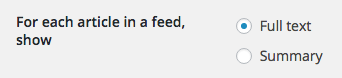
Set Summary</strong for For each article in a feed show
https://en-support.files.wordpress.com/2008/12/full-text-or-summary.png
https://en.support.wordpress.com/settings/reading-settings/ -
Oops!
Hi.
Set Summary for For each article in a feed show
https://en-support.files.wordpress.com/2008/12/full-text-or-summary.png
https://en.support.wordpress.com/settings/reading-settings/ -
I just did set the summery feature, but when looking back n the blog, the posts are still the same. Showing up in their long-form. Does the summary feature not work now until I post new blog posts?
-
I just did set the summery feature, but when looking back n the blog, the posts are still the same.
If you want to change—> Format of Posts in Blog Feedyou need set the option that I said you.
If you want to show a resume of your posts on your blog, you need other option. The More tag:
https://en.support.wordpress.com/more-tag/


- The topic ‘Format of Posts in Blog Feed’ is closed to new replies.


 WordPress.com Forums