

formatting links
-
While I can successfully change text to live links, I cannot for the life of me get the format the text to change in some way in order to indicate that it’s a link.
In the writer, the linked text changes color (to red), but this is never reflected in the preview or published posts. I’ve tried selecting the linked text and selecting LINK as the format rather than STANDARD, but this doesn’t change anything.
I’m working in Chrome. I’ve cleared cache and cookies and this changed nothing. Can you help?
The blog I need help with is: (visible only to logged in users)
-
Hi there!
The Sorbet theme does not underline links. You can see in your Customizer that the link color is selected with the first color setting:
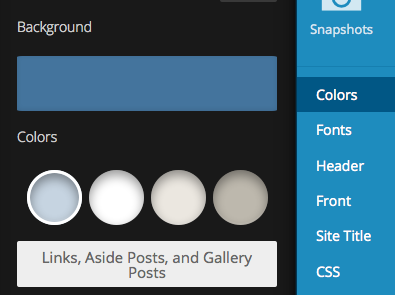
Have you tried changing that setting?
If there’s a specific color you’d like to set your links to, you can edit this using CSS like this:
a {
	color: #FF0000;
}
Let me know if I can help with anything else!
-
Bingo! Wow…it had been awhile since I’d been into the Customizing section and I’d forgotten about the options there. All fixed. THANK YOU!
-


- The topic ‘formatting links’ is closed to new replies.


 WordPress.com Forums