

Formatting the post title
-
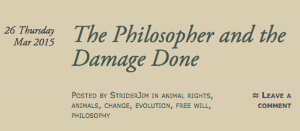
Is this possible? Especially, when the title scrolls to the 2nd line, would be good to have some control over centering or indenting.
The blog I need help with is: (visible only to logged in users)
-
Hi there!
Can you clarify what you mean by when the title scrolls to the 2nd line? Currently this is what I see for the post title:

Let me know if you have any questions with this!
-
Nope. Mine scrolls to the second line after ‘the’, and justifies to the left.
I’m on windows 7 and don’t know how to show that to you.
-
Are you talking about this?
Please note that that happens when the browser display isn’t wide enough. Try increasing the browser width and it should go back to one line as seen in my first screenshot.
-
Just checked another computer in the house. Same thing.
Also looking at it on a 21″ screen. Same thing. No matter how I zoom. -
-
“Please note that that happens when the browser display isn’t wide enough. Try increasing the browser width and it should go back to one line as seen in my first screenshot.”
As I said above, I have it on a 21″ screen, with browser full width. Nothing I can do will change that.
-
Interesting. Does it happen in other browsers like Firefox? I also use Chrome and I’m not seeing that error so it might have something to do with the Chrome setup.
-
uh-oh. When I hear the word “interesting”, that sounds like it’s not something you can fix. I stretched it across two monitors and it doesn’t correct, so it’s something to do with the code.
I just downloaded Firefox. I get the same result. Title wraps on a 21″ screen.
I’ve done what I can do here. Would like to see a resolution, since it’s obviously not supposed to be that way.
What’s next?
-
Can you take a screenshot of this? I have a 13″ display and it’s not doing it on mine or my colleague’s so I’d like to see what’s going on and why it’s only affecting your display. Please upload the screenshot to your Media > Library page.
-
-
-
Ok so I think it could one of two things. It could be your browser width. It seems like it was designed to move the text to the 2nd line as you are showing at around 865 px wide. Is your browser window 865px wide or less? Try increasing your browser window to around 1000px.
If your browser width is already greater than 1000px, it may be the zoom as seen in this screencast:
Try zooming out and see if that fixes it.
-
13″ screen set at: 1366 x 768
21″ screen set at: 1920 x 1080The zoom question I addressed back at 4:44PM. Changing the zoom on either monitor has no effect.
I also deleted the title and re-typed it in , in case there was some formatting issue. No change.
-
I just tried starting a new post with the same title, same result. So it’s not specific to the post.
-
It’s two letters that’s causing the wrap. I can replace ‘and’ with the single symbol “&”, and it doesn’t wrap. I will take 33 characters and spaces, and wraps on 34.
There needs to be some formatting options for the title. If it wraps now, it always justifies left, which looks like crap.


- The topic ‘Formatting the post title’ is closed to new replies.
 WordPress.com Forums