

Fortune theme, quote and the LHS vertical line
-
I am writing a new post and I want to indent a snippet that is copied over from a previous post. That snippet contains a quote paragraph.
When I indent this section, everything is indented, except the vertical line on the left (a graphical style element). This is a bit ugly, as it breaks the indentation of the entire section. Is there a way I can change this (e.g. using CSS) so that the line moves with the indentation? If this is not possible, I would like to remove the line, but only for this paragraph.
The blog I need help with is: (visible only to logged in users)
-
Hi,
Indenting a block of text doesn’t result in a vertical line with the Fortune theme applied. A blockquote does include a vertical line (blue by default) on that theme. So you could avoid the issue by just using the indent tab (icon) in the editor toolbar. The indent and outdent icons and the blockquote icon are among the list of available icons listed in the Visual Editor support page.
I don’t know the CSS needed to shift or remove the blue line if you use the blockquote option.
Each premium theme has its own support forum, where you may ask questions directly of the theme author(s). Here is the support forum for the Fortune theme: https://premium-themes.forums.wordpress.com/forum/fortune.
-
-
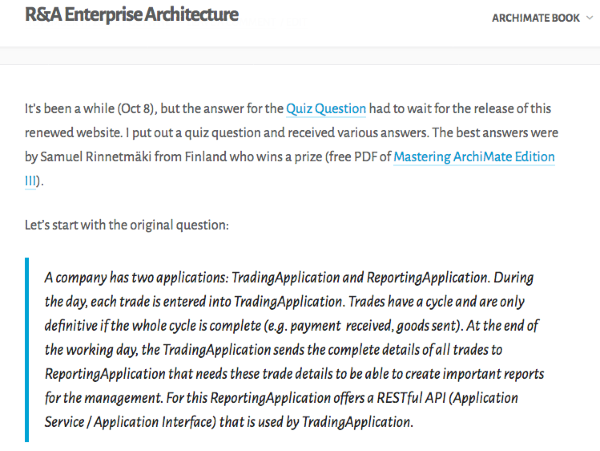
I see the issue on this post:
Part of the reason why I think it looks odd is that you’ve added an extra 120px of padding to the blockquote, moving it so far away from the vertical line that it does look a bit visually disconnected.
This is what it should look like by default, if I remove all that padding in the browser inspector:
So, you have a few options.
1. You can flip to HTML view and remove all that extra padding.
OR
2. You can remove the vertical line next to blockquotes, if you prefer not to have it:
blockquote {
  border-left: none;
}
OR
3. Add some left margin to the blockquotes, but leave the vertical line intact:
blockquote {
  margin-left: 30px;
}
Let me know how it goes!
-
The padding happens when you indent using the WordPress.com editor.
The point is,it is a blockquote inside a ‘quote’ (a ‘quote’ form another article just done with indentation). Of course I can remove all the indentation, but that is not correct.
In post A I have
A Text
  A Blockquote
A Text
And in post B I want to ‘quote’ that, so I do
B Text
  A Text
    A Blockquote
  A Text
B Text
B TextWhich works fine, except that the blockquote line in the second case gets drawn at the level for B, not for A.
-
Ok, forget about the previous,it doesn’t show as intended.
In post A I have
A Text A Blockquote A TextAnd in post B I want to ‘quote’ that, so I do
B Text A Text A Blockquote A Text B Text B Text -
Hey there, it’s much easier for me to help you with CSS code if you can point me to specific posts. :)
For the type of blockquote in this post:
If you’d like to keep the entire blockquote indented, and you prefer to leave your inline padding on the blockquote in place, this CSS should take care of things, if I’m understanding your goal correctly:
blockquote {
  margin-left: 60px;
}
You can adjust the value of the margin to your liking.
<blockquote style="padding-left:60px;">
<p style="padding-left:60px;">A company has two applications: <em>TradingApplication</em> and <em>ReportingApplication</em>. During the day, each trade is entered into <em>TradingApplication</em>. Trades have a cycle and are only definitive if the whole cycle is complete (e.g. payment  received, goods sent). At the end of the working day, the <em>TradingApplication</em> sends the complete details of all trades to <em>ReportingApplication</em> that needs these trade details to be able to create important reports for the management. For this <em>ReportingApplication</em> offers a RESTful API (Application Service / Application Interface) that is used by <em>TradingApplication</em>.</p>
</blockquote>
<p style="padding-left:60px;">Model the application-relation (no infra, no business) between <em>TradingApplication</em> and <em>ReportingApplication</em> in as many different ways as you can. Note, you can choose to <em>either</em> use behavioural (Application Function/Process & Service) or active structural (Application Component & Interface), I am not looking for all the different combinations of active & behaviour you can make there. Trivial variations (that can be derived) do not count as separate solutions. The easiest is to just use Application behaviour and Data Object.</p>
You may want to remove the padding on the paragraph below the blockquote.
Does this achieve your goal there?
Could you show me an example of “post B” so I can take a look directly? Or if the above was post B, could you link me to a post of type A? Thanks.
-
The answer was simple. In this specific post use
<blockquote style="margin-left:60px;">
instead of
<blockquote style="padding-left:60px;">Post A was: https://ea.rna.nl/2017/10/08/an-archimate-quiz-question/
Post B is: https://ea.rna.nl/2017/11/11/answer-for-an-archimate-quiz-question/ -


- The topic ‘Fortune theme, quote and the LHS vertical line’ is closed to new replies.
 WordPress.com Forums