

free domain in Premium package?
-
Hi
I would like to know why are you charging me money for domain after I bought premium package. I thought the first domain is free. I would like to register free domain denovojersey.com or denovojersey.co.uk
Please let me know if this is possible.
Kind regards,
KamilaThe blog I need help with is: (visible only to logged in users)
-
Hi Kamila,
It looks like you’re currently using your Premium bundle domain credit to map the following domain to your blog:
denovoconstruction.co.uk
Would you like me to remove that domain from your account so you can register one of the domains you mentioned?
Just a note, mapping a domain and registering a new domain both use your domain credit. If you map a domain using your Premium bundle credit, you cannot also register a new domain.
-
Good morning,
Yes please. That would be great to remove mentioned domain.
Please can I register free domain through that £70 package?
denovojersey.co.uk or denovojersey.com
Also how do I register emails eg: (email visible only to moderators and staff)
Thank you for your prompt reply
Kamila
-
Hi Kamila,
I removed denovoconstruction.co.uk from your account. You should now be able to register one of the domains through the instructions here:
Can you give that a try?
As for emails, there are two main options:
- You can setup email forwarding following the instructions here:
http://en.support.wordpress.com/email-forwarding/
In this scenario, email to your custom address (kamila-at-denovojersey.co.uk for example) would be forwarded to an address you already own (like a Gmail address for instance).
- You can add a custom email address through a third-party as explained here:
http://en.support.wordpress.com/domains/add-email/In this scenario, you would be setting up a separate address with a separate inbox
Does that help to explain the options? Please let me know if you need anything else!
- You can setup email forwarding following the instructions here:
-
Thank you Jeremey,
Registered new domain and it works, although when you type me new address it still shows http://denovoconstruction.wordpress.com/. How do I remove wordpress word?
Thank you
-
Hi there,
To do that, you’ll just need to set the primary domain under Store -> My Domains from your Dashboard. It looks like you were already able to do that as I’m seeing the new domain when I visit your site. Please let me know if you need anything else!
-
Hi Jeremey
Thank you for your email. Very helpful.
Just a one more question; in the package I have bought was advertised ‘no adverts’. Is any chance you can remove those text looking like a blog eg:
06/07/2014Projects Edit
Customized McKinley Theme.
Blog at WordPress.com.
So people cant see it?Than you
Kamila
-
Hi Kamila,
The Premium bundle does include a free domain registration. It looks like you were successfully able to register denovojersey.com as shown here:
https://denovoconstruction.wordpress.com/wp-admin/paid-upgrades.php?page=my-upgrades
You were not charged anything additionally for this domain registration. Can you take a look and see if everything appears correct?
-
Hello Jeremey,
Domain works perfectly. Thank you for your help.
Also the package I have bought was ‘promising’ No Advertising.
Any chance we can switch off from my blog :
06/07/2014 Projects Edit
Customized McKinley Theme.
Blog at WordPress.com.Many thanks,
Kamila
-
Hi Kamila,
You shouldn’t see advertisements on the blog denovojersey.com. If you’re seeing them, can you point me to the URL of the page where you’re seeing the advertisements?
-
Hello
You see it here on my website http://denovojersey.com/
eg:
On the first page (06/07/2014 Projects Edit)
On the bottom of the page (Customized McKinley Theme.Blog at WordPress.com.)Please can this disappear as doesn’t look professional.
Many thanks
Kamila
-
Hi Kamila,
On the first page (06/07/2014 Projects Edit)
That isn’t an advertisement, just the meta information for your post. In this case, it reflects the date the post was published and the category.
On the bottom of the page (Customized McKinley Theme.Blog at WordPress.com.)
The WordPress.com footer credit cannot be removed per our Terms of Service here (specifically #11):
Let me know if you have any additional questions!
-
-
Hi Kamila,
You’re required to leave the footer attribution in place per our Terms of Service. If you would like to remove the post meta information, you can use the following CSS:
div.entry-meta {
	display: none;
}
Just input that under Appearance -> Customize -> CSS.
-
Hi Jeremey,
That was very helpful, many thanks.
Do you know how can I make line in my PROJECT page (see below) freeze? So people who scroll the gallery can still see agenda?
new-build heritage commercial sports&leisure re-development retail civils
Thank you
KK
-
Hi,
I believe what you’re looking for is for the following to float at the top of the screen regardless of where the user is on the page so that if they scroll down, they can still see the agenda.
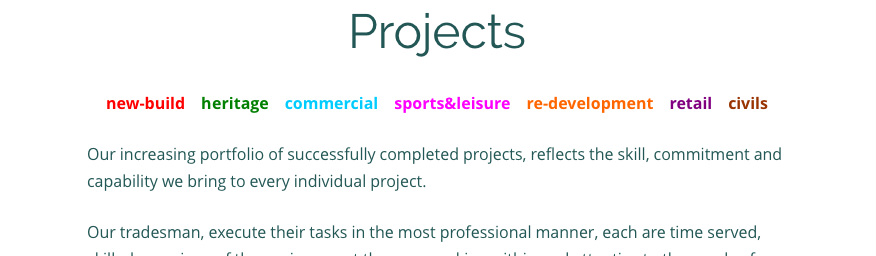
Is that correct? That exact action isn’t possible without switching themes. Certain themes have floating menus built in like Twenty Fourteen. If you scroll down the page on the theme demo here, you’ll notice that the top menu sticks with you:
http://twentyfourteendemo.wordpress.com/
However, I don’t even think that matches what you’re looking for as that menu would appear on all pages, not just your product page.
The method you’re currently using (repeating the agenda at the top and the bottom) is currently the best way to accomplish this. I apologize there isn’t a better way!
-
Hello Jeremey,
How are you doing?
I did set up email transfer etc but how can I send emails from the address (email visible only to moderators and staff). Tried outlook but it is not available anymore? – only when you buy it? Does WordPress provide something free and easy to manage?
Thank you
Kamila -
Hi Kamila!
It looks like you setup email forwarding, which basically forwards the emails sent to a custom address ((email visible only to moderators and staff) for example) to an address you already have established through another service (like Hotmail or Gmail). You should be able to change the “From” address for outgoing emails so the emails appear to be coming from your custom address, not the default third-party address.
Instructions for various email services including Outlook can be found here:
http://en.support.wordpress.com/email-forwarding/#changing-your-from-address
Are those the instructions you tried?
-
Hello Jeremey,
I have few errors.
– from my denovojersey.com website email should be forwarding to (email visible only to moderators and staff) instead of my email.
– also would like to set up ‘send and receive account’ for (email visible only to moderators and staff) instead of (email visible only to moderators and staff), but won’t let me.
Can you help please?
Thank you
Kamila -


- The topic ‘free domain in Premium package?’ is closed to new replies.
 WordPress.com Forums