

Free site
-
Hi I can’t start up my free site and have been at a block. Only options are transfer to existing domain or set one up. I thought WP offered free sites. I need assistance on this and setting up a theme to build please then I will transfer to my domain. Want to do trial for now.
-
Hi there,
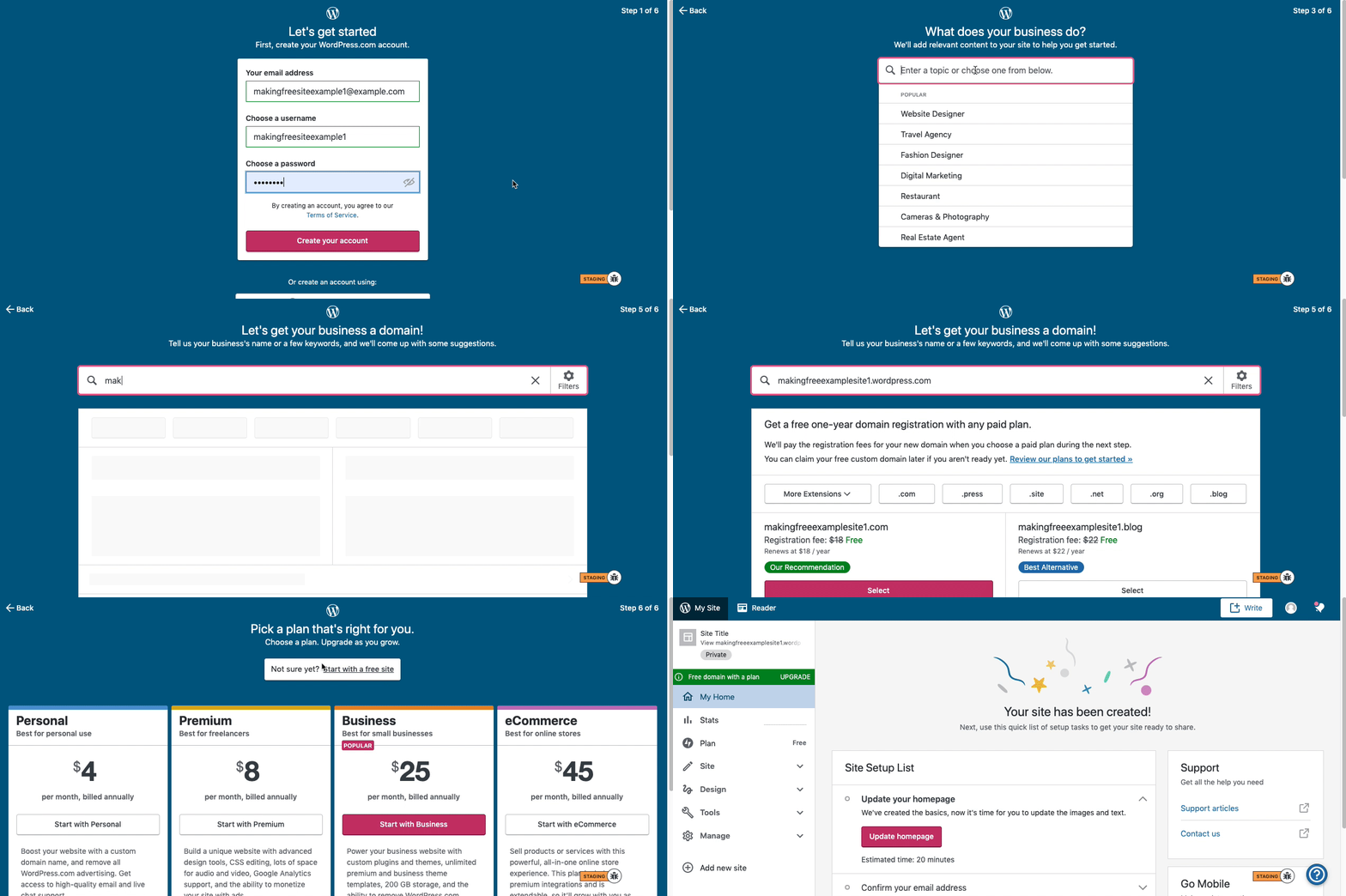
Here are visual instructions on how to create a free
.wordpress.comsite:Step 1: Select email, username, and password.
Step 2: select Blog for a.home.blogfree site or Business for a.wordpress.comsite.
Step 3: Select the Topic of your site.
Step 4: Type in the Title of site (optional).
Step 5: Type in the full, exact site address you want including the.wordpress.comor.home.blogsubdomain (ex:freeexamplesite.wordpress.com,freeexampleblog.home.blog). The first option should be the free site that you manually typed in. Click select next to that option.
Step 6: At the very top, click the link that says: start with a free site.Then, your free site should be created! Please follow those steps and if you have any questions, let us know. Thanks!
-
Thanks so much for your reply. I’ve already created my account with name/email/PW/etc but these instructions don’t align with what I click, these options aren’t there. I can’t see where you select .home or .wordpress.com site.
Is there any updated direct links of simply setting up a site and applying a template/theme? Just seems so tricky compared to Wix. Thought would be more straightforward.
-
staff-blorbo WordPress.com do seem to have changed things once again (or is this new “flow” only if you are creating an additional site?). I no longer see six steps. At https://wordpress.com/jetpack/new?ref=calypso-selector there are now only 2 steps to create a site. But at last it has become a simple process. Just typing somethingsomething.wordpress.com and you’re immediately offered a free site below the two paid for options. One more click and the site is created.
-
Our team is experimenting with a few different signup flows, so everyone might not be seeing the exact same process.
-
hi yes thank you I resolved it and it looks like it’s created. Now I have to figure out how to upload a theme I’ve downloaded. Any good suggested links? Much appreciated everyone!
-
@bitlets Note that if you have a free site you can only use the themes found at https://wordpress.com/themes External themes are designed for sites hosted elsewhere that use the WordPress.org software and can only be used here at WordPress.com if you upgrade to a Business plan.
-
ok great to know thank you for all your help. This forum has been great, I’ll probably be back once I start building it.




- The topic ‘Free site’ is closed to new replies.
 WordPress.com Forums