

Front and Grid template on same page
-
How can I set up Edin to display both the front page and grid page templates on the same web page as is shown in the Edin Demo?
The blog I need help with is: (visible only to logged in users)
-
A page can only use one template. The front page in the Edin demo is using the Front Page template.
These are the instructions for setting up this template:

You can find more information here:
https://wordpress.com/themes/edin/
If you have additional questions, please let us know, and we will be happy to help.
-
How is it then that on the Edin demo page they are able to show the child pages in Grid layout below?
-
You set the Featured Pages for the Front Page Template in the Customizer under Theme Options (scroll down to the bottom):
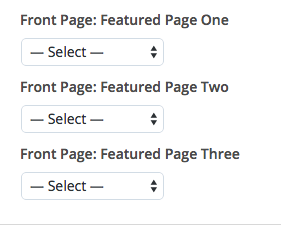
https://londondrivinglessons.wordpress.com/wp-admin/customize.php
Let us know if you have any more questions.
-
-
You’re very welcome.
If you have any other questions regarding WordPress.com, please let us know.


- The topic ‘Front and Grid template on same page’ is closed to new replies.
 WordPress.com Forums