Gallery Carousel Issues??
-
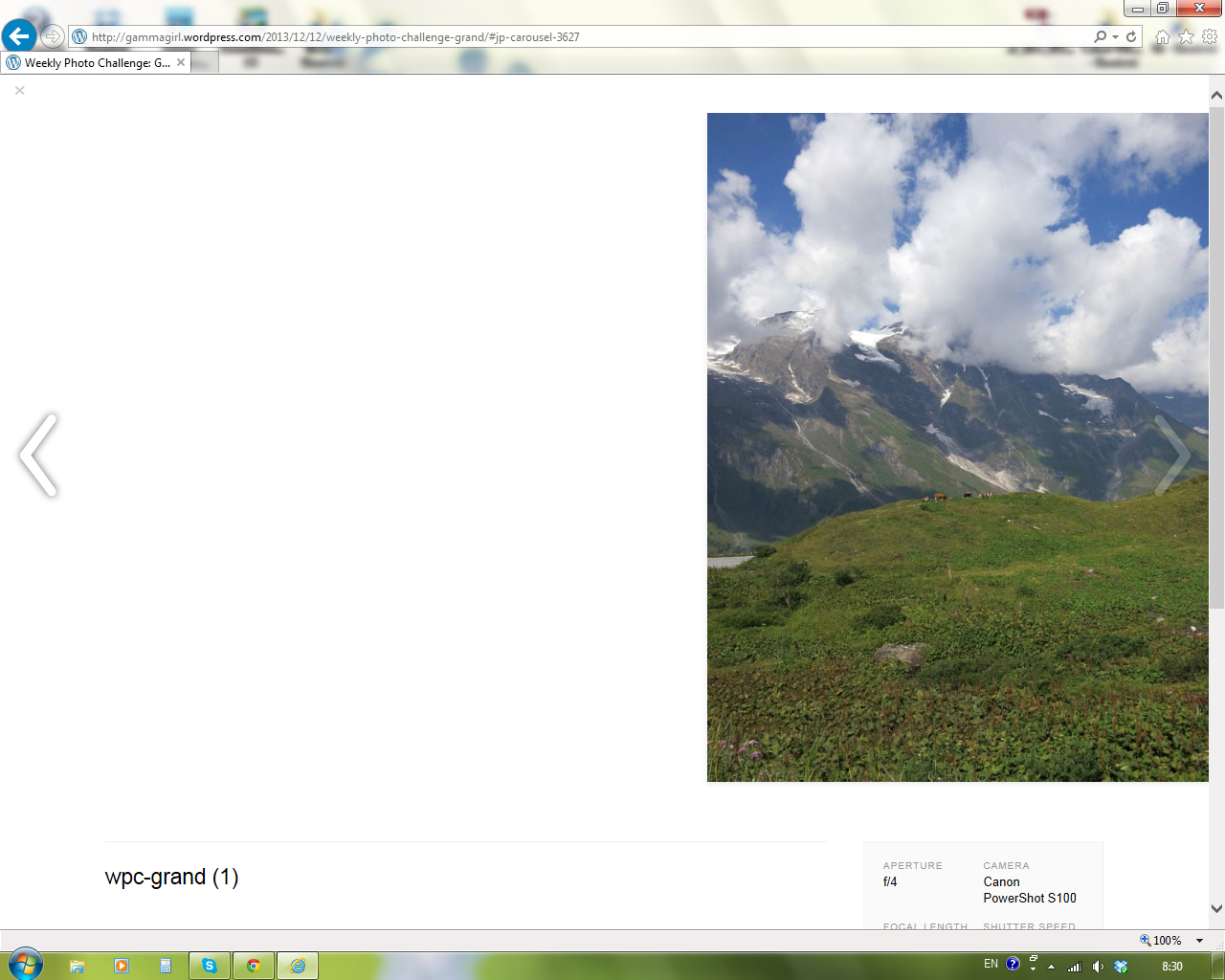
I’ve been having problems with my gallery carousel. It’s not hard to use, in fact it’s super easy, but what’s been troubling me is that once it’s all up and ready, when I click a photo to bring it up to view, it’s super far over to the right. All of them are, they aren’t centered, and it looks stupid. How can I fix this? Is anyone else having this issue or is it just me?
-
-
I’ve been having the same issue in Internet Explorer forever. I just figured it was something I was doing. I’m glad it’s not just me. They look OK in Firefox–that is, when the gallery carousel works at all.
Just today I also noticed that the gallery carousel doesn’t work consistently in either Firefox or Internet explorer. The carousel doesn’t appear, just the slide that I click on. The problem comes and goes. About every other time I click in the carousel, the slide show fails to work.
My blog is http://thepracticalpsychosomaticist.com/
A representative link for the right only slide in IE http://thepracticalpsychosomaticist.com/2014/01/29/cpcp-rapid-two-step-screen-for-delirium-by-medical-students/#jp-carousel-22583
-
@jajsamos911-at the moment, I’m viewing in Firefox 26, which is the latest version. So far no problem looking at that particular slideshow. Carousel loads completely, each “slide” is centered and navigation works between the images. What version of FF are you using?
Have you tried the browser troubleshooting tips here? http://en.support.wordpress.com/browser-issues/
If you are using the up-to-date version of IE (11) or even IE10, make sure you are not using Compatibility Mode to browse the site.
If you need to update your browser, you can do so here: http://browsehappy.com/
-
Right now I’m at my office computer. Our IT dept. doesn’t allow the version of FF you’re talking about and the IE version 8 is the most recent they’ll allow as well. I can’t make the carousel work at all in these environments.
This morning I also couldn’t make the add Tag feature work.
How things are going on my home computer will have to wait until this evening when I get home.
More importantly, as of this morning my employer apparently has put a block on my WordPress site for some reason which I’ve contacted them about. Is there any problem with WordPress that might contribute to this? Can you see anything on my site (which I’ve been writing to since late 2010) that would trigger a block?
The block is intermittent and I might not be able to log in next time to answer your messages.
-
Our IT dept. doesn’t allow the version of FF you’re talking about and the IE version 8 is the most recent they’ll allow as well. I can’t make the carousel work at all in these environments.
WordPress.com works best in modern browsers. If your place of employment requires you to use outdated browsers, then you will be at a disadvantage not only on WordPress.com, but most everywhere else on the web. IE 8 is no longer supported on most sites, soon no longer even by MS (when XP goes belly-up in April). It also becomes a security issue as well.
Is there any problem with WordPress that might contribute to this?
IMHO-the best place to ask that question is your company’s IT department.
-
The carousel doesn’t work at all on IE 11.0 or FF 26 on my home computer. I’ve cleared cache and cookies. I don’t know what else to do.
What do you suggest?
By the way, my workplace IT security was the culprit behind the block. I completely agree with you about the IT issue here.
-
Odd.
On your particular link above the Carousel won’t open in IE11, but on my site the Carousel does open. However as mentioned above, the image is not centered. (screenshot)
Have you in the interim turned off the Photo Carousel in your Media settings? Now I’m not getting any Carousel on your site in FF26 either.
I’ve tagged this for Staff assistance. Please be patient while they get back to you.
-
I didn’t even know I could turn the carousel on and off. I hadn’t touched anything. I looked and the box was checked next to “Display images in full-size carousel slideshow” in Media Settings.
Thanks for trying to help me with this.
-
@jajsamos911 It seems the gallery settings were set to links to the image attachment page instead of the image file (which opens the carousel). I’ve just changed this for you.
Let me know if it works now.
-
The carousel still doesn’t launch at all in either Firefox or Internet Explorer, even after clearing cache and cookies. All I get are individual slide images.
I can’t recall ever changing the gallery settings.
-
If possible, send me a screenshot. You can simply upload the screenshot to your Media Library, like any other image, and I’ll be able to access it from there. The page at the following link has some helpful tips for taking screenshots:
Also make sure that you disable any browser extensions: http://windows.microsoft.com/en-us/internet-explorer/manage-add-ons#ie=ie-11
-
@kardotim-for a screenshot of my site where the images are not centered in the Carousel in IE11, please see here: https://en.forums.wordpress.com/topic/gallery-carousel-issues?replies=11#post-1627504
-
I’ve uploaded the image of the title slide to a presentation to my media file library just now. The title says “CPCP: Diagnosing Delirium” and underneath are the authors’ names, Emily Funk and Laura Socwell. And it’s from FireFox. The slide is against a black background when I try to launch the carousel.
Sorry; I’m at my office on my work computer now and I don’t have administrative rights to enable or disable browser extensions.
-
@karim- possibly related post for why the carousel is not being invoked when logged out; there’s an errant bit of js code that appears in the footer.
Both users are using Modern News on their sites.
-
That’s interesting. I never noticed that the carousel works when I’m logged in and it doesn’t when I’m logged out. I’m using Modern News.
Does this mean that I have to contact the creator of Modern News? The last time I had a question, there was no response.
-
Does this mean that I have to contact the creator of Modern News? The last time I had a question, there was no response.
@jajsamos911 Please contact the theme developer directly by posting your message at http://premium-themes.forums.wordpress.com/forum/modern-news#postform
Thank you!
-
@karim- would you then please advise the same to the poster in the thread I linked to? Thanks https://en.forums.wordpress.com/topic/this-slideshow-requires-javascript-6?replies=16
Also, should we open another thread for the Carousel being off-center in IE11 or is it sufficient to continue in this thread (which was the original question but not followed up)?
-
I’ve sent a message to Modern News about this issue, the slides being offset to the right and another issue that I just noticed: the WordPress Presentation Shortcode slidesets I’ve made don’t consistently work and it’s also keyed to whether I’m logged in or not.
When I’m logged out I get the message:
“This slideshow could not be started. Try refreshing the page or viewing it in another browser.”
Could this also be related to the Modern News theme?
-
Would you then please advise the same to the poster in the thread I linked to? Thanks https://en.forums.wordpress.com/topic/this-slideshow-requires-javascript-6?replies=16
Done :)
Could this also be related to the Modern News theme?
Yes, possibly. The theme author will reply to your thread as soon as possible.
Thank you.


- The topic ‘Gallery Carousel Issues??’ is closed to new replies.
 WordPress.com Forums