

gaps between image and tex
-
on my posts especially juice cleansing they are big gaps between the image and recipes. It doesn’t look good and wondered how to resolve this?
The blog I need help with is: (visible only to logged in users)
-
Hi Melanie, I took a look at your Post about juice cleansing:
http://melaniekalay.com/2014/05/05/juice-cleanse/The spacing issues are occurring because there are some extraneous bits of code hanging out in your post. This probably happened when you made adjustments to your layout in the visual editor. It’s an easy fix, but you’ll need to do it in your Text editor.
First, open your Juice Cleanse post in the editor. Then, you’ll see that the Visual tab is open above your text editor. You want to click on the Text tab instead. If you don’t know any HTML, this might look intimidating, but I’ll walk you through what you need to do and it should be painless.
Click on the link below:
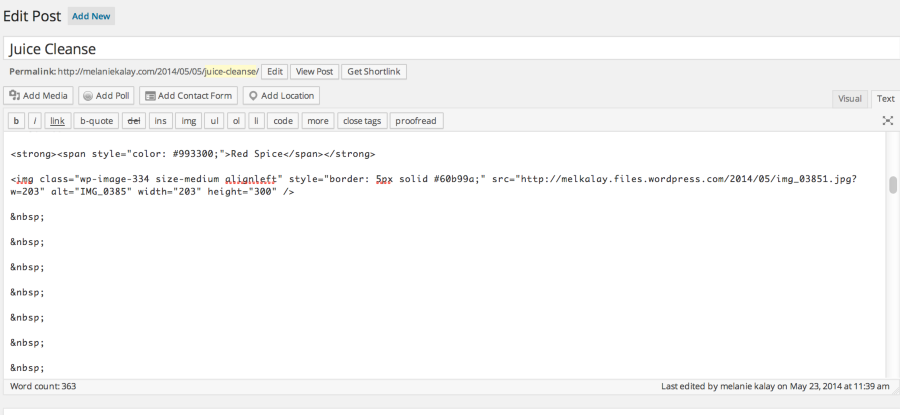
You’ll see in the top of the text editor that this is the recipe for your Red Spice juice. Then, a bit below the juice name, you’ll see a lot of these:
Those are line breaks in HTML code. You can delete these in order to close down the space between the image and the text. You can delete a few, and then click Preview Changes to see how your adjustments are taking effect. You may want to remove all, or just some of those line breaks.
Make the adjustments that you like and the click Update to save your changes.
Please let us know if you have any other questions. Thanks much and happy blogging! I’m off to make myself a Green Power juice right now :)


- The topic ‘gaps between image and tex’ is closed to new replies.


 WordPress.com Forums