

Gateway Theme – Call to Action
-
Hello,
I’ve been trying and testing out a new theme that would go to my main blog site. However, I can’t seem to make the CallToAction feature work.
I chose the Gateway theme since it’s clean and have that feature.This one: http://imgur.com/JNfNgDR
I followed the instruction but it doesn’t work. Hope that would be enough info to ask for support. :)
Thank you,
KaiThe blog I need help with is: (visible only to logged in users)
-
Hi Kai, looks like you’ve missed some steps in the setup guide. Your front page is currently set to display the latest posts, but if you want your site to look like the Gateway demo, you need to set a static homepage and assign it to the Homepage template.
While you selected a static front page, you still need to select which page you want to have your front page and posts assigned to:
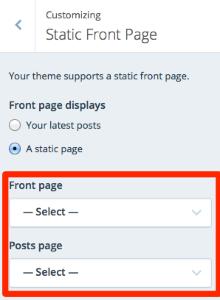
Since you haven’t selected those, your site is still displaying posts on the front page.
Follow each step in the “Homepage Template” section on the setup guide to get started:
https://theme.wordpress.com/themes/gateway/The screenshot you provided shows steps 6 & 7 – but you haven’t finished steps 1-5 in that section yet. :) If you get stuck at any point, just let me know and I’ll be glad to have another look.
-
Oooh, so, is it possible that the CallToAction be an external site?
Thank you for the tips!
Kai -
Surely :)
Replace the example.com with any external link you wish to redirect your visitors to.
<a href="http://example.com" class="button">Button Text</a>Add this html to Hero Content textbox in the Customizer > Theme Options > Homepage Template > Hero Content textbox. You can also add it to the Video Content textbox if you wish.
Note that the Call to Action button preview doesn’t appear in the Customizer; you will see the html. But the button appears on the site once you click Save and Publish button in the Customzier, after adding the html.
-
-
-


- The topic ‘Gateway Theme – Call to Action’ is closed to new replies.
 WordPress.com Forums