

Gateway Theme: Can I hide titles or remove titles on pages?
-
I’m using Gateway theme. I’ve tried everything to remove or hide the titles on pages. For example, my Photo Gallery is in the primary menu, Photo Gallery title also shows up on the page when I load the menu which I don’t want. For some reason, I can’t add a plug-in either to remove or hide titles.
The blog I need help with is: (visible only to logged in users)
-
Hey there,
Hiding a Page Title will require the use of CSS code which is a part of the Custom Design Feature within the Premium and Business Plans. You’ll need to be on one of those plans in order to utilize the Custom Design features.
If you are on one of those plans you should read this support doc for some guidance on css editing.
https://en.support.wordpress.com/custom-css/
Hope this is helpful.
-
If you don’t have a plan that includes custom CSS, you can simply remove the page title from the title field in the editor.
If the concern is the wording in the menu, you can change the Navigation Label wording in the menu while leaving the page title itself intact in the editor — the two can be different:
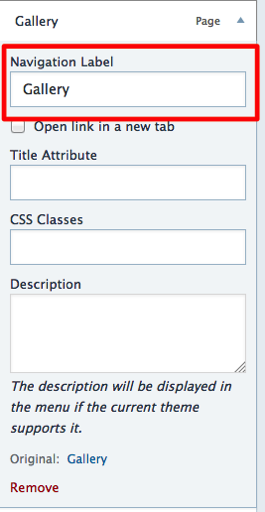
Let us know if you need further help.
-
Thank you Kathrynwp, when I remove or “cut” the title in my page, the menu navigation shows: #164 (No Title) which isn’t what I want. The menu still needs to show Gallery, but when you open the page I don’t want Gallery appearing in the title? On your suggestion re navigation label, I can’t find where to edit that in the theme?
-
If you want to keep the menu as “Gallery” but change the page title, you can do that in your editor.
Go to My Site > Pages, click on the Gallery page to edit, and change the page title where I’ve circled it in red in this screenshot:
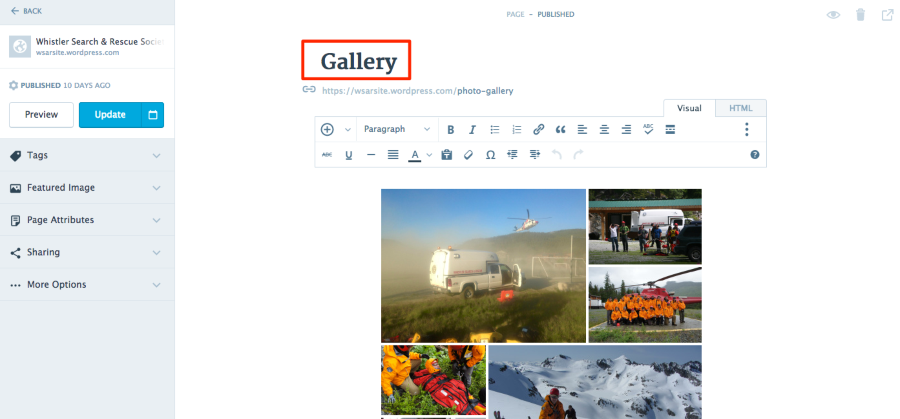
Let me know how it goes.
-
Thanks again, sorry I wasn’t clear. I want to keep the page title, so it shows up in the menu as Gallery, but want to delete the word Gallery once the page is displayed, so only the photos appear and the title Gallery is removed.
-
Thanks again, sorry I wasn’t clear. I want to keep the page title, so it shows up in the menu as Gallery, but want to delete the word Gallery once the page is displayed, so only the photos appear and the title Gallery is removed.
You have two options for hiding a page title:
1. Delete the page title in the page editor. Open your Customizer and then go into the Menus panel. Change the Navigation label from “#164 (No Title)” to “Gallery” in the field indicated in my earlier screenshot:
Save your changes in the Customizer.
2. Use custom CSS to hide the title with code. Custom CSS is available with the Premium or Business plans.
Let me know how it goes.
-
-
Wonderful!
p.s. I was interested to read about your organization. The folks from Automattic — the company behind WordPress.com — had our annual company-wide meetup in Whistler last year, and we had a great time. :)
-
Whistler is a wonderful place. Hope you come back! I’m hoping to publish this site real soon. Truly appreciate your help!
-
It’s my pleasure — good luck finishing up your site and don’t hesitate to ask if you need further help.
We are indeed going back to Whistler this fall, can’t wait!
-
Hi me again. How do I decrease the spacing below the menu appearance. I’d like to remove unwanted space or decrease the space that shows up in each of my pages. For example there is alot of unwanted space between menu/header and menu/posts in my for each menu. Do I put a special HTML code on each page?
-
You’d need some custom CSS to eliminate or reduce that space:
.site .site-content {
  margin-top: 0;
}
Custom CSS is available with the Premium or Business plans.
-
-
-
Hi. Is there a way I can increase the size of the font in my navigation bar and also change to the color to white so it pops out against the green navigation bar? I only want to increase the font in the navigation bar, not in any of the content or pages. I’ve tried everything through the research I’ve done and haven’t come up with a solution. I have the Premium Plan.
-
Hey there,
Thank you I just bought Premium Plan and your suggestion worked perfectly!
Excellent!
Is there a way I can increase the size of the font in my navigation bar and also change to the color to white so it pops out against the green navigation bar? I only want to increase the font in the navigation bar, not in any of the content or pages.
This should increase the size. The text colour is already white, are you seeing something else?
.nav-menu a {
 font-size: 20px;
}
Change the value to whatever you like.
I’ve tried everything through the research I’ve done and haven’t come up with a solution.
Learning how to target your site’s CSS will help you make certain design and layout changes. Here are some very helpful posts that will help you customize your site with CSS:
http://en.support.wordpress.com/custom-design/how-to-find-your-themes-css/
https://thewc.co/articles/view/web-inspector-tutorial
https://cssworkshop.wordpress.com/
If CSS is new to you, here are some resources for learning more about it:
If you need further help with something else, please go ahead and start a new thread rather than adding to this one. Thanks!
-
Thank-you Kathryn for the tips and links. I just tried the CSS command and nothing happen. I copied and also rewrote just as you provided. It’s strange because when I did another CSS to change the nav bar (which you also helped me with), I could see the changes as I input the CSS, but in this case for the font size change nothing happened. Am I doing something wrong? I noticed that the command line .nav-menu a (the a shows up in red font? – does that mean its an error?)
-
It sounds like you may have added the CSS within the comments at the top. To avoid accidentally doing that, I suggest you remove the default comments at the top of the CSS editor, as they’re not needed. :)
It should work, as you see here:
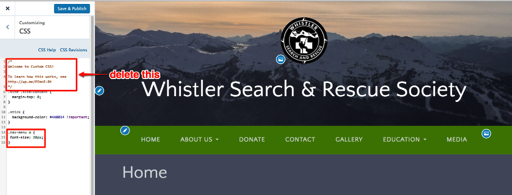
Let me know how it goes!
-
Hi there, thanks again, darn it, for some reason it’s not working. When I enter the CSS command, the “a” shows red, thinking it’s an error? Pls see my site. I followed everything :
-(
.nav-menu a {
font-size: 20px
}


- The topic ‘Gateway Theme: Can I hide titles or remove titles on pages?’ is closed to new replies.
 WordPress.com Forums