

Gateway theme – Space around Featured Image and header image
-
There’s a big, empty space at the bottom of the header image on pages other than the homepage. Also, there is empty space on both sides of the Featured Image for the Homepage (using the homepage template) now as well. The space takes on the color of the background.
You should be able to see it here: https://insightinntest.wordpress.com/
You will see a blue/green on either side of the Featured image on the homepage. Both FireFox and Chrome show this. In Chrome, I also see green under the featured image and above the menu on other pages. But not in FireFox.This is a continuation of the discussion on the .org forum: https://wordpress.org/support/topic/header-image-zoom?replies=12#post-7063706
The blog I need help with is: (visible only to logged in users)
-
I tagged this thread for WordPress.COM Themes Staff assistance. Please subscribe to it so you are notified when they respond. To subscribe look in the sidebar of this thread, find the subscribe to topics link and click it.
-
Hi there, let’s look at each of these issues separately.
Also, there is empty space on both sides of the Featured Image for the Homepage (using the homepage template) now as well. The space takes on the color of the background.
This is the expected display. You can see that the demo site, which has a featured image that’s much wider than it is tall, also shows the background colour on the sides when displayed in a wide browser window:
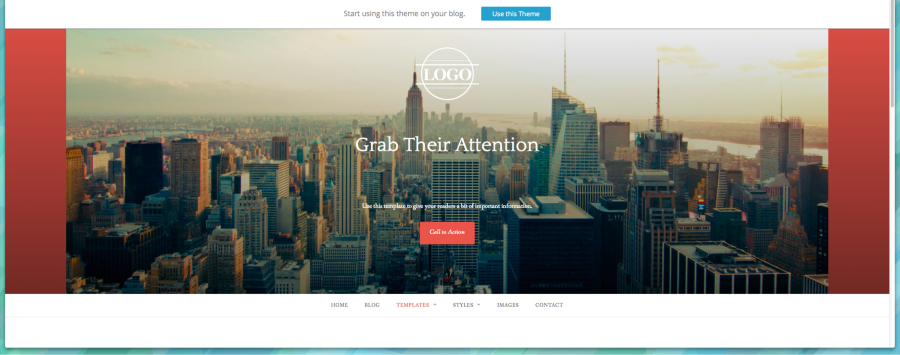
You could try cropping your feature image vertically in a graphics program and re-uploading it.
-
There’s a big, empty space at the bottom of the header image on pages other than the homepage.
I had a look at a half-dozen of your pages in Firefox, Chrome, and Safari, but didn’t notice any unusually large space below the header in any browser.
Could you provide a link to a specific page where you see extra space, and a screenshot as well so I can take a look at what you’re seeing?
Here’s a guide on how to make a screenshot:
http://en.support.wordpress.com/make-a-screenshot/You can upload the screenshot – in a graphic format like JPG, PNG, or PDF – in your Media Library so I can see it. Thanks.
-
Hmm, 1st issue: Homepage image. I don’t see that. Even full-sized my browser and reduced the viewing size and the image resolved so no background showed on the sides. Looking here: http://demo.rescuethemes.com/gateway/
-
2nd issue: Here’s a link to a specific page. But actually am seeing it on all pages other than home. https://insightinntest.wordpress.com/what-i-do/
Screenshot is in media library imgGreenBarUnderName.jpg
That green bar shouldn’t be there. Another person is also seeing it in Safari and Firefox on a Mac. I’m on a windows pc.Thank you.
-
1st issue again: FYI, The background on the sides seems new. 3 of us have noticed this started recently. One is another user who posted on the wordpress.org support site, and I don’t know that person and am not working woth them.
-
Hmm, 1st issue: Homepage image. I don’t see that. Even full-sized my browser and reduced the viewing size and the image resolved so no background showed on the sides. Looking here: http://demo.rescuethemes.com/gateway/
That is the self-hosted version of Gateway, which is different from the WordPress.com version.
Have a look at the WordPress.com demo for Gateway, that’s where I took my screenshot:
-
I’m going to bring the homepage image issue to our developers to find out if this is the intended display or not. I’ll keep you posted here.
-
Thanks for the screenshot showing the green strip. I can see it at browser window sizes under about 1590px. I’ll report this to our developers as well.
-
I just did some further testing on the second issue – the green strip. The recommended size for header images is at least 2560 × 640, but yours is only 2000 by 500. Could you try uploading a larger – specifically, taller – image? Once I uploaded a larger image on my test site, I could not see a coloured strip below the image. Let me know how that goes.
-
I don’t see the background on the sides with the .com demo site.
I did upload a larger image for the header 2560 x 640, I still see the green strip. I cleared my cache and rebooted just in case that was an issue. But still see it. Do you?Thank you for your help with this!
-
I take some of that back.
2nd issue: I just uploaded a header image at 2560 x 660, and that seems to have hidden the green horizontal strip on the non-home pages.1st issue: I looked at the size of the Featured image on the homepage. I had one in there at 4272 x 2848. I looked at what size the gateway one is: 2000 x 1226. I resized and uploaded a new featured image to 2000 x 1333. Same issue with background color showing through on the sides.
-
2nd issue: I just uploaded a header image at 2560 x 660, and that seems to have hidden the green horizontal strip on the non-home pages.
Great!
1st issue: I looked at the size of the Featured image on the homepage. I had one in there at 4272 x 2848. I looked at what size the gateway one is: 2000 x 1226. I resized and uploaded a new featured image to 2000 x 1333. Same issue with background color showing through on the sides.
Yes – I’ve reported this issue to our developers so they can have a look. I’ll keep you posted here.
-
Any update on this? I moved the content over to theinsightinn.com. Not seeing it in Chrome now, but definitely in Firefox.
-
The issue was been reported but I don’t have any updates. Theme issues are fixed in order of priority and I’ll keep you updated here.


- The topic ‘Gateway theme – Space around Featured Image and header image’ is closed to new replies.
 WordPress.com Forums